EasyManua.ls Logo

Sony TRINITRON KV-29C3A - Page 29

Sony TRINITRON KV-29C3A
84 pages
Print Icon
To Next Page IconTo Next Page
To Previous Page IconTo Previous Page
Loading...
KV-29C3
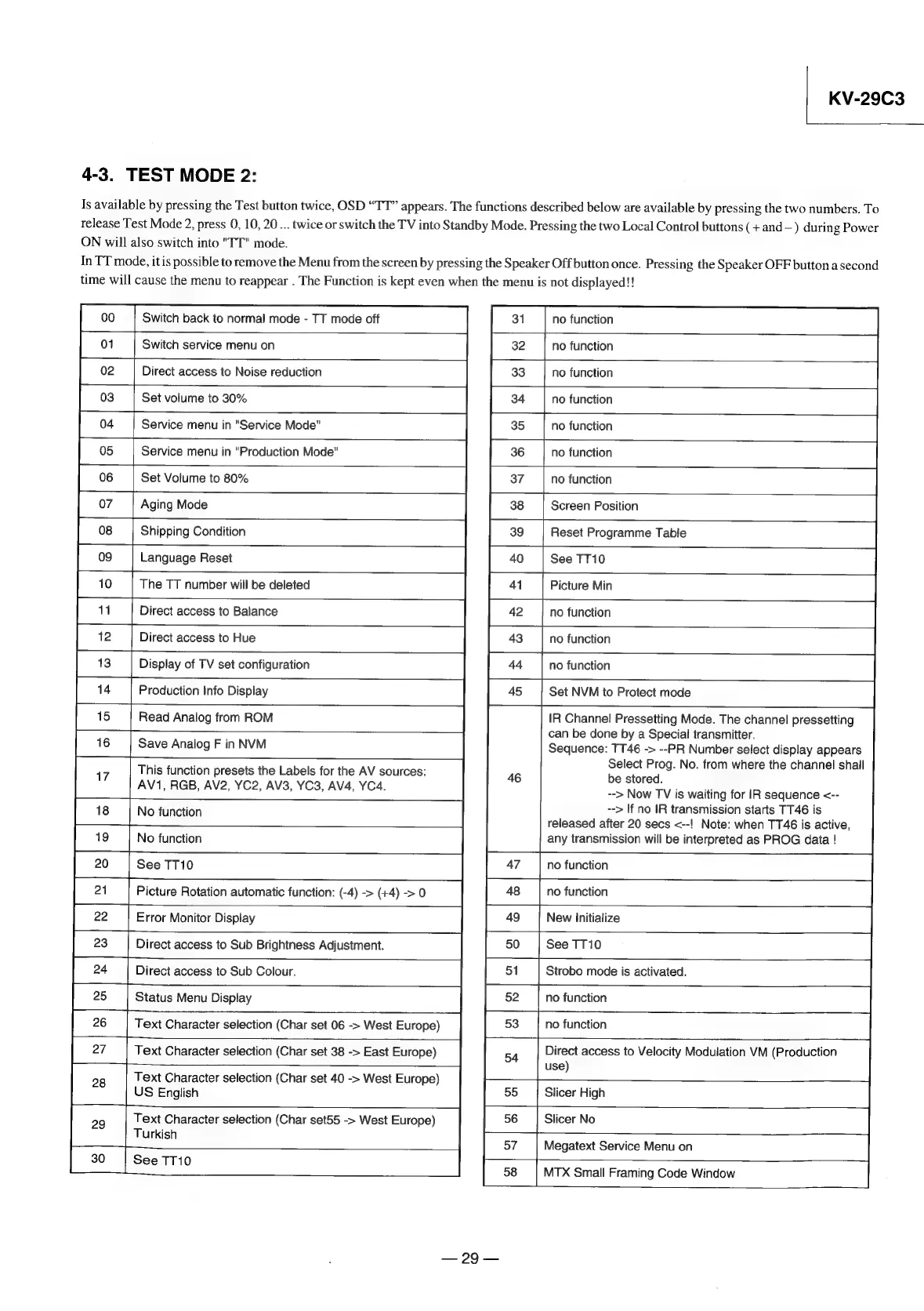
4-3.
TEST
MODE
2:
Is
available
by
pressing
the
Test
button
twice,
OSD
“TT”
appears.
The
functions
described
below
are
available
by
pressing
the
two
numbers.
To
release
Test
Mode
2,
press
0,
10,
20...
twice
or
switch
the
TV
into
Standby
Mode.
Pressing
the
two
Local
Control
buttons
(+
and—
)
during
Power
ON
will
also
switch
into
"TT"
mode.
In
TT
mode,
it
is
possible
to
remove
the
Menu
from
the
screen
by
pressing
the
Speaker
Off
button
once.
Pressing
the
Speaker
OFF
button
a
second
time
will
cause
the
menu
to
reappear
.
The
Function
is
kept
even
when
the
menu
is
not
displayed!!
no
function
Switch
back
to
normal
mode
-
TT
mode
off
01
no
function
Switch
service
menu
on
no
function
02
Direct
access
to
Noise
reduction
no
function
03
Set
volume
to
30%
no
function
04
Service
menu
in
"Service
Mode"
no
function
Service
menu
in
"Production
Mode"
05
no
function
06
Set
Volume
to
80%
07
Aging
Mode
Screen
Position
Reset
Programme
Table
08
Shipping
Condition
09
Language
Reset
See
TT10
15
16
alk
Save
Analog
F
in
NVM
Picture
Min
41
42
no
function
43
no
function
44
no
function
45
Set
NVM
to
Protect
mode
IR
Channel!
Pressetting
Mode.
The
channel
pressetting
can
be
done
by
a
Special
transmitter.
Sequence:
TT46
->
--PR
Number
select
display
appears
Select
Prog.
No.
from
where
the
channel
shall
46
be
stored.
-->
Now
TV
is
waiting
for
IR
sequence
<--
-->
If
no
IR
transmission
starts
TT46
is
released
after
20
secs
<--!
Note:
when
TT46
is
active,
any
transmission
will
be
interpreted
as
PROG
data
!
This
function
presets
the
Labels
for
the
AV
sources:
AV1,
RGB,
AV2,
YC2,
AV3,
YC3,
AV4,
YC4.
17
18
[Ne
function
19
No
function
no
function
See
TT10
47
48
no
function
Picture
Rotation
automatic
function:
(-4)
->
(+4)
>
0
-
49
New
Initialize
22
|
Error
Monitor
Display
Direct
access
to
Sub
Brightness
Adjustment.
50
|
See
TT10
24
a
Direct
access
to
Sub
Colour.
51
Strobo
mode
is
activated.
52
no
function
25
|
Status
Menu
Display
no
function
26
Text
Character
selection
(Char
set
06
->
West
Europe)
53
Direct
access
to
Velocity
Modulation
VM
(Production
use)
27
Text
Character
selection
(Char
set
38
->
East
Europe)
54
Text
Character
selection
(Char
set
40
->
West
Europe)
US
English
55
Slicer
High
56
Slicer
No
Text
Character
selection
(Char
set55
->
West
Europe)
Turkish
57
Megatext
Service
Menu
on
See
TT10
|
58
MTX
Small
Framing
Code
Window
29

Related product manuals