16 Advanced Operations
Sony KV-DA34M81 Group E1 (GB, FR, PR, AR)_2-186-712-11 (3)
HD/DVD
VIDEO
DRC-MF
PROG
INDEX
CENTER
SP
WEGA
THEATRE
A/B
MENU
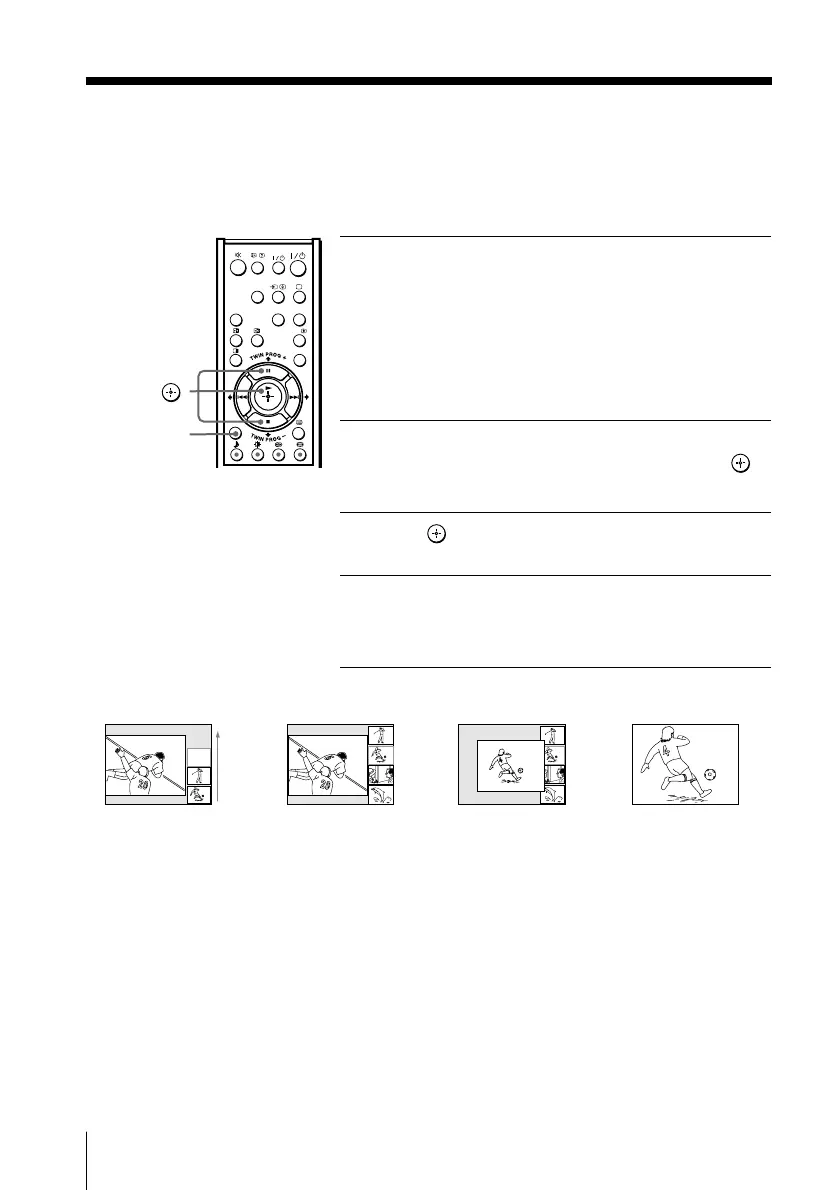
x Displaying multiple programs
B KV-DA34M86/DA29M86 only
The Program Index feature displays all tuned TV programs scrolling on the
screen for direct selection.
1
Press PROG INDEX.
The current program is displayed on the left.
The first tuned program is displayed on the
bottom right of the screen, then frozen.
It scrolls up and the next program appears on
the bottom-right until all tuned programs
appear one by one.
2
Press V or v until the program you want to
view is displayed in the frame, then press
.
To return to scrolling, press V or v again.
3
Press again to enlarge the selected
program into the left frame.
4
Press PROG INDEX.
The selected program is displayed in full
screen.
Note
• When displaying multiple programs, only the sound of the left picture is heard.
V/v/
PROG INDEX
8
10
10
,,
8
,
1 432
01GB05AVD-STMME.p65 9/7/04, 1:35 PM16
Black








 To Next Page