17
Sony KV-DA34M81 Group E1 (GB, FR, PR, AR)_2-186-712-11 (3)
Advanced Operations
x Viewing Teletext
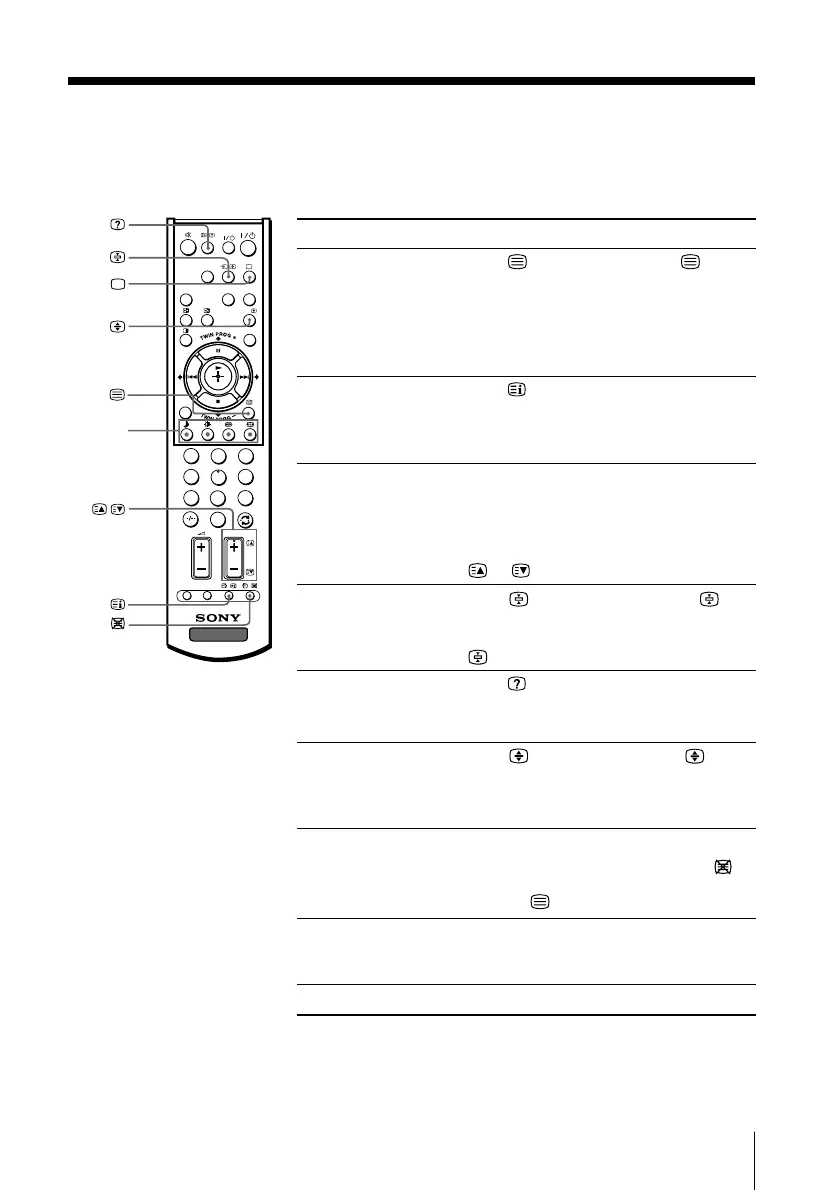
Some TV stations broadcast an information service called Teletext which allows
you to receive various information, such as stock market reports and news.
You can use the buttons on the remote to view Teletext.
To Do this
display a Teletext Press . Each time you press , the
page on the screen changes as follows:
TV picture Teletext t Teletext and TV t TV.
If there is no Teletext broadcast, “100” is
displayed at the top left corner of the
screen.
check the contents Press .
of a Teletext service An overview of the Teletext contents,
including page numbers, appears on the
screen.
select a Teletext page Press the number buttons to enter the
three-digit page number of the desired
Teletext page. If you make a mistake,
reenter the correct page number. To
access the next or previous page, press
or .
hold (pause) a Press to display the symbol “ ” at
Teletext display the top left corner of the screen. To
resume normal Teletext viewing, press
.
reveal concealed Press .
information (e.g., To conceal the information, press the
an answer to a quiz) button again.
enlarge the Teletext Press . Each time you press , the
display Teletext display changes as follows:
Enlarge upper half t Enlarge lower
half t Normal size.
stand by for a Teletext (1) Enter the Teletext page number that
page while watching you want to refer to, then press
.
a TV program (2) When the page number is displayed,
press
to show the text.
select a FASTEXT Press z (red, green, yellow and blue)
menu or the colored that corresponds to the desired menu or
boxes page number.
turn off Teletext Press a.
Notes
• The FASTEXT feature can be used only when the FASTEXT broadcast is available.
• Teletext is automatically cancelled when there is no signal or the frequency of input signal is
not within the proper range.
z (red,
green,
yellow,
blue)
1
2
3
4
6
7
8
9
0
5
HD/DVD
VIDEO
DRC-MF
PROG
INDEX
CENTER
SP
WEGA
THEATRE
A/B
MENU
OPTION RESET
TV
PROG
,
01GB05AVD-STMME.p65 9/7/04, 1:35 PM17
Black





 To Next Page