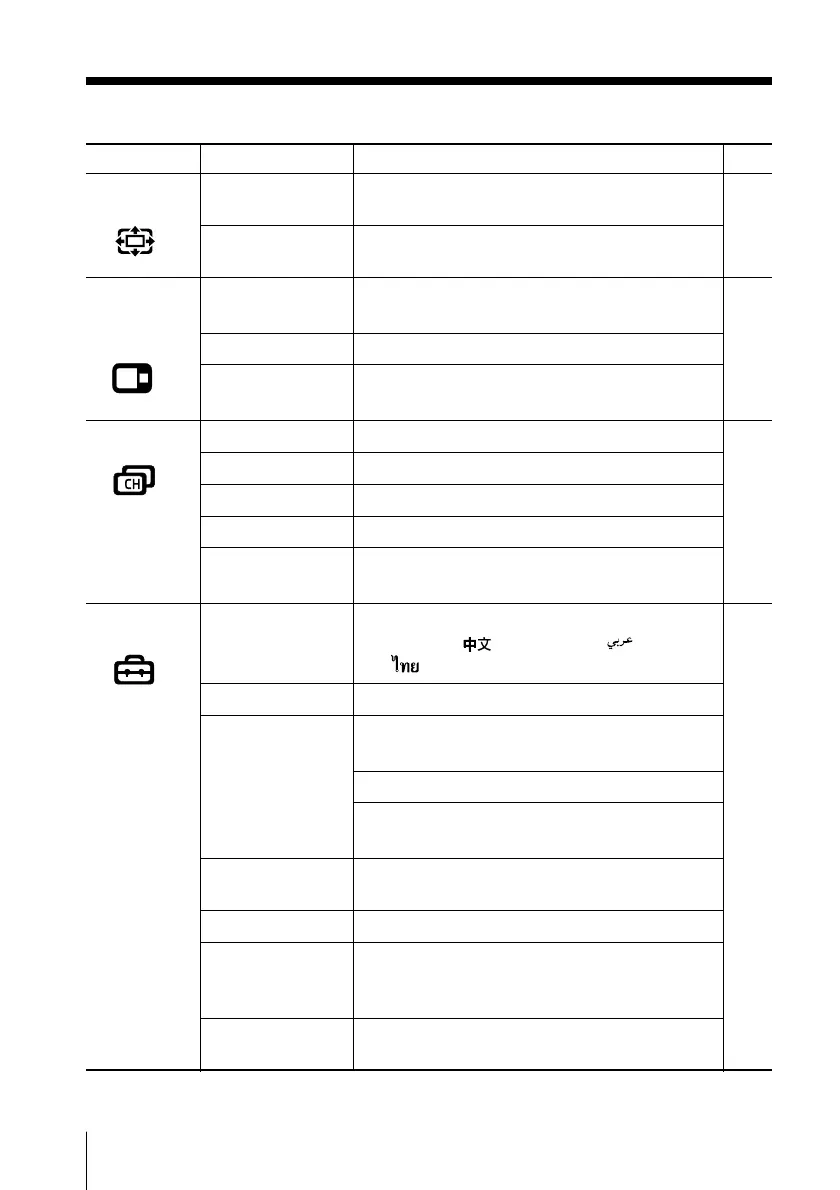
20 Menu Adjustment
Sony KV-DA34M81 Group E1 (GB, FR, PR, AR)_2-186-712-11 (3)
Level 1
“Wide Screen”
“Multi Picture”
(KV-DA34M86/
DA29M86 only)
“Channel Setup”
“Setup”
Level 2/Level 3
“Wide Mode”
“Auto Wide”
“Twin”
“Swap”
“Program Index”
“Auto Program”
“Manual Program”
“Program Label”
“Program Block”
“Program Sorting”
“Language”
“Picture Position”
“WEGA Theatre
Setup”
“Direct Input”
“Speaker”
“Game Mode”
“Video Label”
“Color System”
“Eco Mode”
Level 3/Level 4/Function
Change the picture size:
“16:9” t “4:3”
Optimize wide screen picture:
“On” t “Off”
Display a TV program beside the main screen:
“On” t “Off”
Swap the pictures between the left and right screens.
Scroll all tuned programs one by one for direct
selection.
Preset channels automatically.
Preset channels manually.
Label the program number.
Block unwanted programs.
Change the order in which the channels appear
on the screen.
Change the menu language:
“English” t “ ” (Chinese) t “ ” (Arabic)
t “ ”(Thai)
Adjust the picture position.
Select the WEGA Theatre Mode.
Select the input for connected equipment.
Select the speaker mode:
“MAIN” t “CENTER IN”
Adjust the picture settings for video games:
“On” t “Off”
Label the connected equipment.
Select the color system:
“Auto” t “PAL” t “SECAM” t “NTSC3.58”
t “NTSC4.43”
Reduce power consumption of your TV:
“On” t “Off”
Page
25
26
27
29
continued
01GB05AVD-STMME.p65 9/7/04, 1:35 PM20
Black





 To Next Page