6 (GB)
Location and Function of Parts and Controls
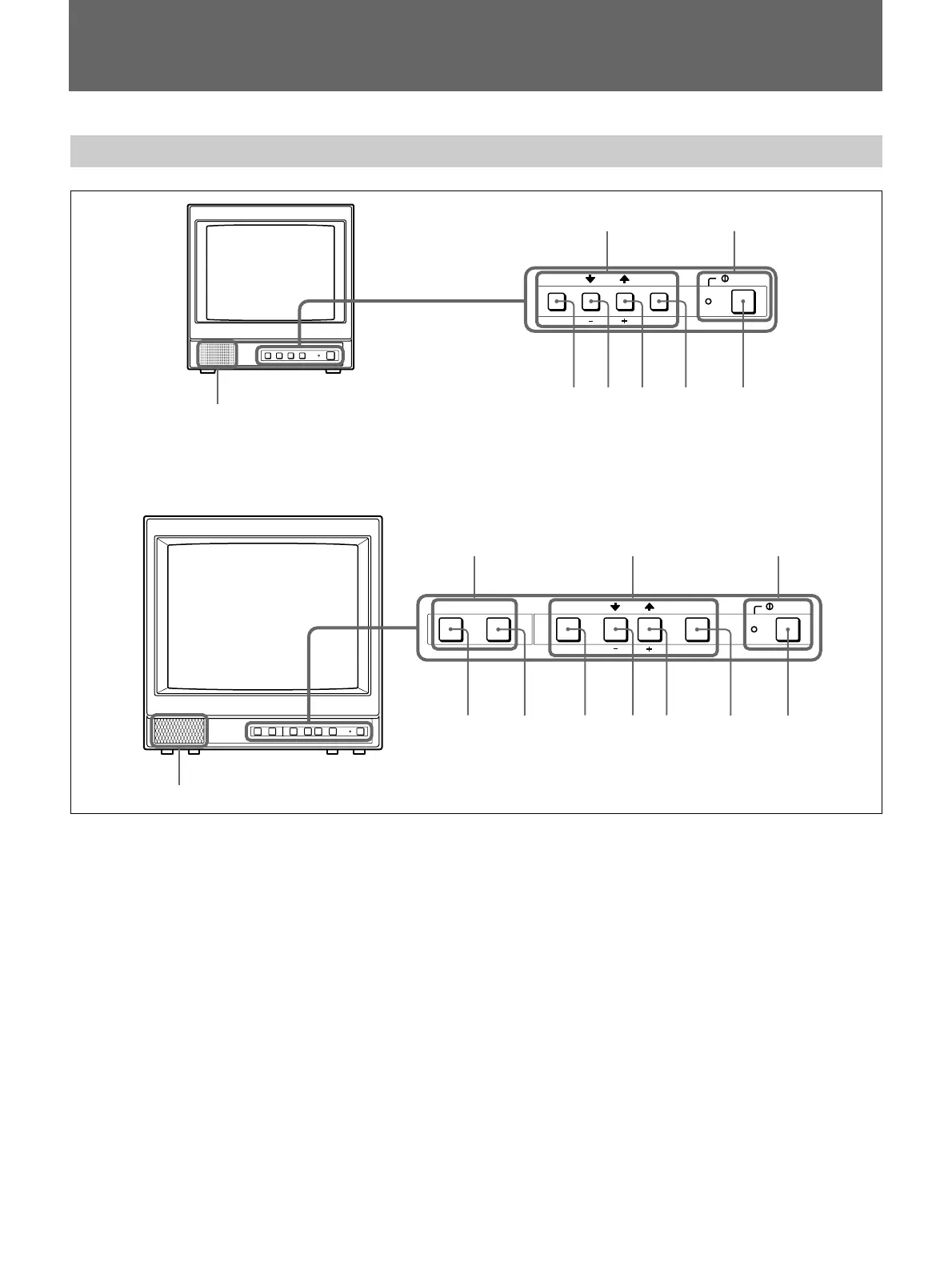
Control Panel
Speaker
MENU buttons
!POWER switch
and indicator
PVM-9L1
PVM-14L1/PVM-20L1
Speaker
MENU buttons
!POWER
switch and
indicator
LINE A/LINE B
buttons
MENU ENTER POWER
EXIT SELECT
MENULINE BLINE A ENTER POWER
EXIT SELECT
543 2
1
543 2
1
67
!POWER switch and indicator
1 !POWER switch
Press this switch to turn on the monitor. The lamp will
light up. Press this switch again to turn off the
monitor.
MENU buttons
2 ENTER/SELECT button
Press this button to confirm an item selected on the
menu.
3 M/+ (move the cursor up/adjust the value)
button
4 m/– (move the cursor down/adjust the value)
button
Press these buttons to move the cursor or adjust an
item selected on the menu.
5 MENU/EXIT button
Press this button to show or hide on-screen menus.
LINE A/LINE B buttons (PVM-14L1/PVM-20L1
only)
6 LINE A button
Press this button to monitor the signal input through
the LINE A connectors.
7 LINE B button
Press this button to monitor the signal input through
the LINE B connectors.










 To Next Page