8 (GB)
VIDEO IN/OUT (BNC)
These are the input/output connectors for a
composite video signal. Connect them to the
composite video input/output connectors on
equipment such as a VCR, video camera, or another
monitor.
AUDIO IN/OUT (phono jack)
These are the input/output jacks for an audio signal.
Connect them to the audio input/output jacks on
equipment such as a VCR.
3 PARALLEL REMOTE terminal (8-pin modular
connector)
Forms a parallel switch and controls the monitor
externally.
For details on the pin assignment, see page 13 (GB).
4 LINE B connectors (PVM-14L1/PVM-20L1
only)
Line input connectors for composite video and audio
signals. Press the LINE B button on the control panel
to monitor the signal input through these connectors.
If you input signals to both Y/C IN and VIDEO IN, the
signal input to the Y/C IN is selected.
Y/C IN (4-pin mini-DIN)
This is the input connector for a Y/C IN separate
signal. Connect it to the Y/C separate output
connector on equipment such as a VCR, video
camera, or another monitor.
VIDEO IN (BNC)
This is the input connector for a composite video
signal. Connect it to the composite video output
connector on equipment such as a VCR, video
camera, or another monitor.
AUDIO IN (phono jack)
This is the input jack for an audio signal. Connect it
to the audio output jack on equipment such as a
VCR.
You can select one of six languages (English, German,
French, Italian, Spanish, Japanese) for displaying the
menus and other on-screen messages.
The factory preset language is ENGLISH (English).
The current settings are displayed in place of the
marks on the illustrations of the menu screen.
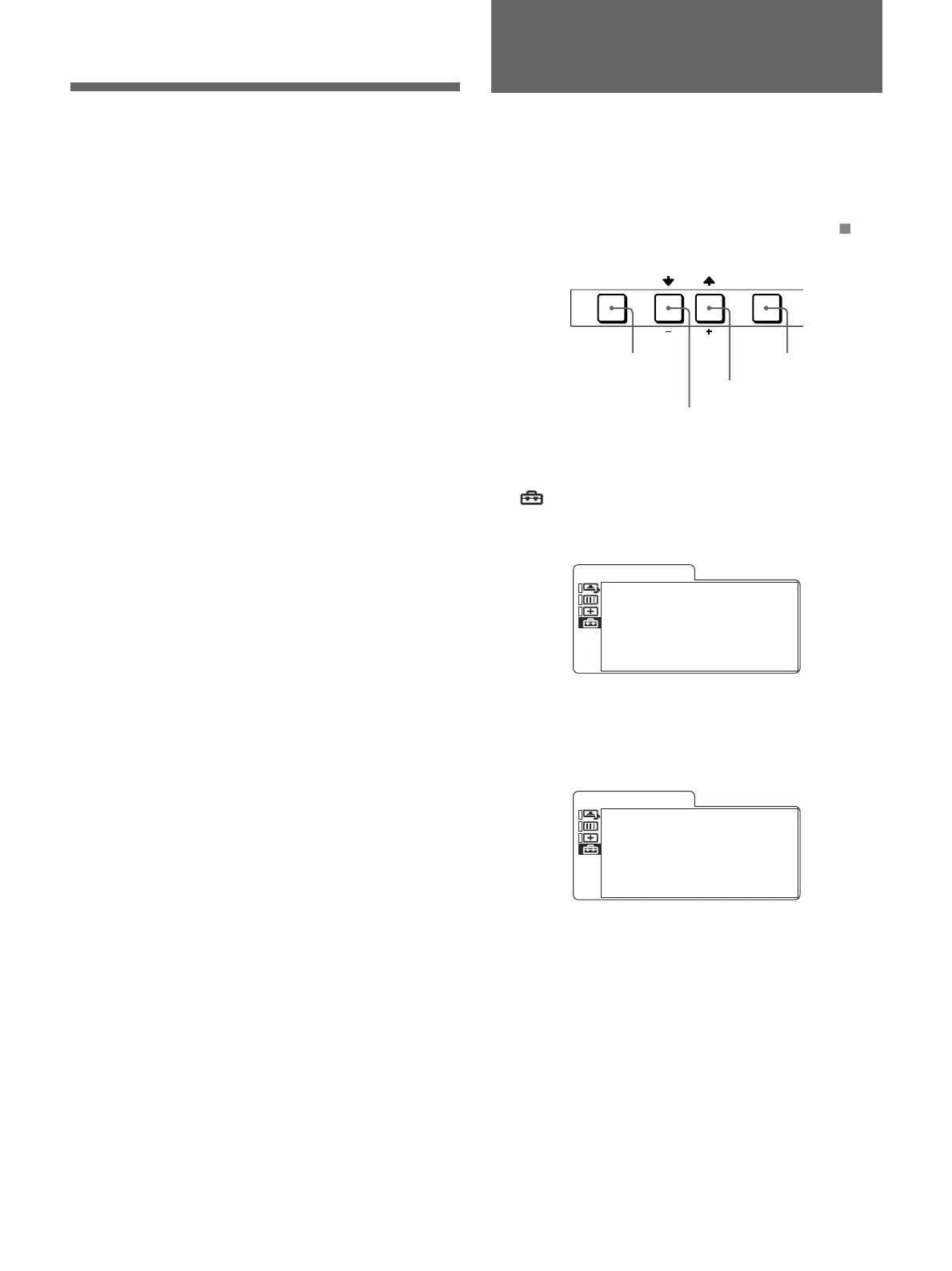
MENU ENTER
EXIT SELECT
1 Press the MENU/EXIT button to display the menu
screen, and press the M/+ or m/– button to select
(USER CONFIG), then press the ENTER/
SELECT button.
The USER CONFIG menu appears.
x
F O R M A T . D I S P . . . . . x x x x
•
L A N G U A G E . . . . . E N G L I S H
U S E R . C O N F I G
2 Press the M/+ or m/– button to select
“LANGUAGE,” then press the ENTER/SELECT
button.
The selected item is displayed in yellow.
•
F O R M A T . D I S P . . . . . x x x x
x
L A N G U A G E . . . . . E N G L I S H
U S E R . C O N F I G
3 Press the M/+ or m/– button to select the desired
language, the on-screen language changes to the
language you have selected, then press the
ENTER/SELECT button to finalize the setting.
To clear the menu
Press the MENU/EXIT button.
The menu disappears automatically if a button is not
pressed within one minute.
Selecting the Menu
Language
ENTER/SELECT
button
MENU/EXIT
button
m/– button
M/+ button
Location and Function of Parts and
Controls










 To Next Page