1-6
VPL-ES4/EX4
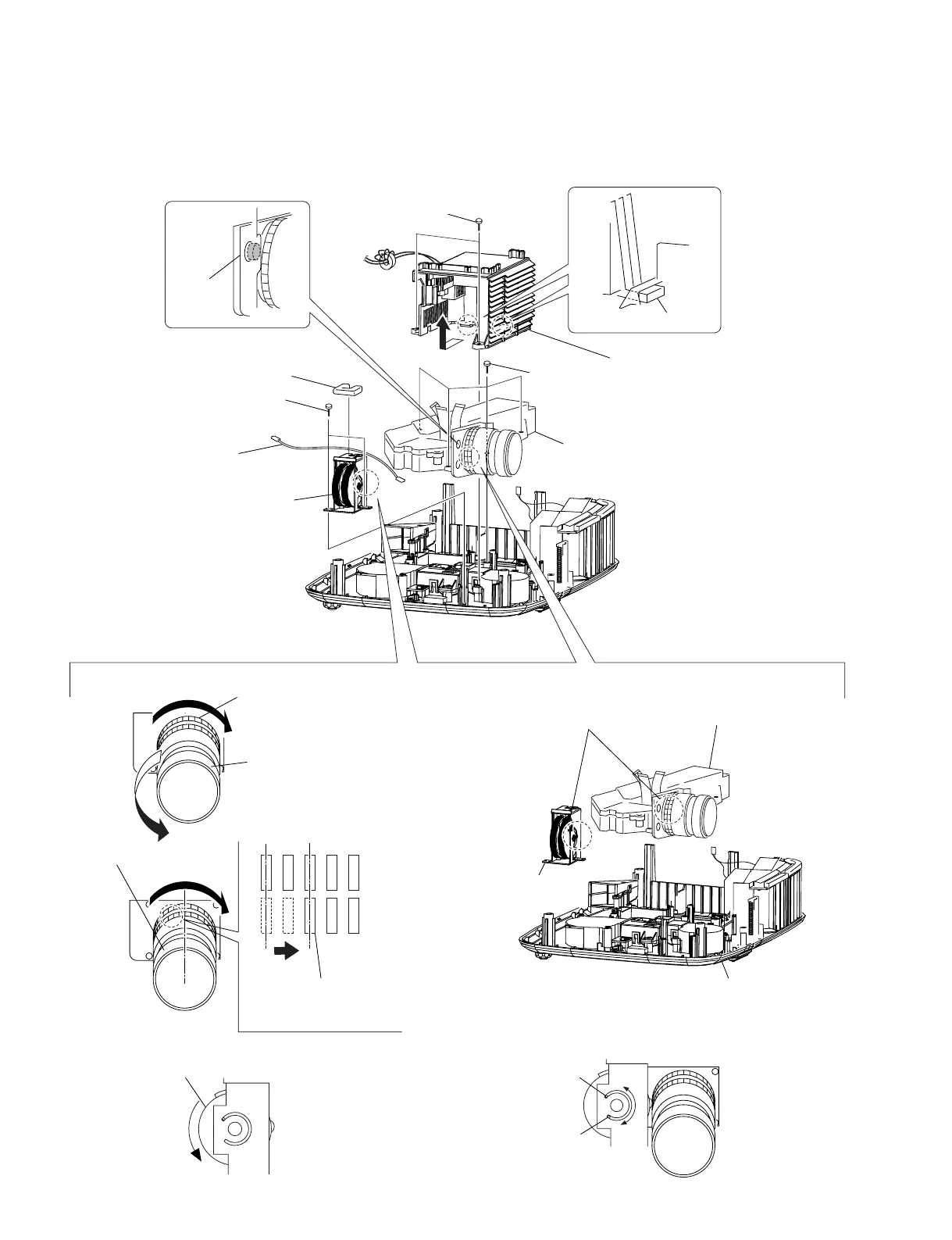
1-3-8. Optics Section
Remove the lamp power supply and power board before starting the removal work.
2
Two claws
0
Optucs section
8
Focus/Zoom adjust
assembly
1
Two tapping screws
(PAN 3 x 7)
6
Two tapping screws
(PAN 3 x 7)
5 Harness
4
Gasket
9
Four screws
(+P 2.5 x 8)
!=
Rotate the Focus dial
counter-clockwise as
shown until it is stopped.
!]
Rotate the Focus/Zoom Adjust Assembly
counter-clockwise until it is stopped.
!;
Install the Focus/Zoom
Adjust Assembly as shown.
!' After installation is completed, verify that the Optucs
section can rotate from the position
A
to the position
B
smoothly.
A
B
Lower case
Focus dial
!\
Install the Optucs section
in the Lower Case.
!-
Rotate the Zoom dial clockwise
as shown until it is stopped.
7
Dowel
A
During the assembling process,
never change the gear position
that is set by step 


 To Next Page