13Step 2: Connecting the Projector
Connections and Preparations
Step 2: Connecting the Projector
When making connections, be sure to do the following:
• Turn off all equipment before making any connections.
• Use the proper cables for each connection.
• Insert the cable plugs properly; plugs that are not fully inserted often
generate noise. When pulling out a cable, be sure to pull it out from the plug,
not the cable itself.
• Refer to the operating instructions of the connected equipment.
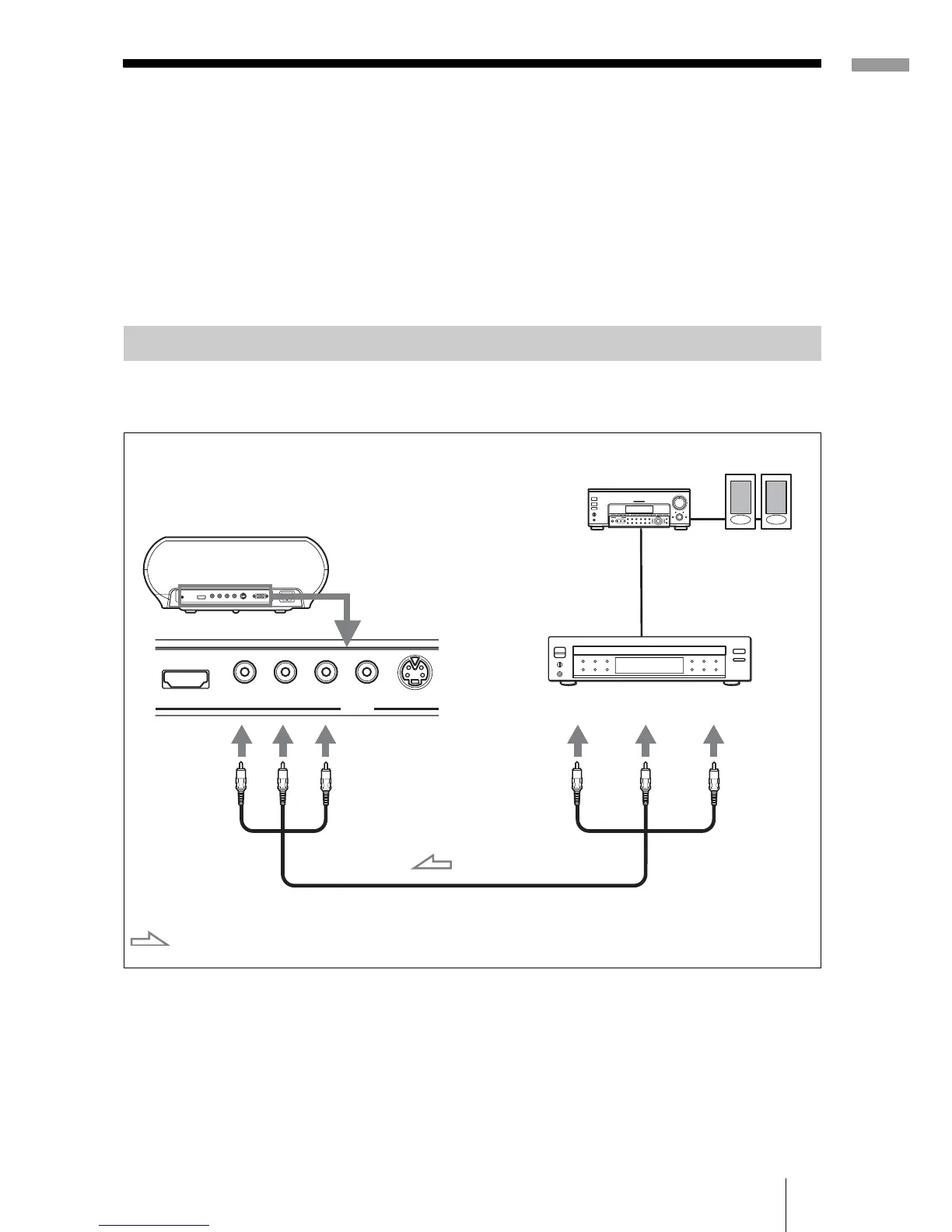
To connect to a DVD player/recorder or digital tuner equipped with
component video connectors
Tip
To connect the projector to a DVD player/recorder, digital tuner, etc. which is not
equipped with component video connectors, use the S video cable to connect to the S-
video output of the DVD player/recorder, digital tuner, etc. If the connected equipment
is not equipped with the S-video output connector, use the video cable to connect to the
video output jack on the equipment.
Connecting to a DVD Player/Recorder or Digital Tuner
S VIDEO
Y
PB/CB PR/CR VIDEOHDMI
INPUT
P
B
/
C
B
P
R
/C
R
Y
P
B
/
C
B
P
R
/C
R
Y
Component video cable (not supplied)
: Video signal flow
DVD player/recorder,
digital tuner, etc., with
component video
connectors
Rear of the projector
AV amplifier
Speakers



 To Next Page