Advanced Operation DLM-E 3kW & 4kW Series Power Supplies
connector configurations and connections required for remote programming of output voltage
and/or current limit without using the REMOTE/LOCAL switch.
Remote Programming Options Control of ... Programming Scales *
Programming with the
REMOTE/LOCAL Switch
Output Voltage
Current Limit
Over Voltage Setting
0–5V, 0–10V, 0–5K
Programming without the
REMOTE/LOCAL Switch
(Jumper J3 Connector)
Output Voltage and/or
Current Limit
0–5V, 0–10V, 0–5K
Local control
* These scales may be used in any combination
4.3.1 Programming Output Voltage and Current Limit with the
REMOTE/LOCAL Switch
The front panel REMOTE/LOCAL Programming switch will allow you to switch back and forth
between remote and local operation when programming output voltage and current limit with
external voltage and/or current sources.
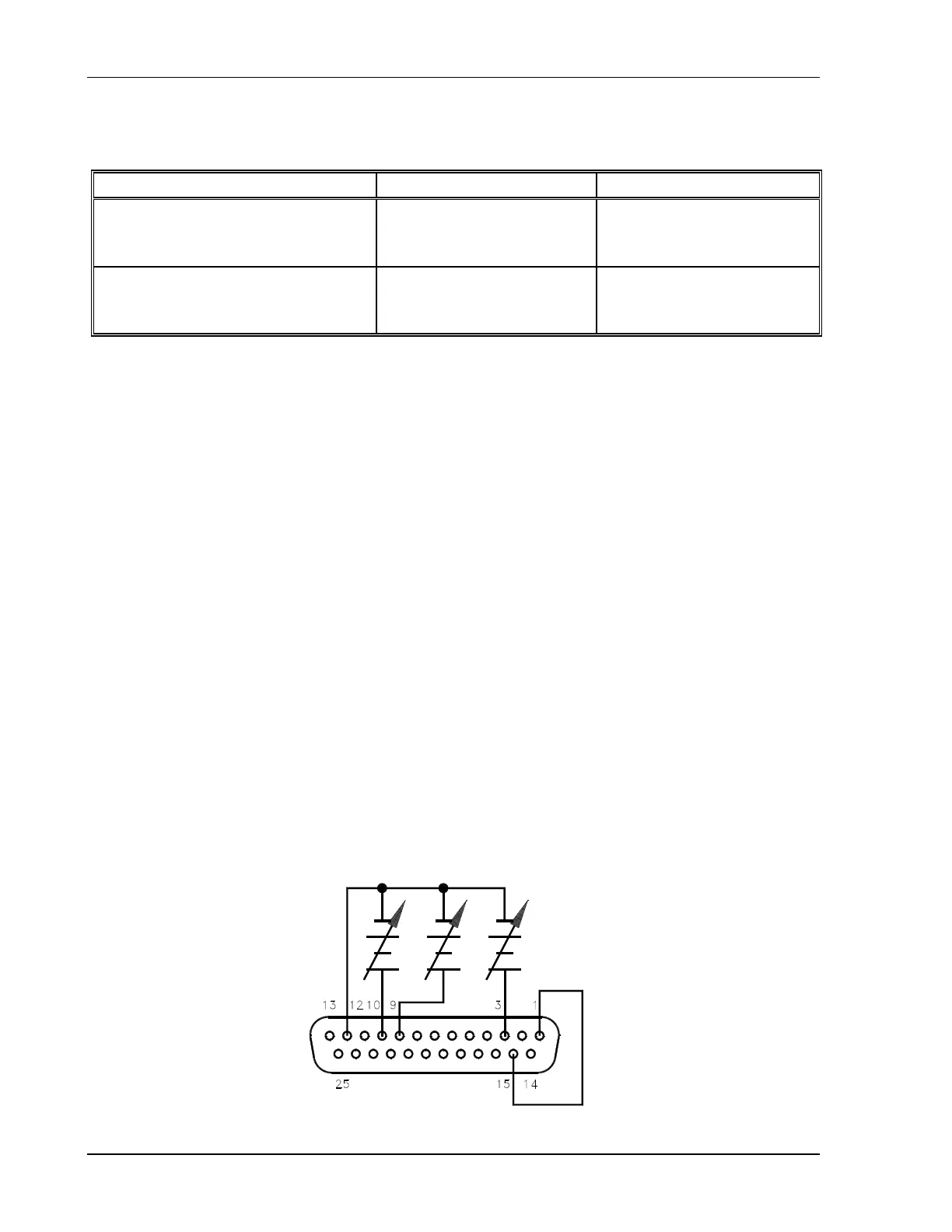
For programming output voltage and current limit using the REMOTE/LOCAL switch:
1. Connect a programming source between pins 9 (voltage programming input/positive)
and 12 (return).
2. Connect a programming source between pins 10 (current limit programming
input/positive) and 12 (return).
3. Connect a programming source between pins 3 (OVP programming input/positive) and
12 (return).
4. Connect a TTL high signal to Pin 1 (remote output enable). An external source must be
referenced to Pin 6 (common). Pin 15 (+5V) may be used as a source.
5. Set the front panel REMOTE/LOCAL switch to REM.
4-6 M362000-01 Rev E



 To Next Page