Product Overview | 11 Table of Contents
1. Overview
1.1 Product Overview . . . . . . . . . . . . . . . . . . . . 11
1.2 Charger Overview . . . . . . . . . . . . . . . . . . . . 12
1.3 Important Safety Information . . . . . . . . . . . 13
2. Pairing
2.1 Pairing with an iOS Device . . . . . . . . . . . . . 16
2.2 Pairing with an Android Device . . . . . . . . . . 18
2.3 Mobile Phone Use . . . . . . . . . . . . . . . . . . . 19
2.4 2-Way Audio (iOS only) . . . . . . . . . . . . . . . 20
3. Charging
3.1 Charging Your SoundGear Devices . . . . . . . 22
3.2 Charger On-Board Battery LEDs . . . . . . . . . 24
4. Use and Care
4.1 Insertion and Removal . . . . . . . . . . . . . . . . . 25
5. User Controls
5.1 Power On & Off . . . . . . . . . . . . . . . . . . . . . . 26
5.2 Auto Off . . . . . . . . . . . . . . . . . . . . . . . . . . . . 26
5.3 Rotary Volume Control . . . . . . . . . . . . . . . . 27
5.4 Volume Control Indicators . . . . . . . . . . . . . . 28
5.5 Battery Indicators . . . . . . . . . . . . . . . . . . . . 28
5.6 Memory Change and Memory Indicators . . 29
6. Device Care
6.1 SoundGear Device Care . . . . . . . . . . . . . . . 30
6.2 Charger Care . . . . . . . . . . . . . . . . . . . . . . . . 34
6.3 Troubleshooting Guide . . . . . . . . . . . . . . . . 35
7. Technical Specifications . . . . . . . . . . . . . . . . . . . . 38
8. Limited Warranty Information . . . . . . . . . . . . . . . 42
9. Regulatory Information
9.1 Safety Information . . . . . . . . . . . . . . . . . . . . 45
9.2 FCC Information. . . . . . . . . . . . . . . . . . . . . . 53
7
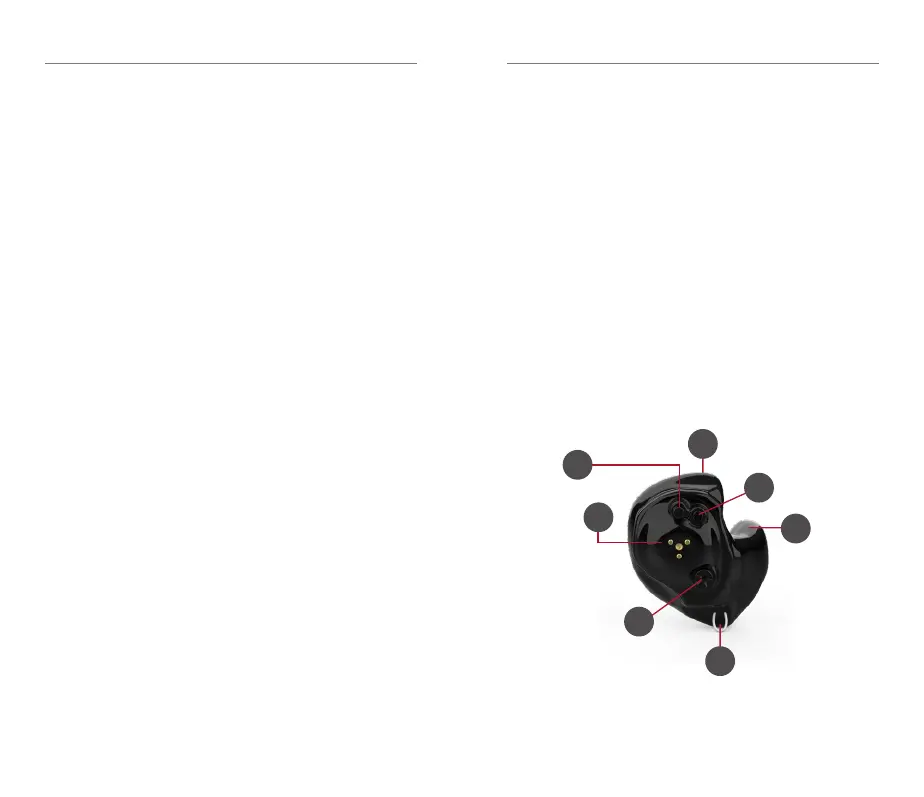
1.1 SoundGear Features, Controls
and Identification
Your SoundGear devices include:
1. Microphone
2. Rechargeable battery contact
3. Lanyard loop
4. Sound outlet
5. Multifunction button
6. Rotary volume control
7. Location of serial number
*Not actual size
5
2
3
4
1
6



 To Next Page