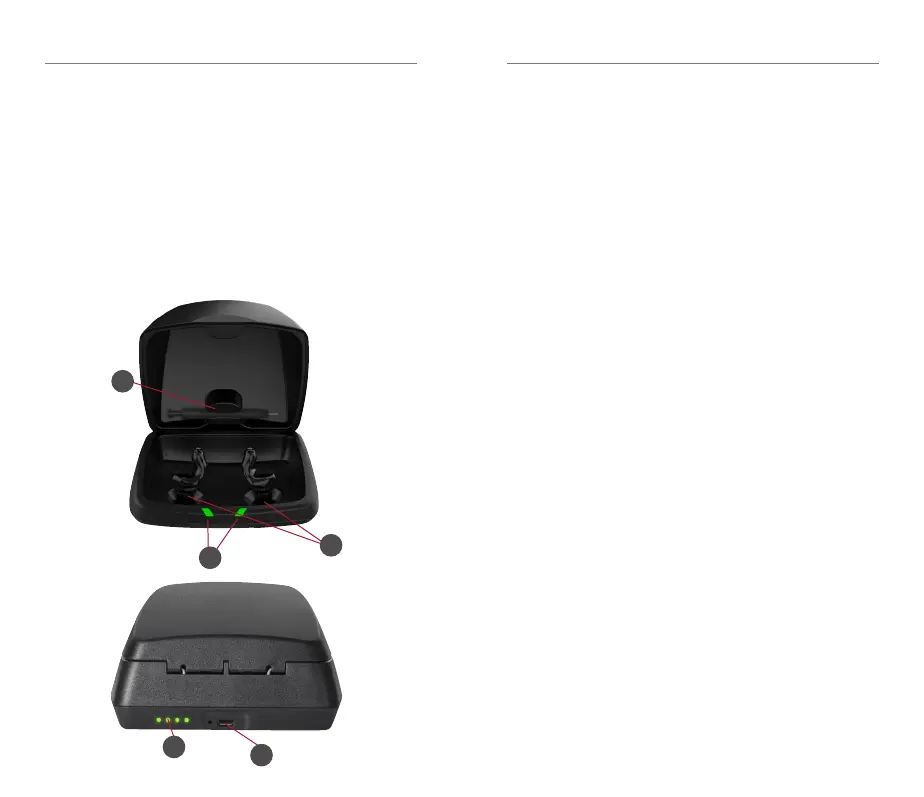
4
5
2
3
1
Important Safety Information | 13 12 | Charger Overview
1.2 Charger Features, Controls and
Identification
1. Cleaning brush
2. Charging posts
3. Charging LEDs
4. On-board battery LEDs
5. MicroUSB port
1.3 IMPORTANT SAFETY INFORMATION
Improper use of the product can result in
hearing damage and other injury.
Make sure this product provides adequate
hearing protection for your activities.
To prevent hearing damage, you may need to
wear secondary hearing protection (earmuffs)
over this product (e.g., when at the shooting
range).
Some very loud sounds may damage hearing,
even when wearing secondary hearing
protection (e.g., high-caliber firearms). Review
soundgear.com/guide for more information.
Ensure proper fit.
Improper fit will reduce the effectiveness of
hearing protection. Your audiologist should
confirm your device fits properly when
delivered.
After some time, your custom fit device may
not fit properly, due to changes in the shape of
your ears or device. Before each use, make sure
the device is secure in your ear and is blocking
out sound (see insertion instructions on pg. 14).
If the device does not fit, stop using and see
your audiologist.
The fit of this device is custom to you only.
Do not allow others to use. Do not modify
the fit of the device in office or at home
(buffing, grinding, sanding, etc).



 To Next Page