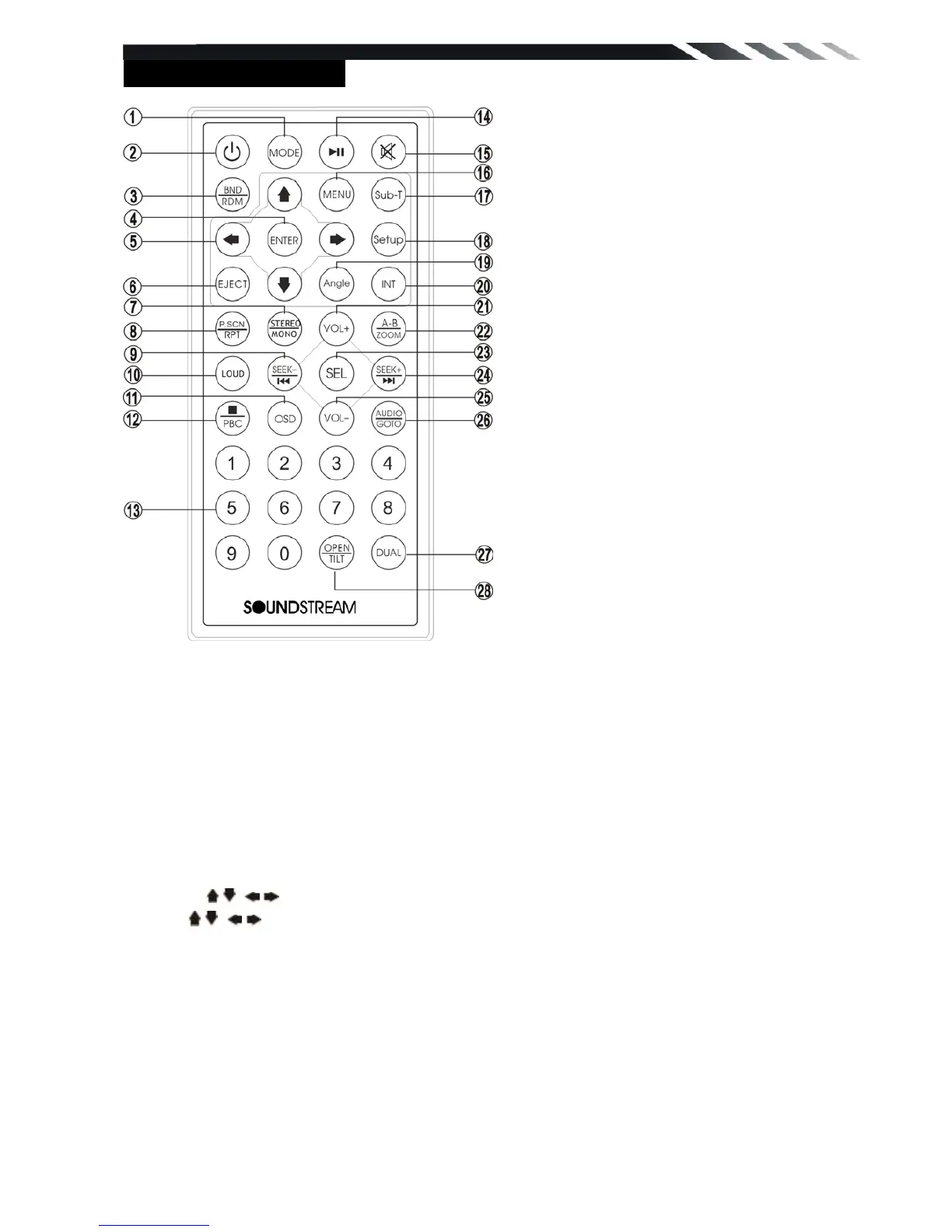
REMOTE CONTROL
1. MODE button
Press it to select the mode: Radio, DISC (if there is a disc in unit), USB (if there is a USB
device in the unit), CARD (if there is a SD/MMC card in the unit), TV (For VR-730T) and AV IN.
2. POWER
Power on or off
3. BAND/ RDM button
In Radio mode, press to change radio band in sequence of FM1 → FM2 → FM3 → AM1 →
AM2. In DVD mode, press to play randomly .
4. ENTER button
Press it to confirm selection or setting.
5: Cursor / / / buttons
Use the / / / buttons to select the menu item. the title, track or to show next frame.
6. EJECT button
Press it to eject the disc.
7. STEREO/MONO button
Press STEREO button to select STEREO or MONO.
8. P.SCN/ RPT button
In SD CARD/ USB mode, press to repeat REP 1 => REP DIR => REP ALL
In DVD mode, press to start repeat REP OFF=>REP Chapter=>REP Title=>REP Off.
In Radio mode: PS (Preset Scan): Press to scan all preset stations in the memory of the current
band and stay on each memory stations for about 5 seconds.
AS (Auto Save): Long press to save the stations with good reception automatically.













 To Next Page