EasyManua.ls Logo

Soundstream VR-74H2B - SWC-Steering Wheel Control Setting; Configure Steering Wheel Controls

Soundstream VR-74H2B
31 pages
Print Icon
To Next Page IconTo Next Page
To Previous Page IconTo Previous Page
Loading...
SWC-STEERING WHEEL
CONTROL SETTING
SWC-STEERING WHEEL
CONTROL SETTING
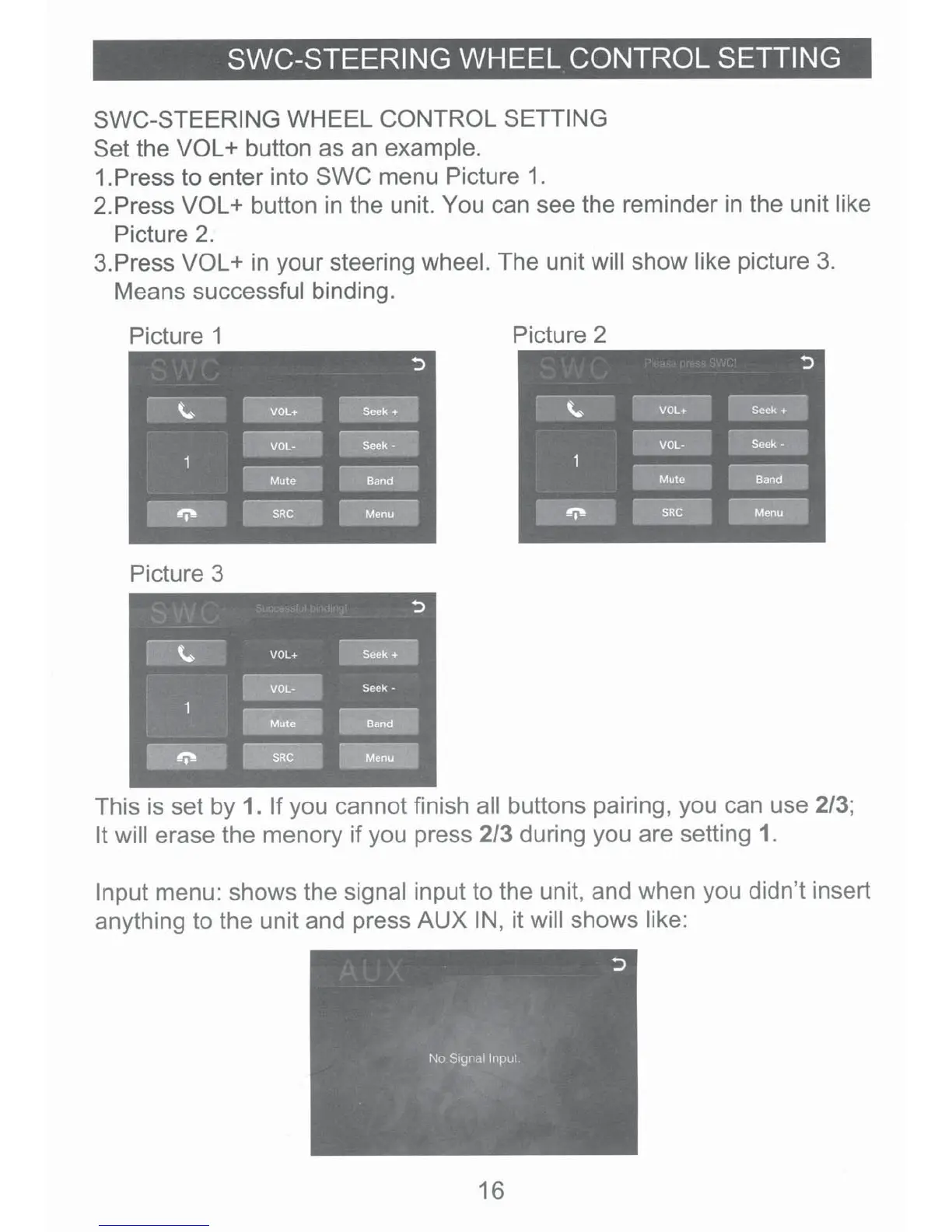
Set
the VOL+
button as an example.
1.Press to enter into
SWC
menu Picture
1.
2.Press
VOL+
button in the unit. You can see the reminder
in
the unit like
Picture
2.
3.Press
VOL+
in your steering
wheel.
The unit
will
show
like picture
3.
Means
successful
binding.
Picture 1 Picture 2
:>
·-·---
------
~
VOL+
Seek+
·---
--
VOL·
Seek·
··
---
------
----
Mute
Band
~-----
~
SRC
M~
Picture 3
This
is
set by 1. If
you cannot finish
all
buttons pairing, you can use 2/3;
It will
erase the menory
if
you press 2/3 during you are setting
1.
Input
menu: shows the signal
input to the unit, and when you didn't insert
anything to the unit and press
AUXIN,
it
will
shows like:
16

Related product manuals