DVR-IP4CF
10
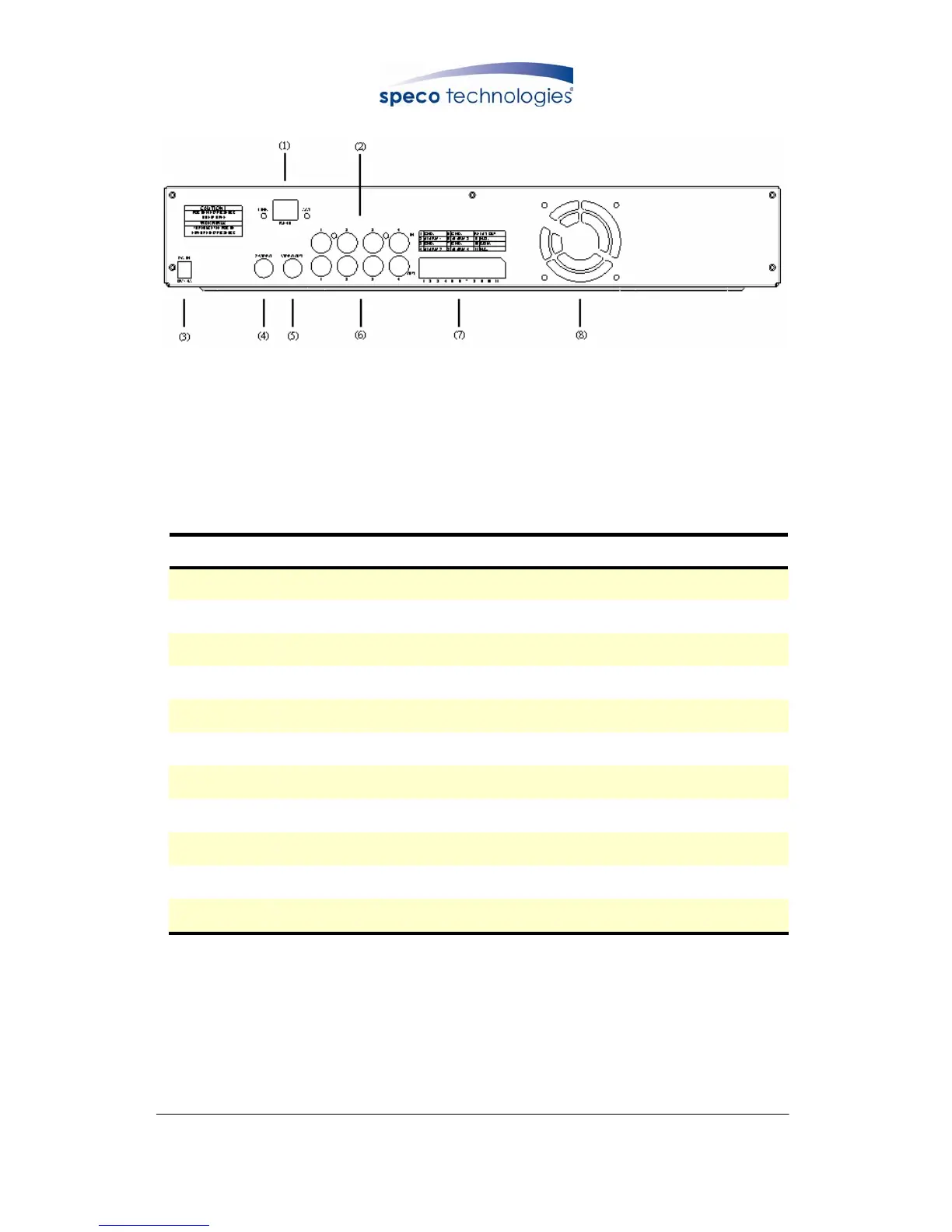
6.2 Rear Panel Buttons and Controls
(1) RJ45: Internet connection terminal
(2) Video Input [VIDEO IN]: Connect to cameras.
(3) DC 12V (4A) [Power Input terminal]: Power socket.
(4) S-Video Output [S-VIDEO OUT]: Connect to the monitor.
(5) Video Output [VIDEO OUT]: Connect to the monitor.
(6) Video Loop [VIDEO LOOP THROUGH].
(7) I/O Block [I/O BLOCK]: Terminal function description is shown below.
No. Name Function
1 GND
Ground Terminal(signal)
2 ALARM 1
Alarm Input Terminal
3 GND
Ground Terminal(signal)
4 ALARM 2
Alarm Input Terminal
5 GND
Ground Terminal(signal)
6 ALARM 3
Alarm Input Terminal
7 GND
Ground Terminal(signal)
8 ALARM 4
Alarm Input Terminal
9 N.O.
Alarm Output (Normal Open)
10 COM
Alarm Output Terminal (NC/ NO COM)
11 N.C.
Alarm Output (Normal Close)
(8) Cooling Fan.



 To Next Page