DVR-IP4CF
8
6. NAME and FUNCTION of EACH PART
6.1 Front Panel Buttons and Controls
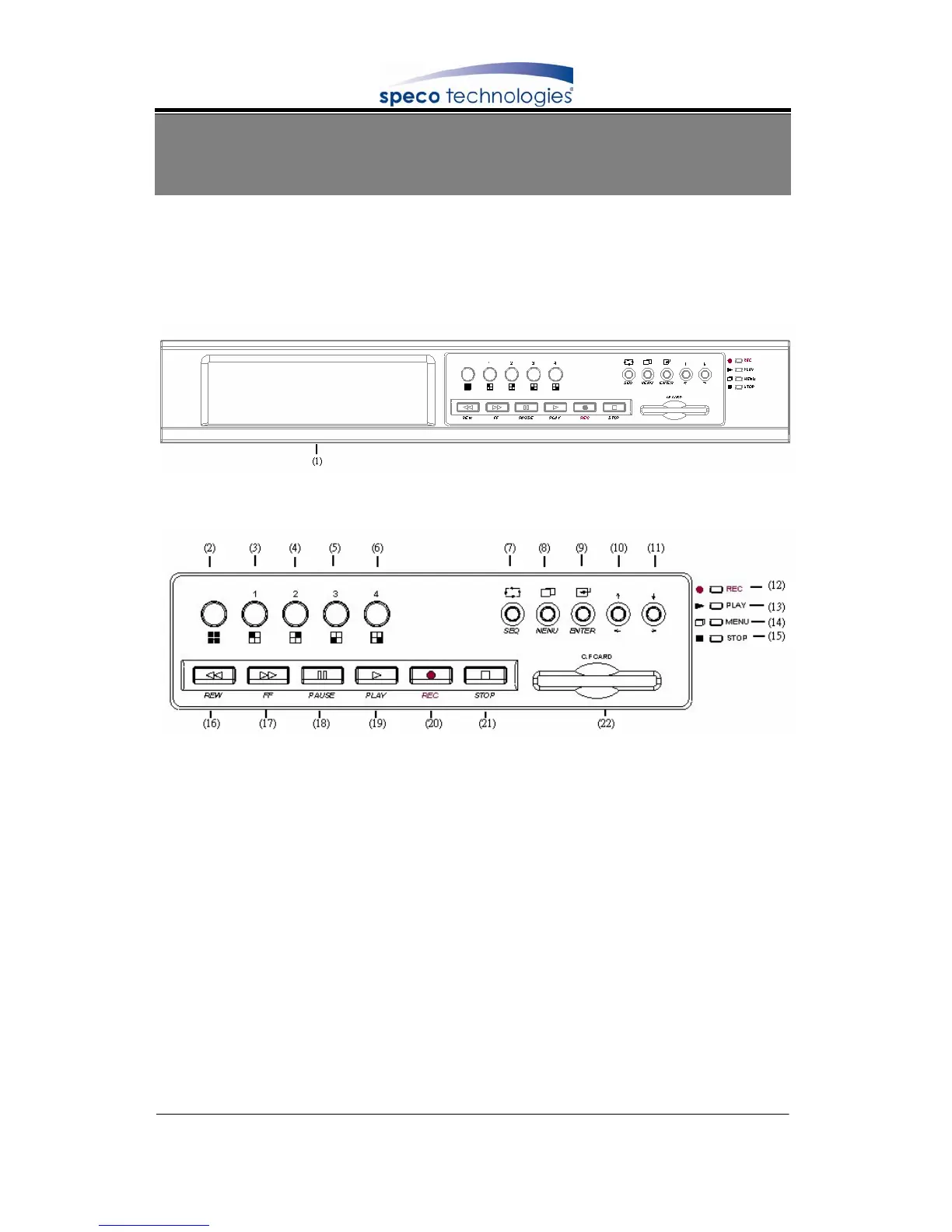
1. Removable HDD Box
2. Front Panel Button Definition
(2) QUAD :
Press this button under monitoring or quad mode to show quad
display.
(3) CH 1 :
Press this button under monitoring or record mode to show
CH 1 in full-screen.
(4) CH 2 :
Press this button under monitoring or record mode to show
CH 2 in full-screen.
(5) CH 3 :
Press this button under monitoring or record mode to show
CH 3 in full-screen.
(6) CH 4 :
Pres this button under monitoring or record mode to show
CH 4 in full-screen.
(7) SEQ :
Press this button under monitoring or record mode. All
channels are displayed full-screen in turn repeatedly.
(8) MENU :
Press this button under monitoring mode to enter setup
menu and under setup mode to return to the previous
selection.
(9) ENTER : Press this button to confirm after data input.
(10) UP/ LEFT : Press this button to move the cursor up or down.
(11) DOWN/ RIGHT : Press this button to move the cursor left or right.
(12) REC LED : LED lights while recording.



 To Next Page