27
7030-0068-26
28Jul16
Customer Service, Canada/US (719) 633-8333 / (800) 231-0978
Customer Service, Europe +31 33 434 7050
CVX-300
®
Excimer Laser System Version 26 Operator’s Manual
English / English
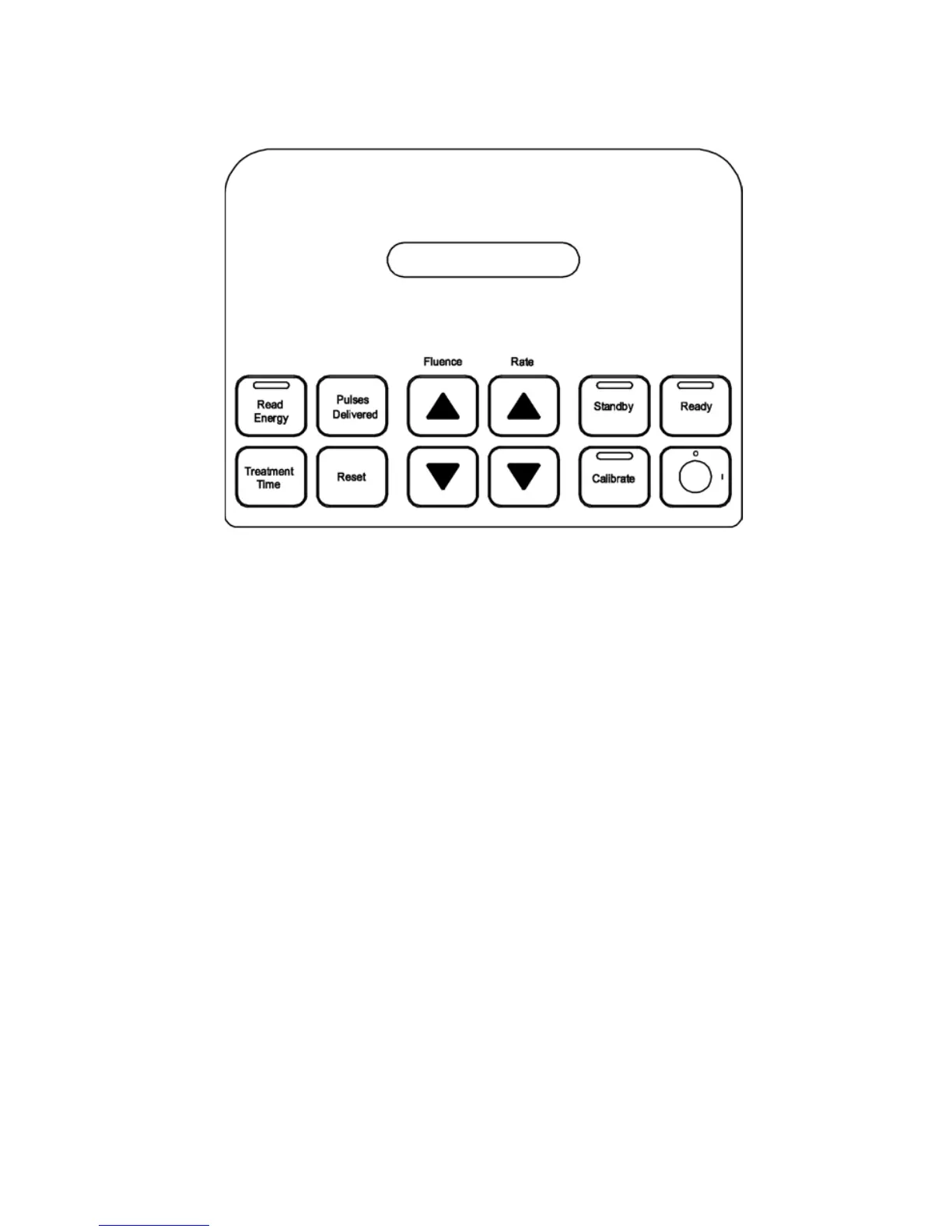
Control Buttons
Calibrate: Depressing the Calibrate button places the Excimer Laser System in Calibrate
mode. The Calibrate button is illuminated.
Fluence: The Fluence button adjusts the output energy of the Excimer Laser System. The
uence value is increased or decreased by depressing the appropriate Fluence button.
The current uence value is visible in the display window and the mJ/mm
2
indicator light
is illuminated. A brief press of either the increase or decrease Fluence button while in
other operating modes shows the current uence value. Depressing either the increase or
decrease Fluence buttons for one second or longer changes the uence value accordingly.
Pulses Delivered: Depressing the Pulses Delivered button enables the total number of
pulses during a procedure to be visible in the display window.
Rate: The Rate button adjusts the pulse repetition rate of the Excimer Laser System. The rate
is increased or decreased by depressing the appropriate Rate button. The repetition rate is
visible in the display window and the Pulses/Second indicator light is illuminated. A brief
press of either the increase or decrease Rate button while in other operating modes shows
the current repetition rate. Depressing either the increase or decrease Rate button for one
second or longer changes the repetition rate accordingly.
Read Energy: Depressing the Read Energy button enables the ber output energy read
by the calibration detector to be visible in the display window. The Read Energy button will
be illuminated.
Ready: Depressing the Ready button places the Excimer Laser System in Ready mode. If
the Excimer Laser System has not been calibrated, the Ready button is notactive.


 To Next Page