36
6.1 General information
All commissioning for the product is carried out using the front panel.
WARNING: On entering the commissioning mode the product will cease normal
control. All valves will close, the 4-20 mA and the timer will freeze. For safety reasons,
the alarm relay(s) will continue to operate as normal. To regain normal control, return
to the run menu by pressing the button.
WARNING: If during commissioning, the keys are not pressed for a period of greater
than 5 minutes, the controller will revert back to run mode and an error will occur.
If the calibration was incomplete the controller may not provide the correct control.
The product has no battery. The programmed settings are held in non-volatile memory (Flash)
and are written to after changing a parameter and pressing
.
6 .Commissioning
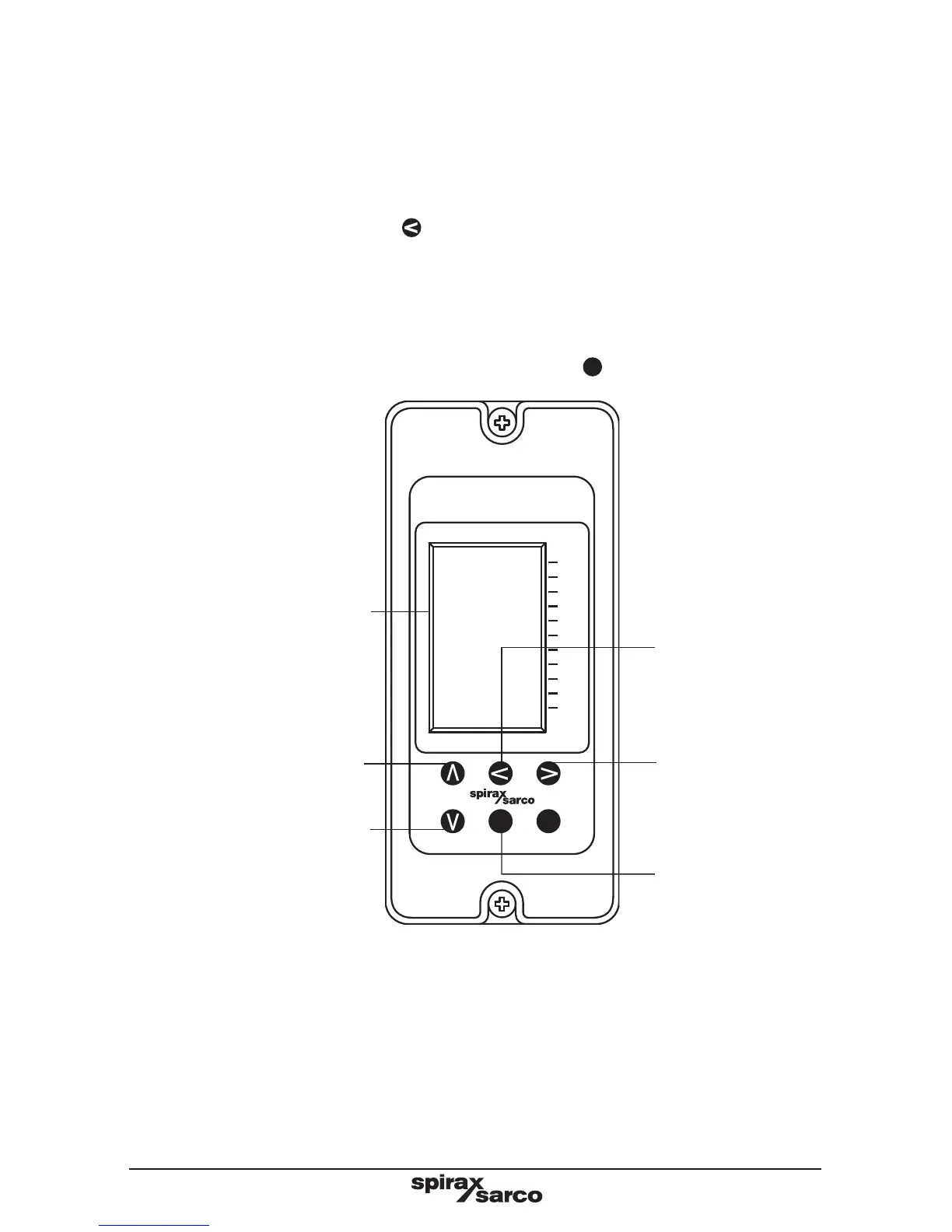
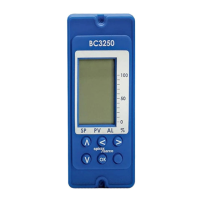
Fig. 28 Front panel keypad and definitions
Enter sub-menus
and shift right to the
next digit when the
parameter or digit is
flashing.
Scroll down menus / sub-menus.
Decrease digits.
Scroll up menus / sub-menus.
Increase digits.
Enters parameters
when the parameter
or digit is flashing.
Hold down for 5
seconds to enter
commissioning
mode.
Exit sub-menus
and shift left to the
next digit when the
parameter or digit is
flashing.
Graphic display.
OK
BC3250
100
50
0
%
SP
PV
AL




 To Next Page