IM-P337- 6 9 EMM Issue 2
68
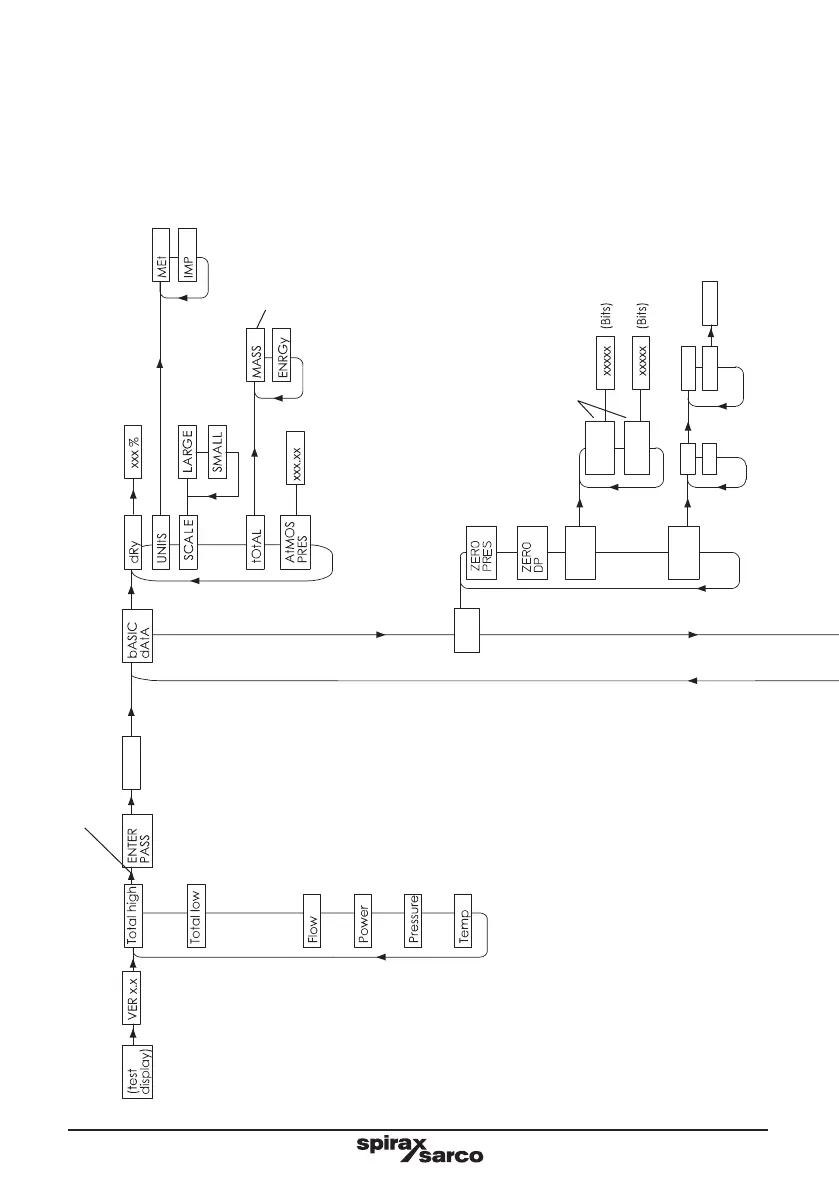
ILVA20/MVT10 Configuration menu
25
PRES
0
8888
ON
OFF
StEAM
HEAt XXXX%
SENSR
tEMP
SENSR
In-PUtS
PRES
0 CAL
PRES
25 CAL
8888
PRES
SENSR
tEMP
SENSR
ON
OFF
STEAM
HEAT
XXXX%
(Normal run mode
display sequence)
(Power on sequence;
turn on all segments,
then show the software
version no.)
(Press the > key and hold for 5 secs.)
(Bar g or psi g, depending if metric
or imperial units are selected)
(If heat is selected, alternates
between steam and condensate
temp, otherwise shows steam
temp. In C or F)
(Shows the total high 5 digits
for 10 secs, then the low 5 digits.
In Tonne/h (metric),
Tons/h (imperial),
Mwh or Mbtu
Tonne/h (metric)
Tons/h (imperial)
(Mwh or Mbtu)
(Configuration sub-menus)
(Display either the mass
total in kg or lbs, or the
steam energy in Mwh
or Mbtu)
Press and hold 'OK' for 3 seconds to zero pressure sensor
Press and hold 'OK' for 3 seconds to zero DP sensor
(When either of these parameters are exited,
the unit will display ‘WAIt’ for 10 seconds)
8888 is display
Default password = 7452



 To Next Page