IM-P337- 6 9 EMM Issue 2
52
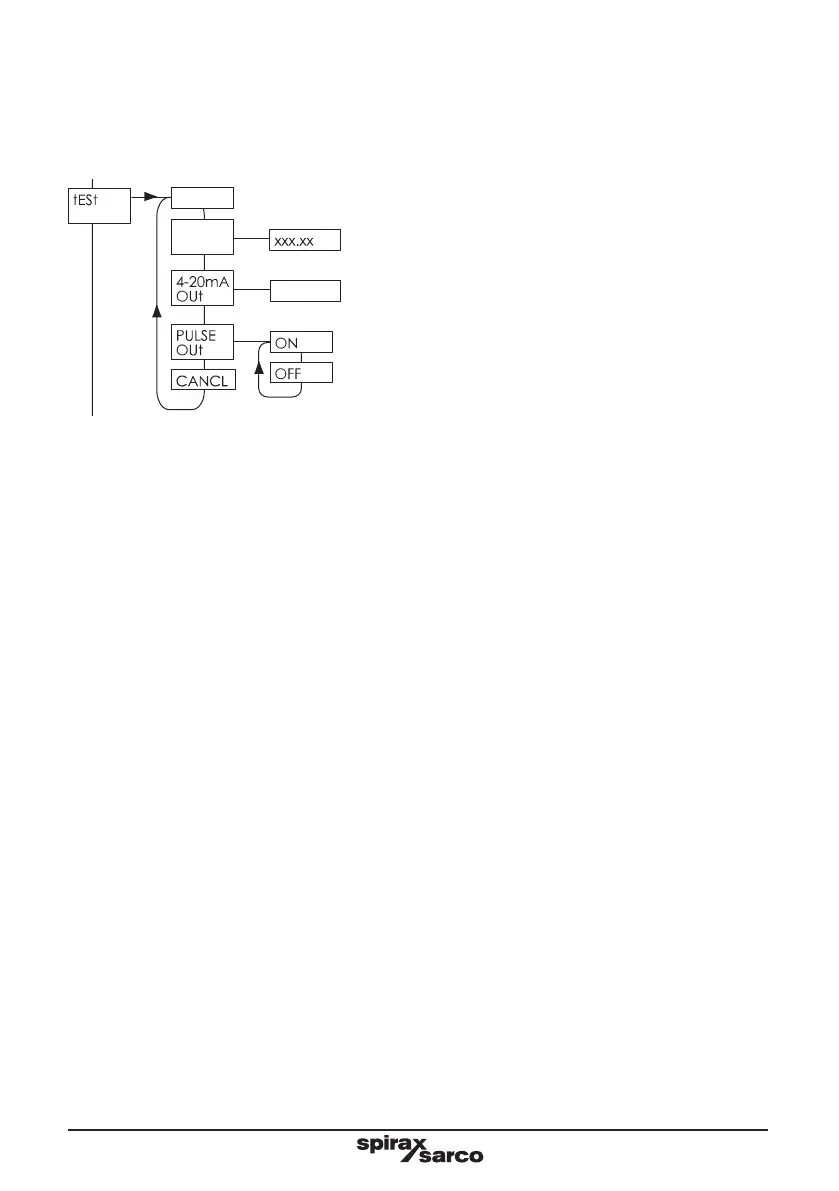
7.7.1 dISP
This allows the display to be tested. Pressing the right button will cause all the segments on the display to
be turned on. Pressing the left button cancels the test and steps to the next stage.
7.7.2 dP
7.7.3.3 4-20 mA Out
This allows the 4-20 mA output to be tested. By editing the value and pressing the 'OK' button the output
cancel option is chosen.
7.7.3 PULSE OUt
This allows the pulsed output to be tested. By selecting 'ON' or 'OFF' the desired test state of the pulsed
output can be selected. Once the 'OK' button is pressed the pulsed output will remain in the selected state
7.7.5 CA NCEL
minutes duration has expired. Press OK to cancel test signals.
7.7 tESt sub-menu
and pulse outputs can be tested.
25
PRES
0
8888
ON
OFF
StEAM
HEAt XXXX%
SENSR
tEMP
SENSR
COMMS
ALARM
In-PUtS
x.xxSec
xx.xxmA
dELAy
XXXX
PRES
0 CAL
PRES
25 CAL
8888
PRES
SENSR
tEMP
SENSR
ON
OFF
STEAM
HEAT
XXXX%
COMMS
ALARM
dISP
dP
Sets pulsed output permanently on



 To Next Page