9
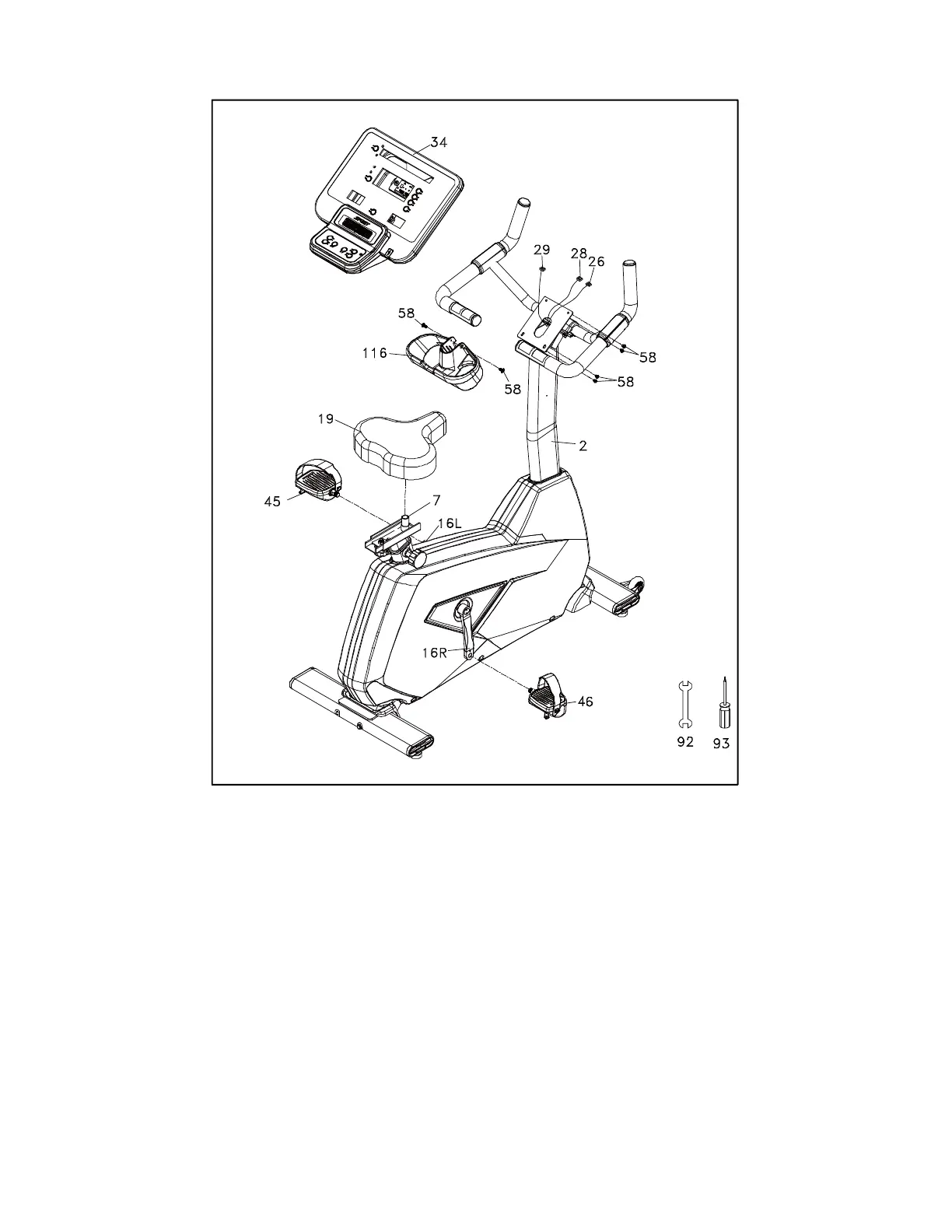
STEP 4
1. Insert the Computer Cable (No.29) and 2 Hand Pulse Cables (No.26, 28) into the connectors in
the back of the Console (No.34). Install the Console (No.34) onto the Console Mast (No.2).
Secure with 4 bottom Screws (No.58).
2. Install the Beverage Holder (No.116) onto the Console Mast (No.2) with 2 Screws (No.58).
3. Install the Pedals (No.45 L, 46 R) onto the Crank Arms (No.16 L, 16 R). The left pedal has a
reverse thread and will be screwed in with the opposite rotation. Make sure to tighten the pedals
as much as possible.
4. Install the Seat Mount Slide (No.7) onto the track on top of the seat tube with the seat post
facing forward. Install the Seat (No.19) onto the seat post and fasten the nut using the Wrench
(No.100).


 To Next Page