32
7. Training
7.1 OVERVIEW OF THE TRAINING OPTIONS
The treadmill offers the following training options:
• Free training with manual setting of speed and incline; optionally with target value for duration, distance
or calories.
• Training with 16 preset programs with target value for duration or distance
• Training with 4 preset HIIT programs (High Intensity Interval Training) with fixed duration of 20 minutes
• HRC training with target pulse rate and selectable duration
• In addition, it is possible to determine the current BMI (Body Mass Index).
• The device must be switched on for all types of training and also for BMI determination
WARNING! Heart rate monitoring systems may be inaccurate. Over exercising may
result in serious injury or death. If you feel faint stop exercising immediately.
• Do not overexert yourself or others when performing the training! Always respect
individual general and daily fitness!
• Never choose programs with too high a speed and/or too high an incline!
• Warm up and warm down sufficiently before and after each training session!
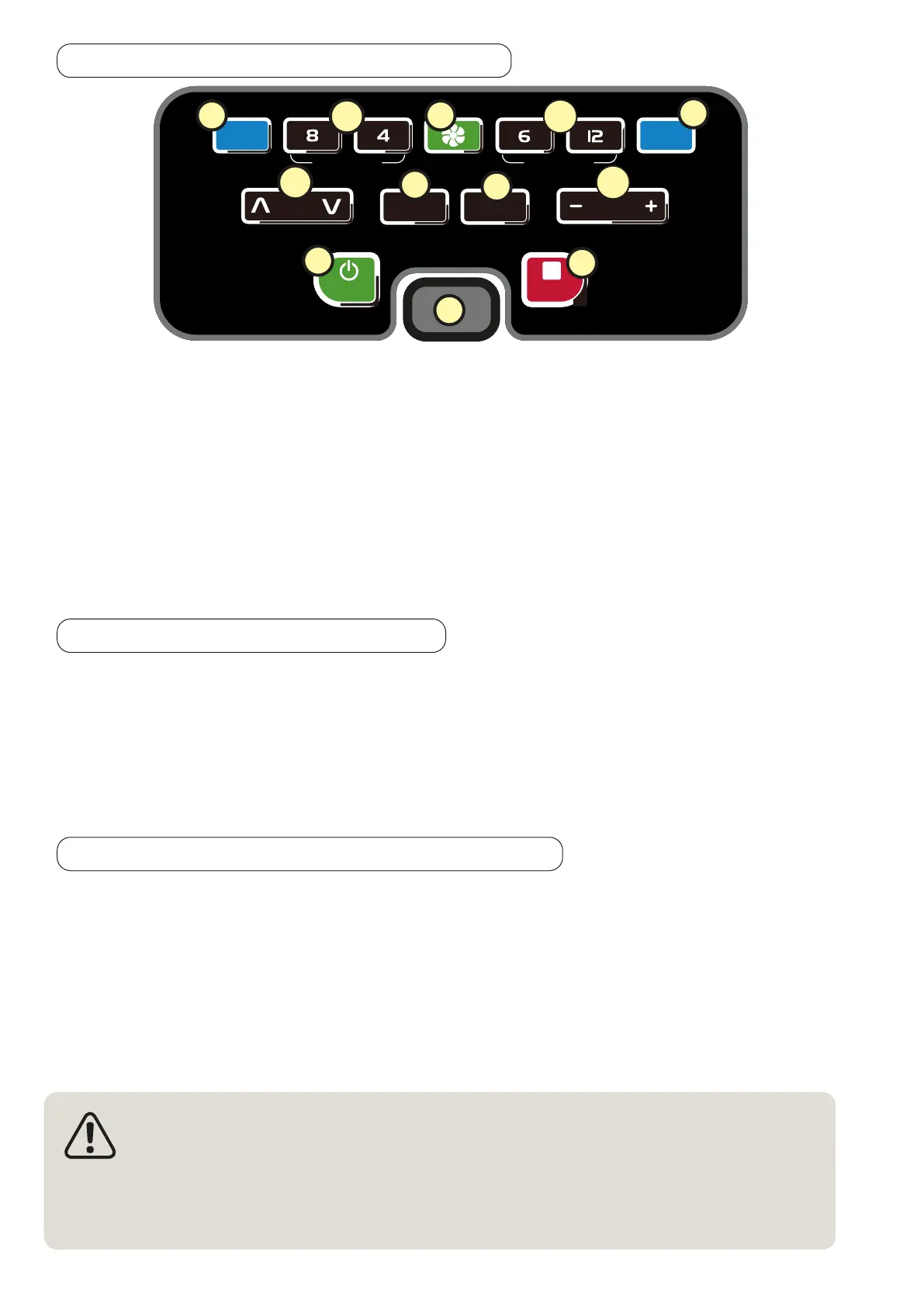
6.3 CONTROL PANEL WITH BUTTONS
LIGHTS
BMI
INCLINE SPEED
MODE
PROG
QUICK INCLINE QUICK SPEED
STOPSTART
J L
O
K.1
P
Q
T
R
K.2
M.1
M.2
S
J Illumination ON/OFF O Start BMI measurement/ select HRC mode
K.1
Incline higher/lower (steps of 1 level) P Select program
K.2
Quick setting of incline (Level 8 / level 4) Q
Select target parameters for manual mode
(time, distance or calories)
L
Fan ON/OFF R Start treadmill (program)
M.1
Speed slower/ faster (steps up to 1km/h;
max 20 km/h)
S Stop treadmill (program)
M.2
Quick setting speed 6 km/h / 12 km/h
(use with care!)
T Plug-position for safety clip
6.4 SWITCHING ON THE DEVICE
• Make sure that the safety clip is NOT attached to the plug-position on the console.
• Plug the mains cable supplied into a suitable grounded socket with adequate fuse protection.
The training computer switches on.



 To Next Page