Page
Product description
09
Enter the operation interface
Settings
Entertainment
Scene
Records
Work Out Data
User Information
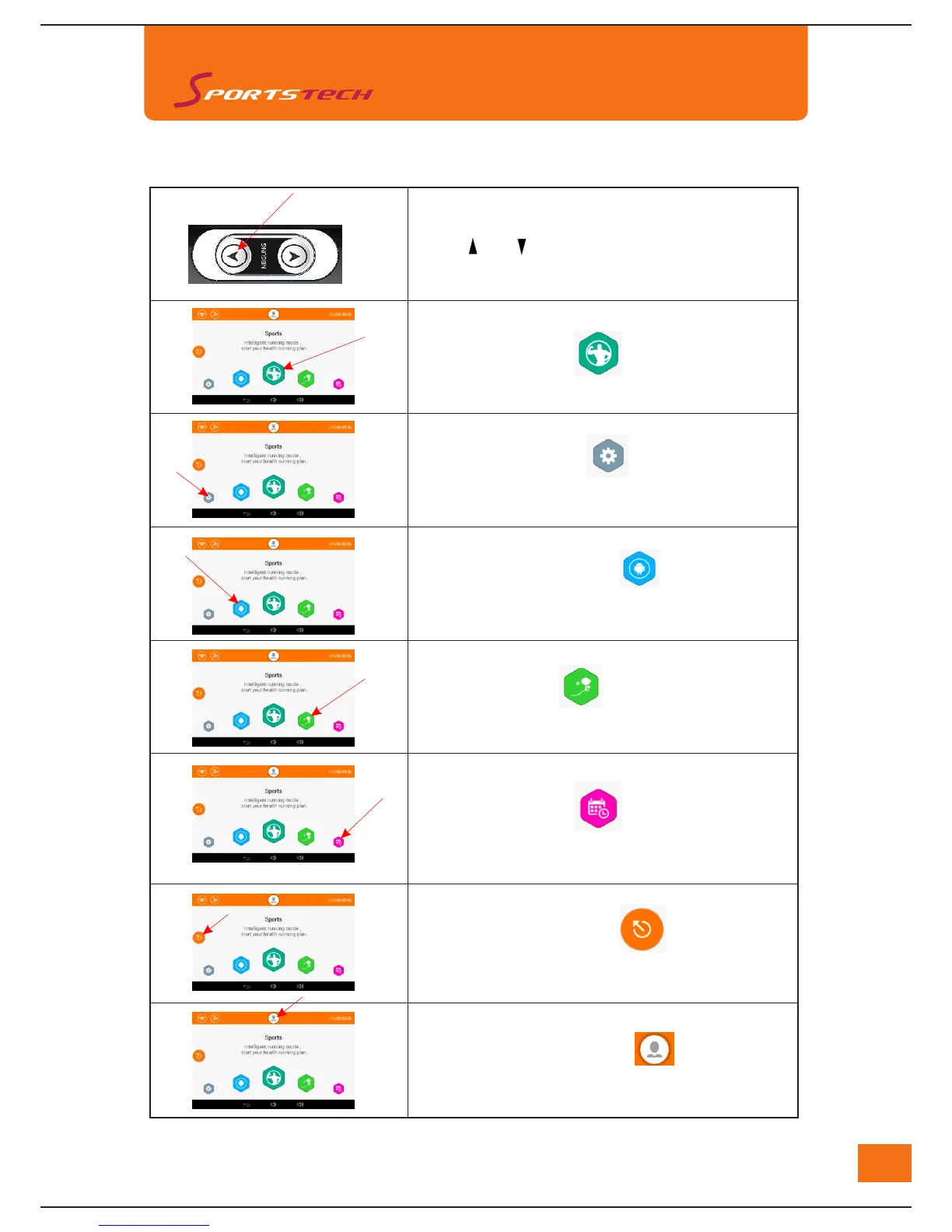
Incline adjustment button on right handle bar
Press " " or " " to increase or decrease the
incline degree.
Touch "Sports" icon to enter the
operation interface
Touch "Settings" icon o
r
enter interface
of "Settings". User can adjust the settings
of "Wi-Fi", "Display", "Sound" and "Language".
Touch "Entertainment" iconn o
r
choose music
play, video play and internet browsing.
Touch "Scene" iconn
o
r
enter "Scene Mode",
there will be 3 scenes for users to explore
Touch "Records" iconn
o
r
check the records
of each and total work out results.
Touch "Work Out Data" iconn o
r
check the
data of work out simultaneously
Touch "User Information" icon to register and
store the user information (while connect to WiFi )
Work out data can be stored after log in



 To Next Page