Matrix 908 Field Computer
22
www.teejet.com
CONSOLE START JOBSETUP HELPMEASUREMENTS UTSETUP
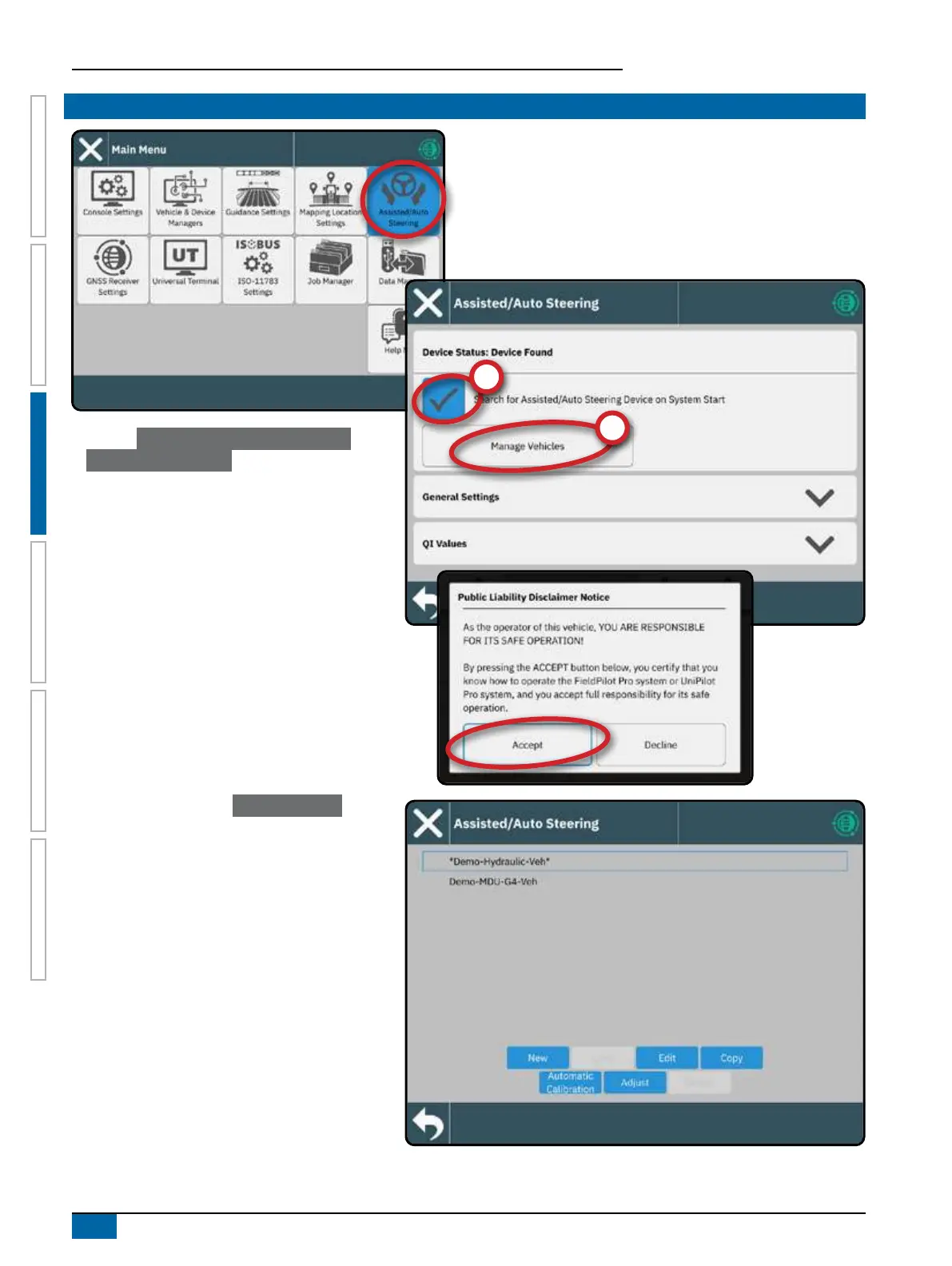
1. Activate Search for Assisted/Auto Steering
Device on System Start
.
2. Restart the console.
3. Acknowledge the Public Liability Disclaimer Notice.
This takes about a minute to pop-up after restart.
4. Return to the Assisted/Automatic Steering Settings
menu.
5. Make adjustments to settings as needed. Changes
are automatically applied.
NOTE: For details Assisted/Auto Steering device
settings, reference the user manual included
with the SCM Pro.
To manage Assisted/Auto Steering vehicles (add
a new vehicle, re-calibrate the current Assisted/
Auto Steering system, or to adjust steering
aggressiveness), press the Manage Vehicles
button
.
NO.8 SET UP ASSISTED/AUTO STEERING


 To Next Page