Matrix 908 Field Computer
31
98-01578-ENUS R2
CONSOLESTART JOB SETUPHELP MEASUREMENTSUT START JOB
NO.2 ESTABLISH AN AB GUIDELINE
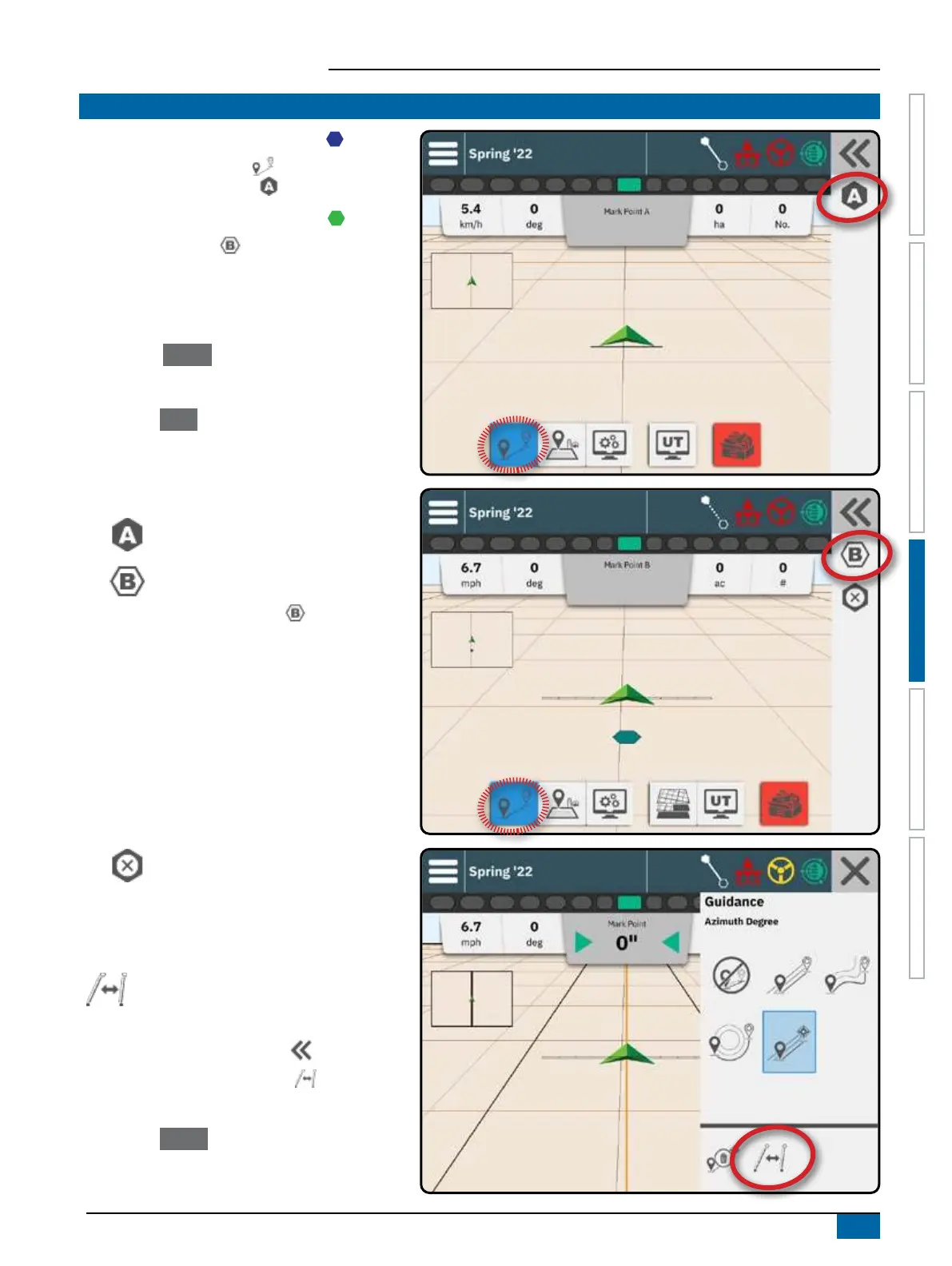
1. Drive to the desired location of Point A .
2. With the Guidance button on the Feature Bar
active, press MARK A icon .
3. Drive to the desired location of Point B .
4. Press MARK B icon to establish the AB line.
Recommendation: If Heading Smoothing is
disabled, mark point B while vehicle is moving.
5. Name the guideline.
W Select Cancel to save the guideline using the
automatically generated name.
W Use the keyboard to select a custom name then
select Save .
The console will begin providing navigation
information.
Action Bar Options
Mark A Point – use to mark the rst point
on the guideline
Mark B Point – use to mark the last point
on the guideline and establish the AB line
NOTE: The MARK B Icon is not available
for selection (grayed out) until the minimum
distance is traveled.
– Straight or Curved Guidance: 10 feet /
3.0 meters
– Circle Pivot guidance: 165 feet /
50.0 meters. If driving the wheel tracks, it
is recommended to complete at least half
of the circle. It is not necessary to drive the
entire circumference.
Cancel Mark – use to cancel the Mark A
Point command and revert to the previous
guideline (when established)
Switch Guideline
If more than one guideline is saved, the
Switch Guideline option will become available.
To change to other available guidelines:
1. Select the Slide-Out Tray button .
2. Press SWITCH GUIDELINE icon .
3. Select the guideline to be active.
4. Press the
Switch button.


 To Next Page