CELL-LINKSPYPOINT
12
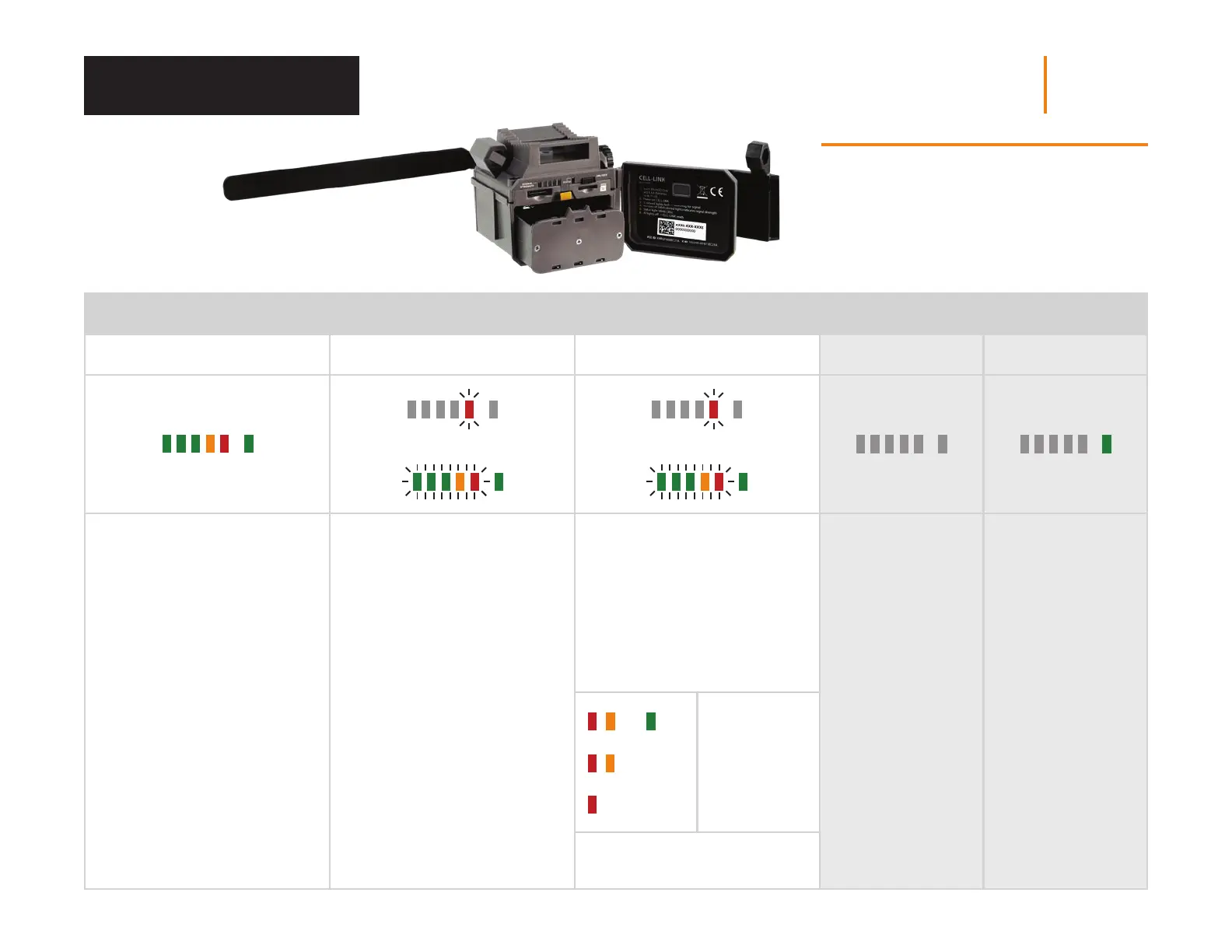
STARTING THE CELL-LINK (CONTINUATION) CELL-LINK IN FONCTION
1 2 3 4 5
All the lights turn on for
3 seconds.
2 possibilities:
The 1
st
red signal LED ashes =
low batteries.
The STATUS light stays on
+ 5 LED ashing = searching for
cellular signal. This can take a few
minutes.
2 possibilities after the cellular
signal search:
Only the red LED is ashing =
network issue.
The STATUS light is ashing and
X LED are xed = indicates the
strength of the signal.
All lights turn o. While the CELL-LINK
is in function,
the STATUS light
is turned on and
xed.
+
+
(1-3)
+
Good to
excellent signal
Weak signal
Insucient
signal
The process lasts 30 s, after which
the CELL-LINK is operational.
or or
NOTE
Inside your device’s door is a small checklist
to guide you through the dierent steps to start
your device.
Starting Your Device














 To Next Page