18
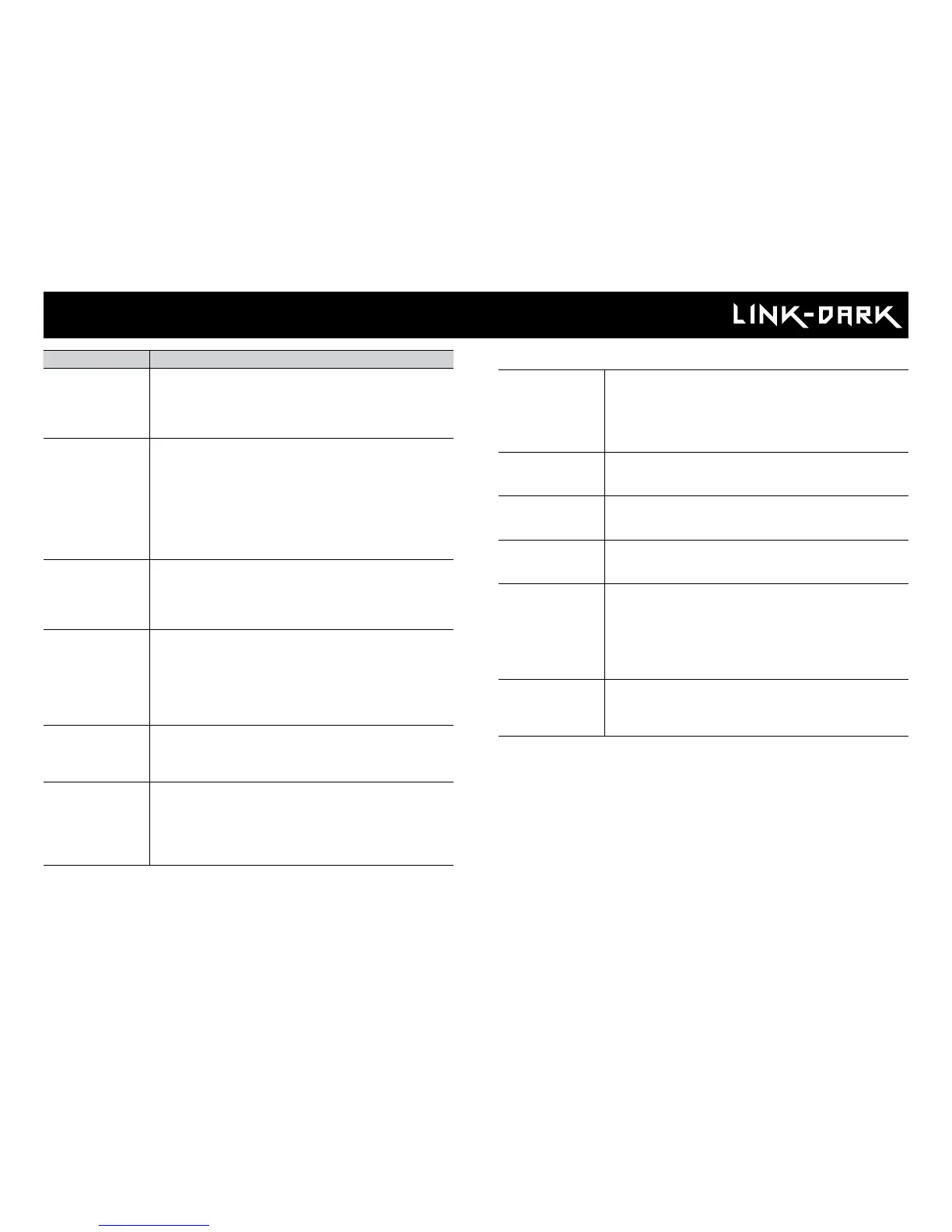
Error: SIM card
The SIM card is defective.
• Turn off the camera and turn it on again.
• Turn off the camera, then remove the SIM card and
insert it again as shown on the camera. The card is
inserted correctly when a click is heard.
Error: SIM locked
Your SIM card is locked.
• Contact the SPYPOINT customer service.
Error: SIM locked
(PUK)
Your SIM card is locked and requires a PUK.
• Contact the SPYPOINT customer service.
Error: SIM card
not supported
• The camera must use the SPYPOINT SIM card
provided with the camera.
Error: No service
The SIM card does not detect any signal.
• Get outside or near a window and restart the
camera a few times if required to get all the
information from the cell network.
* If the signal is still too low, there is a possibility to
get a Long range cellular antenna (CA-01), from our
website.
Error: Modem
There has been a communication problem between the
camera and the modem.
• Turn off the camera and turn it on again.
Error message Possible solutions
Insert memory
card
The use of a memory/SD card is required to record
photos and videos. Make sure to use a SDHC standard
full size 32 GBs and less memory card. DO NOT use a
MICO SD in an adaptor.
Card error
The camera cannot access the memory card.
• Turn off the camera and turn it on again.
• Turn off the camera, then remove the SD card and
insert it again. The card is inserted correctly when a
click is heard.
• Verify if the gold contacts are clean.
• Format the memory card. Slow format the memory/SD
card in a computer.
Low battery
Appears on the screen just before the camera turns
off. Replace batteries or recharge the lithium battery
pack. Always verify the battery level before using the
camera.
No image
The camera does not display any pictures/videos.
• Verify if the SD card is not locked.
• Verify if the memory card contains photos/videos
with a computer. Make sure to use a standard full size
32GBs and less SD card. Do not unse a MICRO SD
card in an adaptor.
Protected le
The le you want to delete is protected.
• Unprotect the photo in the View mode, then you will
be able to delete this le.
• Format the memory card to delete the les.
Error: No SIM
card
The SIM card is missing or defective.
• Turn off the camera and turn it on again.
• Turn off the camera, retrieve the SIM card and insert
it again as shown on the drawing in the battery case.
The card inserted correctly when a click is heard.
Troubleshooting















 To Next Page