Software description
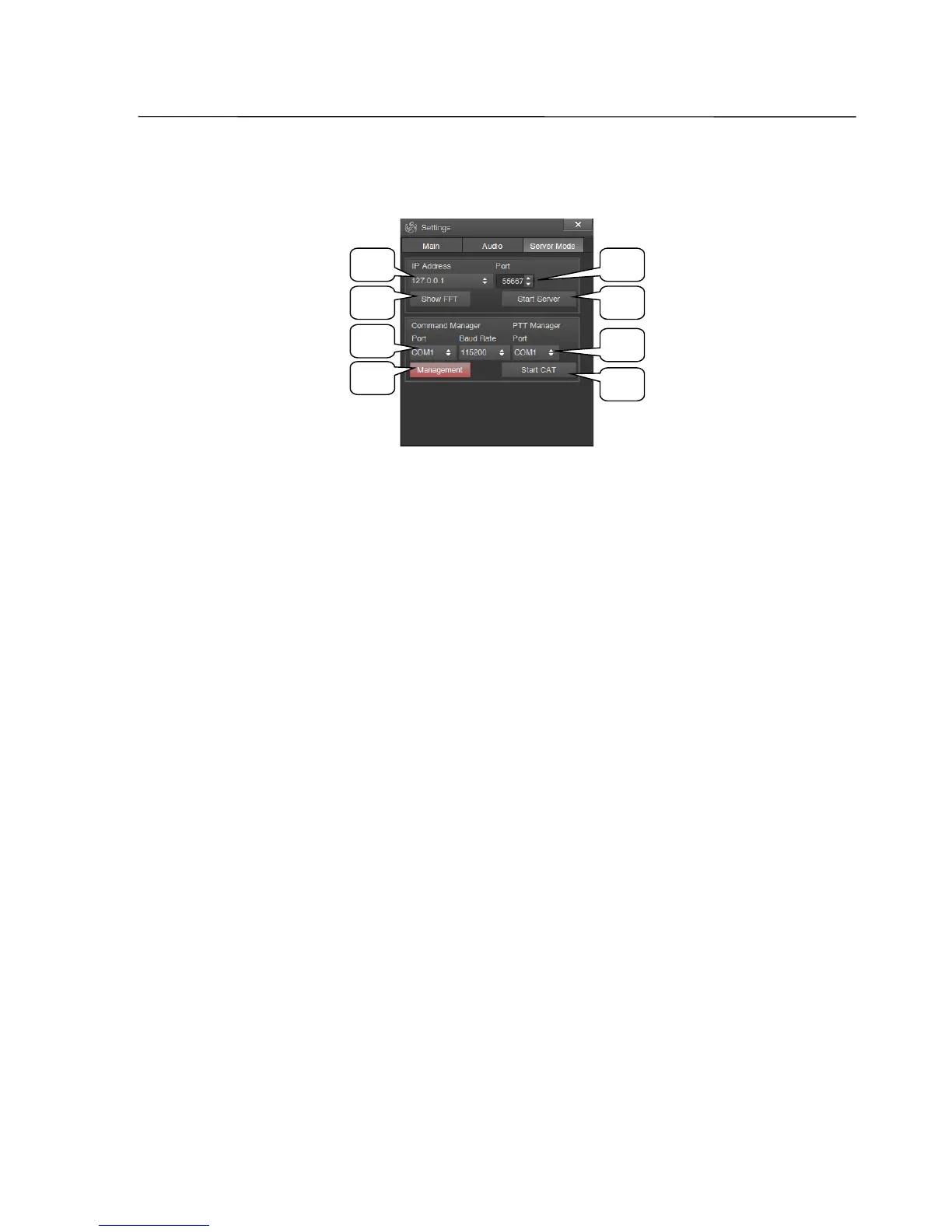
Settings window, Server Mode tab
1 IP Address list
Dropdown List for selecting the servers IP address.
2 Port
Input field for the port number.
3 Show FFT button
On/off switch of local spectrum and waterfall display during remote operation.
Note: When connected to a server (remote operation) the display of spectrum and waterfall in the
ZeusRadio software is stopped. For enabling these functions, the Show FFT button has to be
activated.
4 Start Server button
This button starts/stops the server for remote operation.
5 Port, Baud Rate lists
Dropdown lists for the selecting of a COM port for the CAT Interface and choosing
the connection speed.
6 Management button
On/off switch for transceiver control with the CAT Interface. When switched off,
the chosen COM Port will transfer outgoing transceiver parameters (like changes of
frequency or modulation mode etc.), but will not recognize control commands sent
to the transceiver.
SSB-Electronic GmbH © Page 39 of 88 V2.8.1 Content is protected by Copyright.
21
3 4
7
6
5
8



 To Next Page