Software description
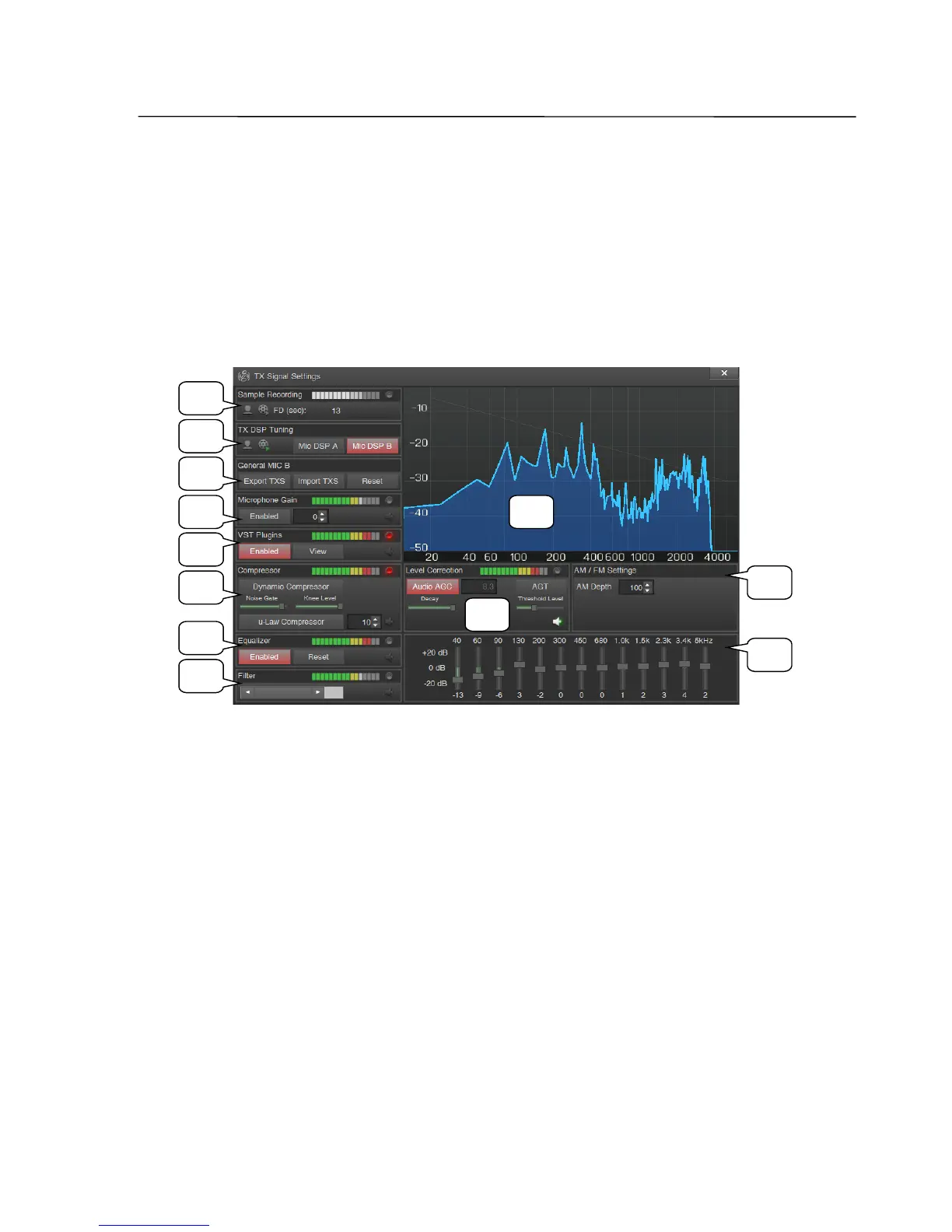
TX Signal Settings window
This window appears by clicking the TXS button in the main window.
In this window are controls for signal processing algorithms of the transmission
signal, which are arranged downward in the order of signal flow.
Each block has its own output signal level display, overload (clipping) indicator
and the speaker icon, which allows to monitor the output signal of this block.
1 Sample Recording Group
Clicking on the microphone icon starts recording audio from selected audio input.
Button starts flashing. Pressing again stops the recording.
Clicking on the tape icon allows you to listen to a recording without any
processing.
Here is also the recording duration indicator, (FD).
Note: After you change the audio sample rate you need to record a new file.
2 TX DSP Tuning Group
Clicking on the microphone icon starts signal processing algorithms for selected
audio input and the result goes to the selected audio output. Thus, one can make
adjustments of the algorithms in real-time.
SSB-Electronic GmbH © Page 46 of 88 V2.8.1 Content is protected by Copyright.
1
2
12
3
4
5
6
7
8
9
10
11



 To Next Page