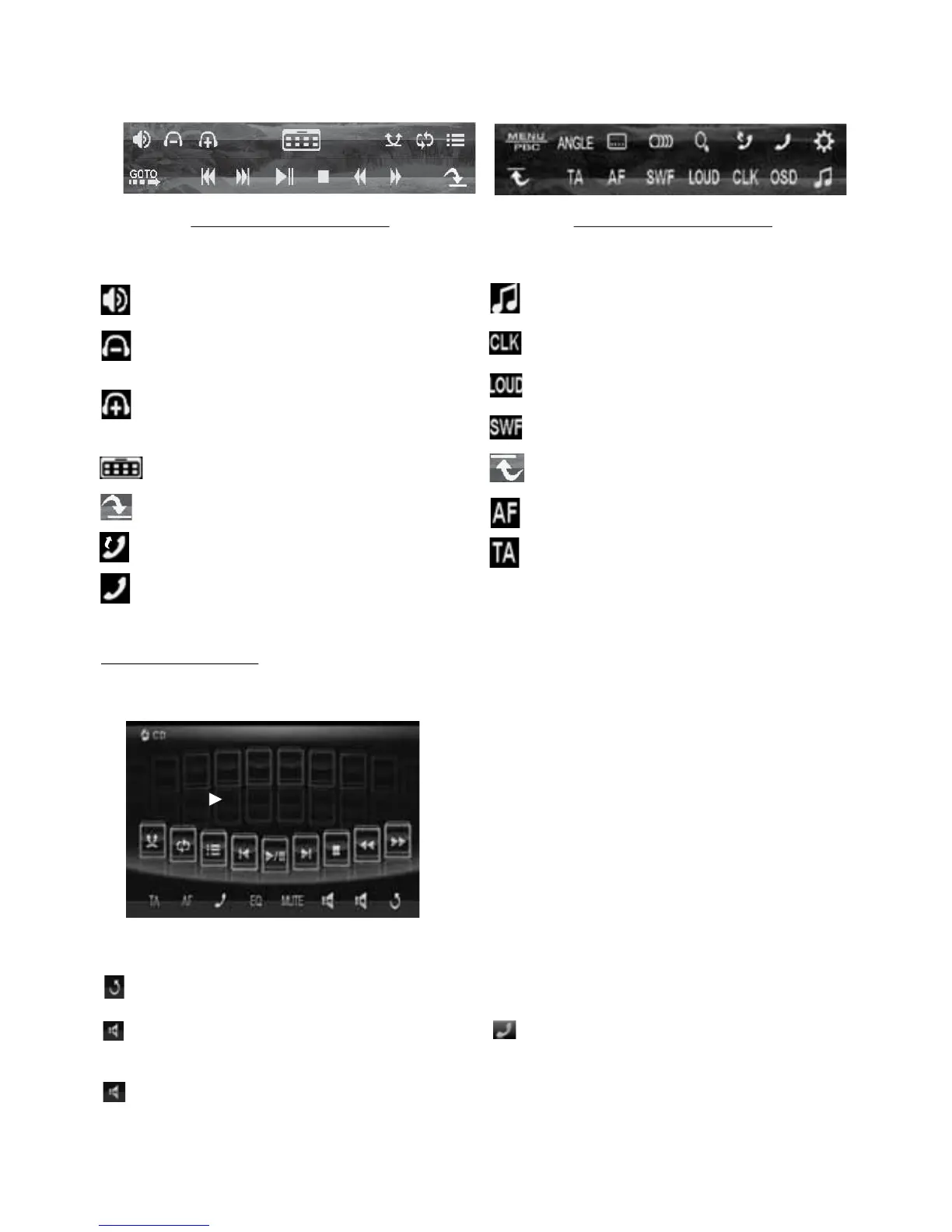
Function Icons-board 1 Function Icons-board 2
The Function Icons-boards display as follows:
* Some icons on the Function Icons-boards descript as follows:
: Same as MUTE button.
: Same as VOL- button or rotating
VOL knob with anti-clock wise.
: Same as VOL+ button or rotating
VOL knob with clock wise.
: Poping up source Menu.
: Poping up Function Icons-board 2.
: To redial the last dialed number.
: To pop up BLUETOOTH MUSIC interface.
2.2 CD interface
During CD playback, the CD interface displays as follows:
* Some icons on the CD interface descript as follows:
: Poping up source Menu.
: Same as VOL+ button or rotating
VOL knob with clock wise.
: Same as VOL- button or rotating
VOL knob with anti-clock wise.
MUTE : Same as MUTE button.
: Same as EQ button.
: Same as CLK button.
: Same as long pressing EQ button.
: Same as SW button.
: Poping up Function Icons-board 1.
:To switch AF mode on or off.
: To switch TA mode on or off.
EQ : Same as EQ button.
: To pop up BLUETOOTH PHONE
interface.
AF : To switch AF mode
on or off.
TA : To switch TA mode on or off.
-19-
4/26
0:00:16
USER SWF



 To Next Page