AUX IN operation
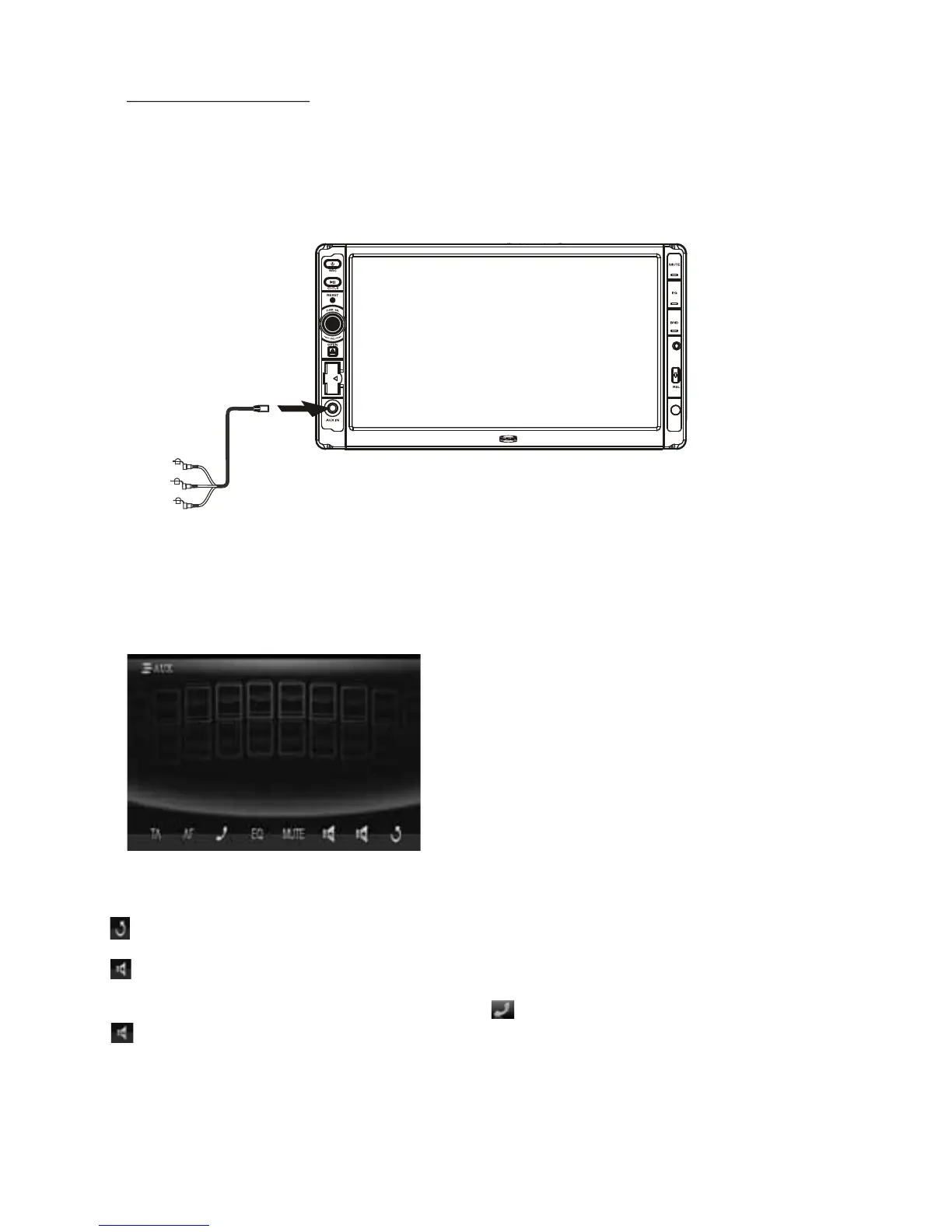
An external AV system can use the car AV system as monitor and amplifier.
1. Use an AV cable to make the car AV system and the external AV system connected
through the AUX IN jack on control panel of the car AV system and the
AV Out jacks
of the external AV system.
2. Play the external AV system, then use SRC button or Source Menu to enter AUX
IN mode for the car AV system. By now, the program played by the external AV
system can be output
through the monitor of the car AV system and the speakers
connected to the car AV system.
* The icons on the AUX interface descript as follows:
: Popping up Source Menu.
: Same as VOL+ button or
rotating
VOL knob with clock wise.
: Same as VOL- button or rotating
VOL knob with anti-clock wise.
3. In AUX IN mode, you can use SEL, +, -, VOL, MUTE, EQ , SW and LOUD buttons
or icons to adjust audio and video.
MUTE : Same as MUTE button.
EQ : Same as EQ button.
: To pop up BLUETOOTH PHONE
interface.
AF : To switch AF mode on or off.
TA : To switch TA mode on or off.
-31-
AUX1 IN
USER SWF
MOD
3.5 mm A/V Cable
MIC
* AUX IN printed on front panel, but its function is AV IN, and no AV IN cable in the package.



 To Next Page