Quick start UM2324
8/44 UM2324 Rev 2
5 Quick start
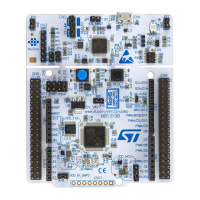
This section describes how to start a development quickly using the STM32 NUCLEO-
G070RB or NUCLEO-G071RB board.
Before installing and using the product, accept the Evaluation Product License Agreement
from the www.st.com/epla web page.
For more information on the STM32 Nucleo board and to access the demonstration
software, visit www.st.com/stm32nucleo website.
5.1 Getting started
The STM32 NUCLEO-G070RB or NUCLEO-G071RB board is a low-cost and easy-to-use
development kit to quickly evaluate and start a development with an STM32 microcontroller
in QFP64 package. To start using this board, follow the steps below:
1. Check the jumper position on the board, CN4 (STLK) on [1-2], [3-4], JP2 (PWR) on
[1-2], JP3 (IDD) on.
2. For a correct identification of all device interfaces from the host PC, install the Nucleo
USB driver available on the www.st.com/stm32nucleo web page, prior to connecting
the board.
3. To power the board, connect the STM32 NUCLEO-G070RB or NUCLEO-G071RB to a
PC with a USB cable 'type-A to micro-B' through the USB connector CN2. As a result
green LED LD3 (PWR) lights up, LD1 (COM) blinks.
4. Press user button B1 (blue).
5. Observe that the blinking frequency of the three green LED LD4 changes, by clicking
on the button B1.
6. The demonstration software and several software examples that allow the user to use
the Nucleo features are available at the www.st.com/stm32nucleo.
5.2 System requirements
• Windows
®
OS (7, 8 and 10), Linux
®
or macOS
®(a)
• USB Type-A to Micro-B cable
5.3 Development toolchains
• Keil
®
: MDK-ARM
(b)
• IAR
™
: EWARM
(b)
• GCC-based IDEs
a. macOS® is a trademark of Apple Inc., registered in the U.S. and other countries.
b. On Windows only



 To Next Page
 Loading...