40287-1307
2
18
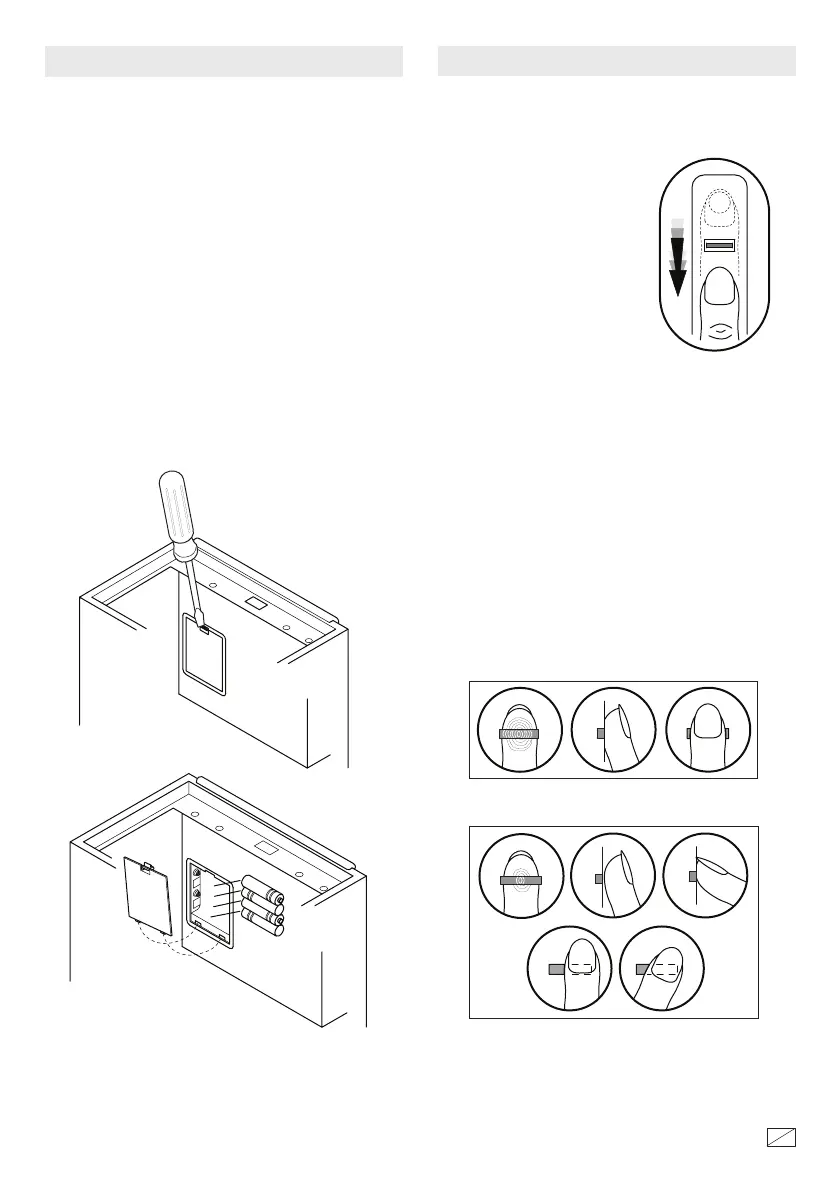
INSTALLING THE BATTERIES
NOTE: Do not mix old and new baeries. Do not
mix alkaline, standard or rechargeable baeries.
Push the baery cover locking tab with a screwdriver
to release the cover. Install the (4) AA alkaline
baeries as shown. Replace the cover by inserting
the rear tabs in the slots and snapping the cover in
place.
NOTE: If the baeries are low the red indicator will
stay on aer scanning. Replace with 4 new AA
alkaline baeries as shown.
When you rst install the baeries, you can open the
safe by pressing the START buon (2). For security
you must record your ngerprint aer you install the
baeries so the safe will read only the recorded
ngerprints.
• Locate the safe at a height
that allows easy access to the
ngerprint scanner.
In order to improve the rate of ngerprint
identication please follow these suggestions:
• Record several of your ngerprints in case you
sustain a cut or an injury to a nger you have scanned.
• Make sure your entire ngerprint crosses the
scanner.
• Use a similar scanning motion when opening the
safe.
• If your hands have oil, lotion or are dirty the
ngerprints may not scan correctly.
TIPS FOR RECORDING FINGERPRINTS
• Scan your nger by
sliding it over the scanner
in a straight and even
manner from back to front
taking 1 to 2 seconds to
make the scan.
Correct
Incorrect



 To Next Page