– 34 –
8-7. Peripheral Unit Drive Circuit
The Control Board of this unit is equipped with a circuit for driving a peripheral
unit (Paper Cutter, Take-Up Device, Cash Drawer, etc.)
The Control Board Connector (CN3) is used to connect the Peripheral Unit to the
Drive Circuit. When using this circuit connect the peripheral unit cable to the CN3
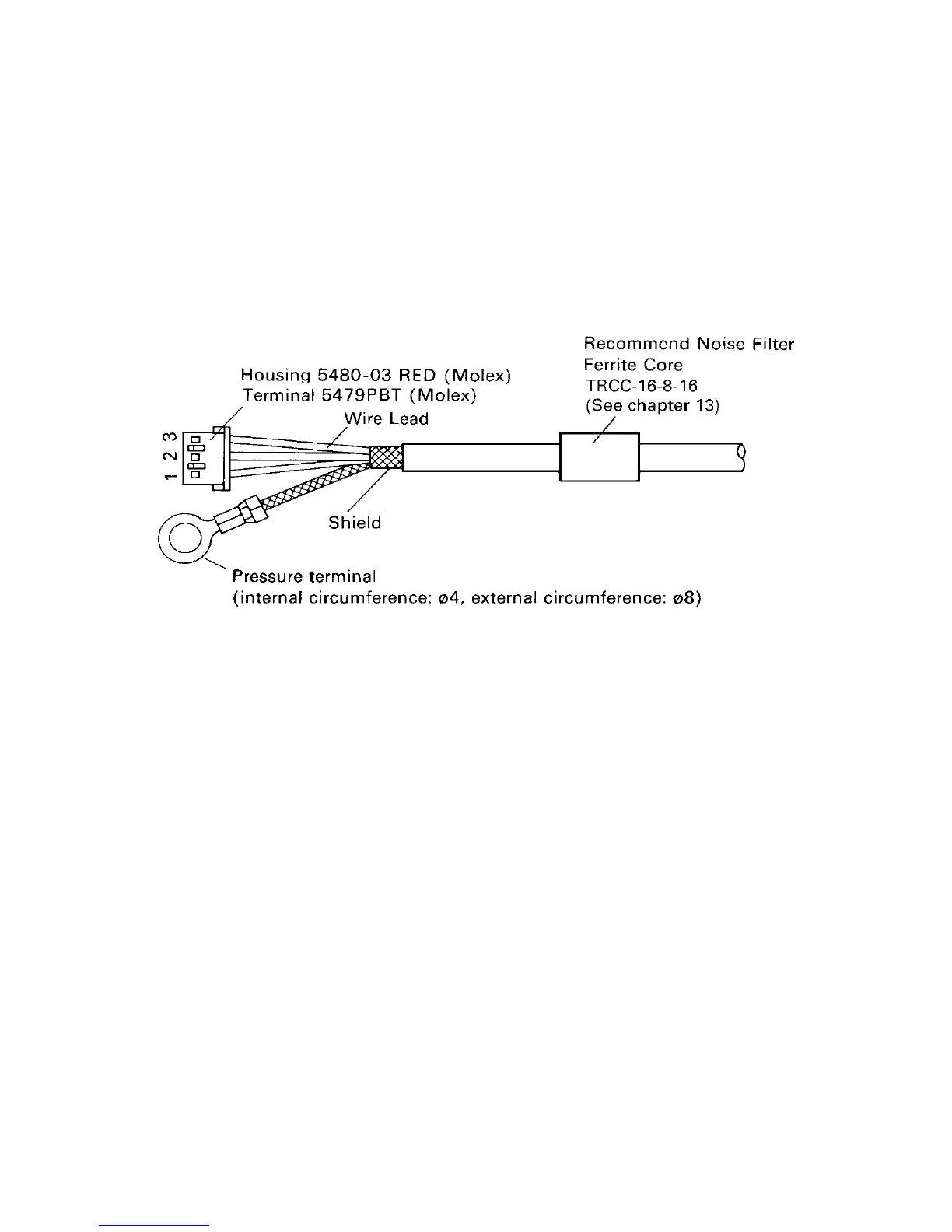
Connector (cable is not included). Use a cable with the following specifications:
Note: Do not run cable near devices generating large amounts of electrical
noise.
Figure 8-7. Cable Specifications
8-7-1. Cable Connection
Remove the printer Bottom Cover and connect the cable to the CN3 Connector.
Pass the cable around the control board as shown and through grommetted hole
in bottom cover. (Grommet may have to be cut)


 To Next Page
 Loading...