10
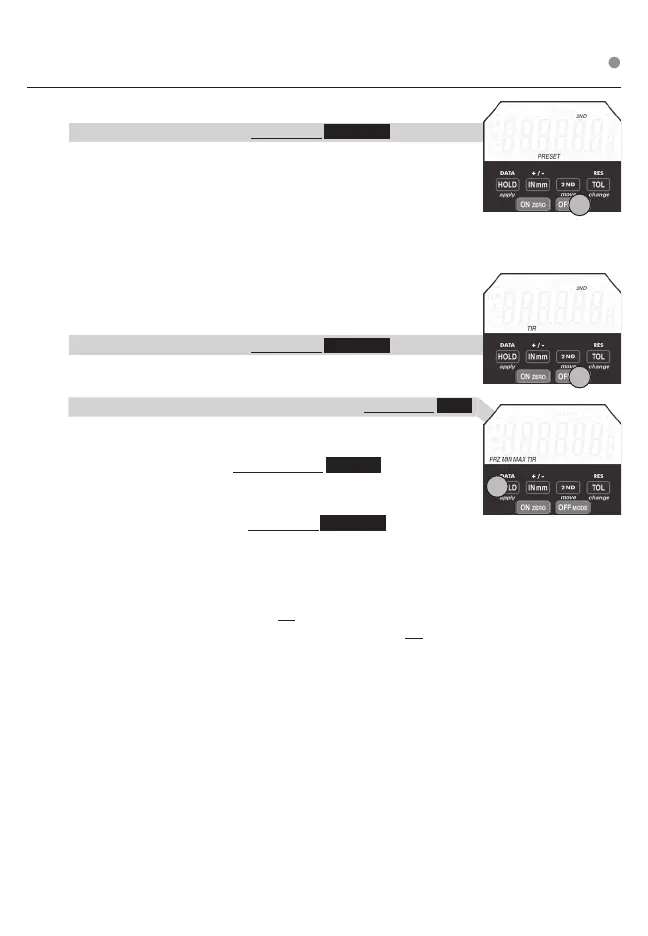
MODE (INC, PRESET, TIR)
PRESET Change MODE from INC, PRESET, & TIR
a. To Change Indicator MODE: Press & Hold OFF MODE The LCD
ICONs will change from INC to PRESET to TIR. Release button when
PRESET ashes on the LCD.
b. To Program Preset Number: Enter PRESET MODE (step a.).
Use the move (2ND), change (TOL), & apply (HOLD) to program /
set the PRESET value.
move scrolls ashing icon left to right. change toggles the value of
the ashing icon. apply stores PRESET value.
TIR (Total Indicator Reading)
Difference between the MAX (peak) & MIN (valley) value
Change MODE from INC, PRESET, & TIR
a. To Change Indicator MODE: Press & Hold OFF MODE .
The LCD ICONs will change from INC to PRESET to TIR.
Release button when the TIR ashes on the LCD.
b. To view the MAX (peak) & the MIN (valley) Value: Press & Hold HOLD
until the desired value is ashing & release button. In TIR MODE,
the freeze (FRZ) is the only function available.
c. To zero (clear) TIR value: Press & Release ON ZERO .
INC (Incremental)
Standard Operating MODE
a. To Change indicator mode: Press & Hold OFF MODE until INC
ashes on LCD
Note:
OFF can be used to exit programming functions (Ratio, Tolerance,
Presets, Lock) Using OFF to exit will not apply changes.
After 60 seconds of inaction, programming will exit and will not
apply changes.
1
1
1
1
Press & Release ❍ Press & Hold












 To Next Page