4
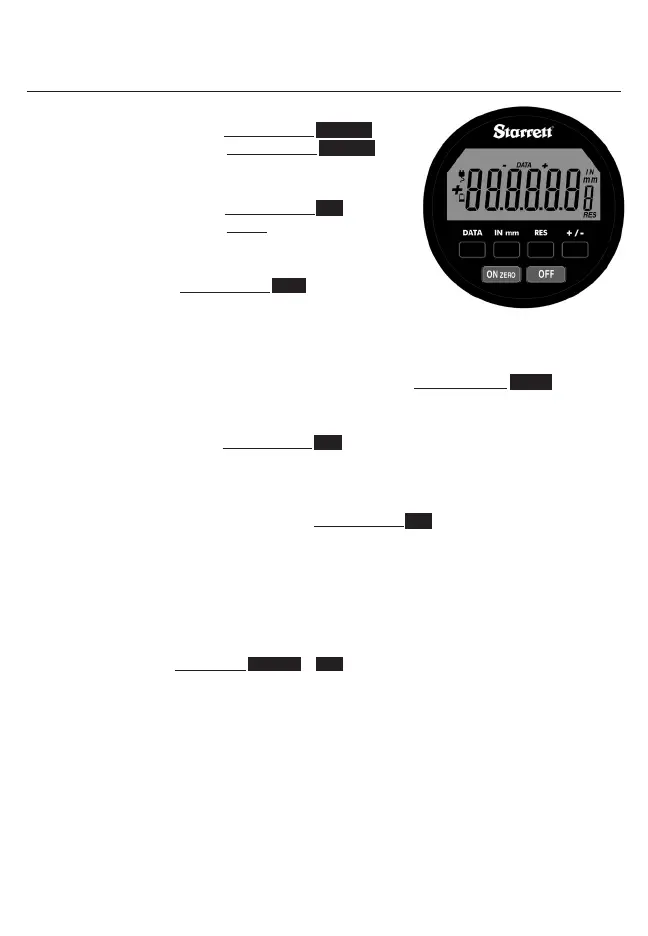
ON Zero Powers indicator ON. Zeros / clears reading
a. To Power Indicator On: Press & Release ON ZERO
b. To Clear / Zero Display: Press & Release ON ZERO
when LCD is On. (Zero on Release of Button)
OFF Powers indicator off
a. To Power Indicator Off: Press & Release OFF
(position & settings are not lost when indicator is off)
DATA Sends Data from indicator with cable or wireless radio
module
a. To Send Data: Press & Release DATA
b. If cable is connected, the indicator reading will be sent
through the data output cable.
c. A computer can also request readings.
IN mm Controls the display units (default is IN / English)
a. To Change From Inch To Millimeter Or Millimeter To Inch: Press & Release IN mm
b. mm for millimeter (metric) or IN for inch (English) will appear on right side of display.
RES Changes display resolution
a. To Change Resolution: Press & Release RES . Repeat until desired resolution is displayed.
b. IN .00005”; .0001”; .0005”; .001” mm .001mm; .002mm; .01mm; .02mm
c. Resolution can only be changed to a coarser resolution than the base indicator purchased.
+ / - Changes spindle / travel direction
a. To Change Travel Direction Of Reading: Press & Release + / - . + – or – + icons appear on LCD
for 1 second
b. + – will count negative with the inward direction of spindle travel. – + will count positive with
the inward direction of spindle travel.
c. – is displayed for negative readings & no sign is displayed for positive readings.
Note:
Factory reset: Press & Hold ON ZERO & OFF simultaneously until RESET appears on LCD
BUTTON FUNCTIONS












 To Next Page