9
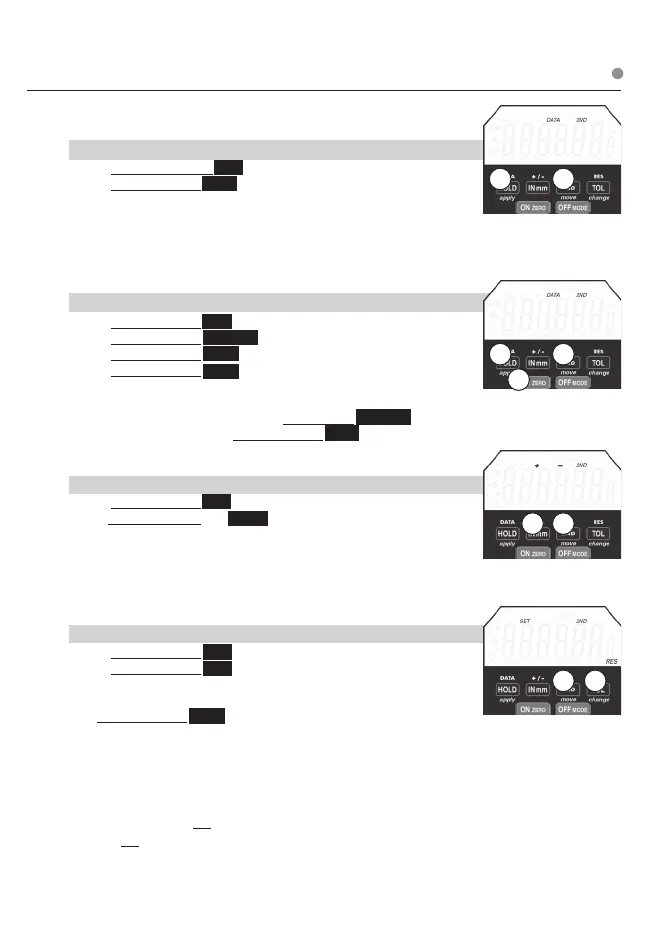
DATA Send Data through cable, wireless radio module, or store readings
in indicator.
a. To Send Data or Store Readings:
1) Press and Release 2ND
2) Press & Release DATA (HOLD).
Cable: If cable is connected, the data will be sent through the data
output cable. For 1 second DATA icon will appear.
For 1 second DATA icon will appear.
Stored Reading: With no cable connection & readings will be stored
in indicator. For 1 second DATA icon will appear.
NOTE: A computer can also request readings.
b. To View Stored Readings:
1) Press & Release 2ND
2) Press & Release ON ZERO
3) Press & Release HOLD . DATA icon appears on LCD
4) Press & Release move (2nd)
5) Repeat step 4) to scroll readings. The newest to oldest reading is
displayed.
To Clear (erase) Stored Readings: Press & Hold ON ZERO
To Exit Stored Readings: Press & Release DATA (HOLD)
+ / - Changes spindle / travel direction
a. To Change Travel Direction Of Reading:
1) Press & Release 2ND
2) Press & Release + / - INmm.
For 1 second + – or – + icons appears on LCD.
+ – counts negative with the inward direction of spindle travel.
– + counts positive with the inward direction of spindle travel.
– displays for negative readings & no sign is displayed for positive readings.
RES Changes display resolution
a. To Change Resolution:
1) Press & Release 2ND
2) Press & Release RES (TOL).
SET will ash on LCD. Repeat Step 2 until desired resolution is
displayed.
Press & Release apply (HOLD) to store resolution
Resolutions IN .00005”; .0001”; .0005”; .001”
mm .001mm; .002mm; .01mm; .02mm
Resolution can only be changed to a coarser resolution than the base indicator as purchased.
Note: OFF can be used to exit programming functions (Ratio, Tolerance, Presets, Lock)
Using OFF to exit will not apply changes. After 60 seconds of inaction, programming will exit
and will not apply changes.
2nd BUTTON FUNCTIONS
2 1
3
2
1
2 1
21
Press & Release ❍ Press & Hold












 To Next Page