8
Primary BUTTON FUNCTIONS
TOL Toggles TOL (Tolerances) On & Off.
a. To Toggle TOL On/Off: Press & Release TOL . If no tolerances are
programmed, a large tol will be displayed & both the LOW & HI
icons will ash.
b. To Program LOW & HI tolerances: Toggle TOL On (step a.).
Press & Hold TOL until HI is ashing & release TOL .
Use move (2ND ), change (TOL), apply (HOLD) to program
HI tolerance. move (2ND) scrolls ashing icon left to right.
change (TOL) toggles value of ashing icon. apply (HOLD)
stores value of HI or LOW.
c. When the value is out of tolerance the numbers will ash and the
LOW or HI will ash. If the LEDs are turned on, the Green or Red
LEDs will ash for 2 seconds when in tolerance and 4 seconds
when out of tolerance. Repeat to program LOW.
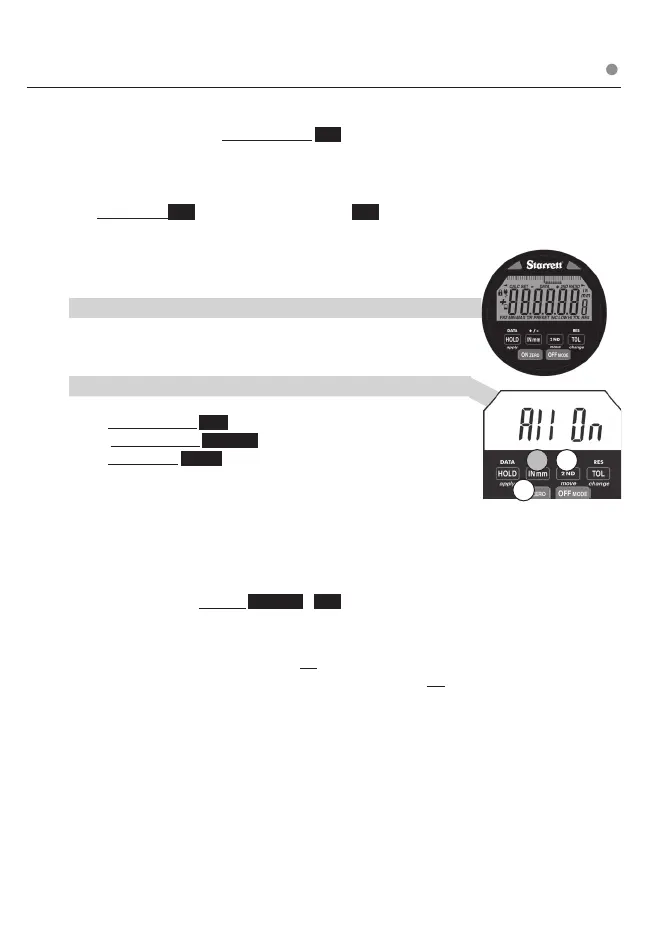
d. To Disable / Enable LEDs for TOL: use the following 3 button
sequence.
1.Press & Release 2ND
2. Press & Release ON ZERO
3.Press & Hold INmm until display changes
(All On, Off, DATA, or Off will be displayed).
Use change (TOL) to scroll All On (LEDs will ash when using
the TOL & DATA), oFF (turned off for both TOL & DATA), tol (turned
on for tolerance only), DATA (turned on for Data only).
Use apply (HOLD) to store desired setting
Note:
Factory reset: Press & Hold ON ZERO & OFF simultaneously until
RESET appears on LCD
OFF can be used to exit programming functions (Ratio, Tolerance,
Presets, Lock) Using OFF to exit will not apply changes.
After 60 seconds of inaction, programming will exit and will not
apply changes.
.
13
2
➥
LEDs
RED &GREEN RED & GREEN
➥
Press & Release ❍ Press & Hold












 To Next Page