11
3rd BUTTON FUNCTIONS
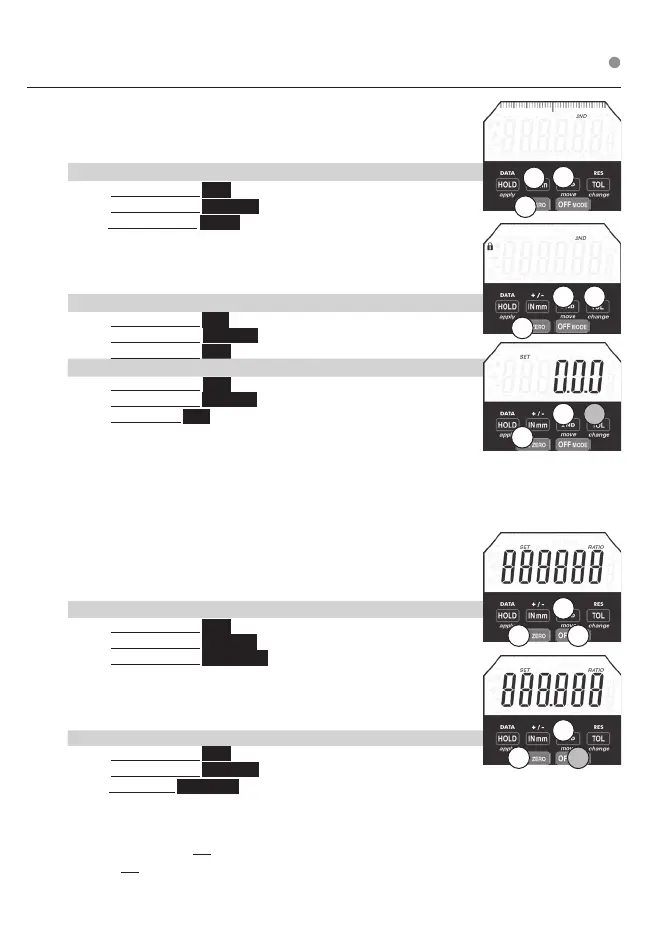
Analog Display
Allows for ticks or graduation scale view at top of LCD
Graduation distance matches the selected resolution of the numeric
display
a. To Disable / Enable Analog Display
1. Press & Release 2ND
2. Press & Release ON ZERO
3.Press & Release INmm
Lock Locks Buttons/Functions/Settings. 3 Button Push can disable /
enable Lock. 3 Digit Lock Combination can be entered for
additional security.
a. To Enable / Disable Lock
1. Press & Release 2ND
2. Press & Release ON ZERO
3. Press & Release TOL A Lock Icon appears on LCD
b. To Program Lock Combination
1. Press & Release 2ND
2. Press & Release ON ZERO
3. Press & Hold TOL until 000 appears & SET is ashing
Use the move (2ND ), change (TOL), & apply (HOLD) to program
3 digit combination.
move scrolls ashing icon from left to right. change toggles the value of the
ashing icon. apply enters 3 digit combination.
Enable functions you want to use before locking indicator. Example: Using MAX
HOLD, Turn the MAX Hold on (MAX appear on LCD) before you lock.
Lock function will lock out all functions that are not turned on.
Functions that can’t be locked include OFF, ON, ZERO.
NOTE: Master Combination 285 (if combination is lost)
Ratio Program a Ratio
a. To Enable / Disable Ratio:
1. Press & Release 2ND
2. Press & Release ON ZERO
3. Press & Release OFF MODE RATIO will appear on LCD.
b. To Program RATIO : Enable Ratio (step a.). Use the move (2ND),
change (TOL), & apply (HOLD) to program/enter RATIO value.
move scrolls the ashing icon from left to right . change toggles the
value of the ashing icon. apply stores/enters the PRESET value.
c. To Change Ratio if Already Programmed
1. Press & Release 2ND
2. Press & Release ON ZERO
3. Press & Hold OFF MODE until rst icon is ashing. Use move, change, apply to reprogram
(see step b. above)
Note: OFF can be used to exit programming functions (Ratio, Tolerance, Presets, Lock)
Using OFF to exit will not apply changes. After 60 seconds of inaction, programming will exit
and will not apply changes.
3
3
2
2
1
1
3
3
3
2
2
2
1
1
1
Press & Release ❍ Press & Hold












 To Next Page