CAUTION
Contact the technical service network authorised by
the manufacturer for information on the assembly of
the options.
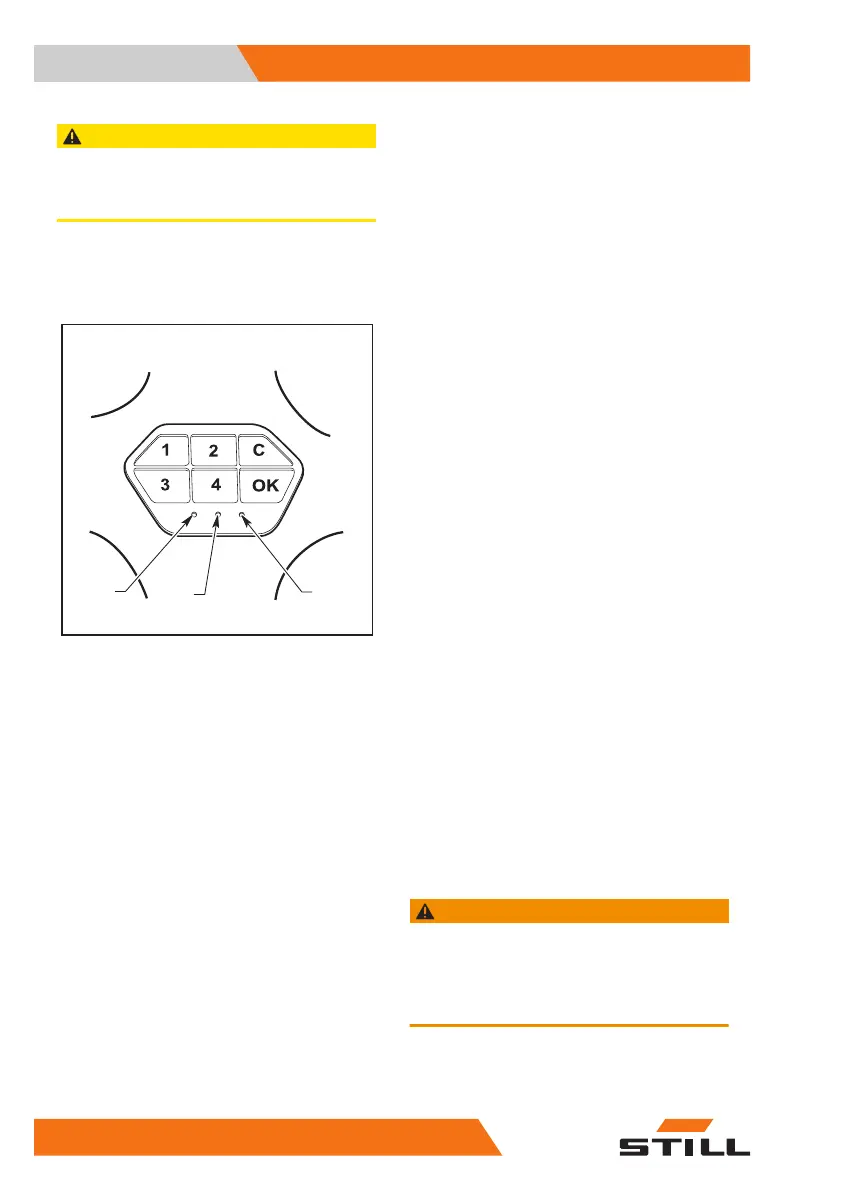
Numerical keypad (optional)
BAD
OM1782
Use instructions for the operator
A numerical keypad is available as an alterna-
tive to the ignition key:
●
numerical keys (1 -2 -3 -4)
●
confirmation key (OK)
●
cancellation key (C), used to enter the ma-
chine start-up code
When the forklift is turned off, the green LED
(A) remains lit.
When the forklift is turned on, the green LED
flashes.
The forklift is turned on by entering the four-
number user password and then pressing the
key (OK):
●
if the password (Pin Code) entered is cor-
rect, the green LED (A) begins to flash.
●
if the password (Pin Code)entered is incor-
rect, the red LED (B) lights up and the nu-
merical keypad emits an acoustic warning
signal, after which the green LED (A) lights
up and remains lit.
The forklift is turned off by pressing key (C).
The four-digit user password for the first start-
up is factory-set and is:
1234
Use instructions for the person respon-
sible for operators
The person responsible for operators has a
password(Master Code) that makes it possible
to:
●
memorise several personal operator pass-
words (Pin Code) for turning on the forklift.
●
cancel one or more personal operator (Pin
Code) passwords
●
change the password of the person respon-
sible for operators (Master Code)
Entering a new Master Code:
●
Enter the password of the person responsi-
ble for operators (Master Code) (for the first
time memorised, the password is the one
set by the factory:
111111
) and press the
key (OK). The green LED (A) turns off and
the yellow LED turns on(D).
●
Using the keyboard, enter the control code
'
11'
and press the key (OK). The yellow
LED (D) will begin to flash.
●
Enter a new six-number password (Master
Code) and press the key (OK).
WARNING
The new password (Master Code) will overwrite the
previous password.
We recommend that the person responsible for oper-
ators change the password (Master Code) when the
forklift is delivered.
Knowledge of the truck
3
Numerical keypad (optional)
32 45628043302 EN - 11/2021 - 07


 To Next Page