Driving
Truck travel
2537
A
B
A
B
1
2
Introduction
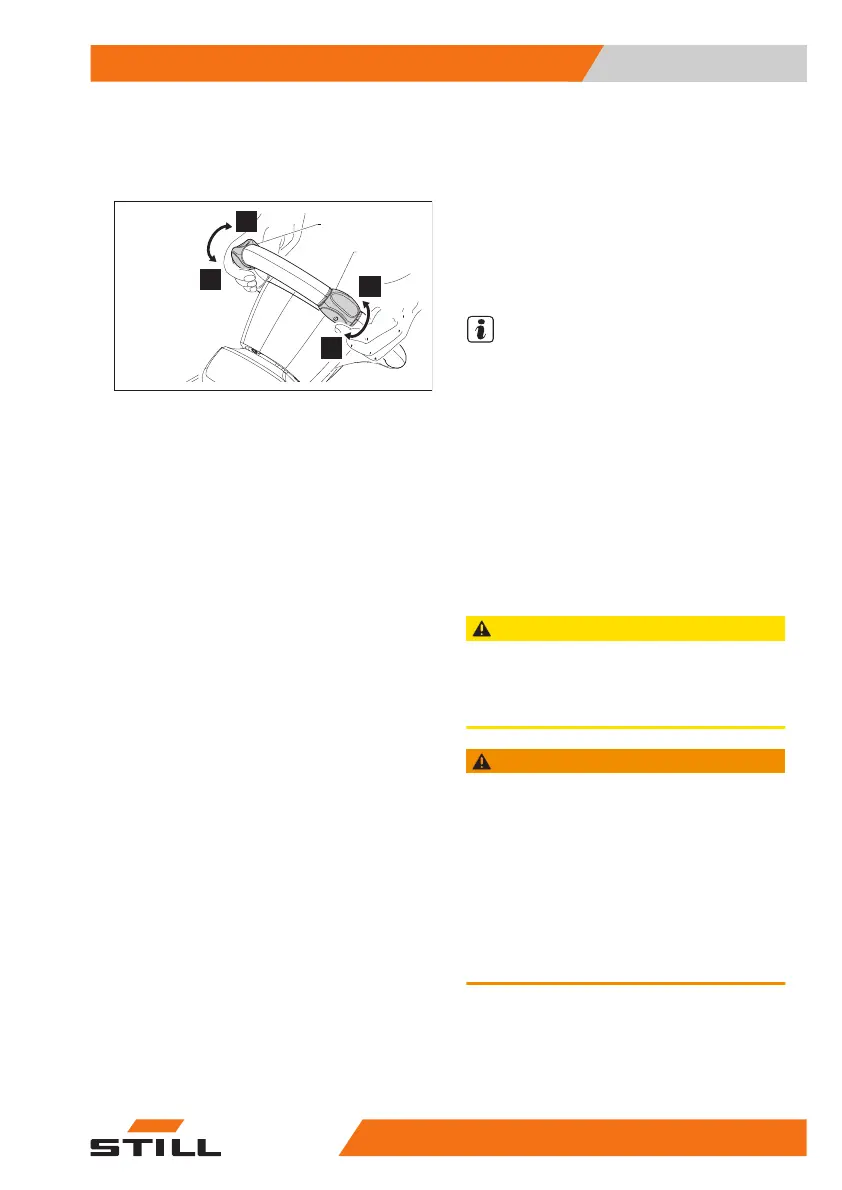
You can use the steering wheel controls (1
and 2) to:
●
Select the direction of movement (forwards
or backwards) for the truck
●
Vary the truck's speed of travel.
Before carrying out the following steps, follow
the correct sequence for using the truck.
⇒
Chapter "Sequence to follow for using the
truck", Page 109
The operating instructions for starting
and accelerating the truck in forward/
reverse travel are as follows:
Starting and accelerating the truck in forward
travel
●
While holding the steering wheel firmly at
the designated points, use your thumb on
the same hand to turn the travel controls (1)
or (2) in direction (A) and increase the angle
of rotation compared to the neutral position.
The truck will start moving forwards at a
speed proportional to the angle of the con-
trol.
Starting and accelerating the truck in reverse
travel
●
While holding the steering wheel firmly at
the designated points, use your thumb on
the same hand to turn the travel controls (1)
or (2) in direction (B) and increase the angle
of rotation compared to the neutral position.
The truck will start moving backwards at a
speed proportional to the angle of the con-
trol.
Decelerating and stopping the truck
●
The following section describes the systems
for braking and stopping the truck using the
steering wheel controls (1 and 2) (
⇒
Chapter
"Truck brake systems", Page 136 ).
NOTE
●
When both travel controls (1) and (2) are
turned in the same direction (A or B), the
control with the greatest angular range will
take precedence.
●
Turning both travel controls (1) and (2) in
opposite directions to each other is improp-
er use and is therefore prohibited. In this
case, the truck will stop and the warning tri-
angle indicator light will light up on the dis-
play at the same time. To turn off the indica-
tor light and start driving the truck again, re-
turn the travel controls to the neutral posi-
tion.
CAUTION
If there are difficulties starting the truck, do not per-
sist but look for the cause of the problem.
To ensure good operation, keep the travel controls
clean of any foreign bodies such as dust and dirt.
WARNING
As described in this section, to ensure an adequate
level of safety when driving the truck, the travel con-
trols must be operated and/or turned manually during
both acceleration and deceleration, and when stop-
ping the truck.
The automatic return of the travel controls to the neu-
tral position is not to be considered as a feature of
normal driving for the truck. The automatic return of
the travel controls is only to ensure that they return to
the neutral position in any situation where uninten-
tional operations that fall outside of the truck's proper
and intended use may occur.
Use
4
Driving
13545878043344 EN - 11/2021 - 12



 To Next Page