15
StingerElectronics.com
®
SiriusXM
Satelite Radio
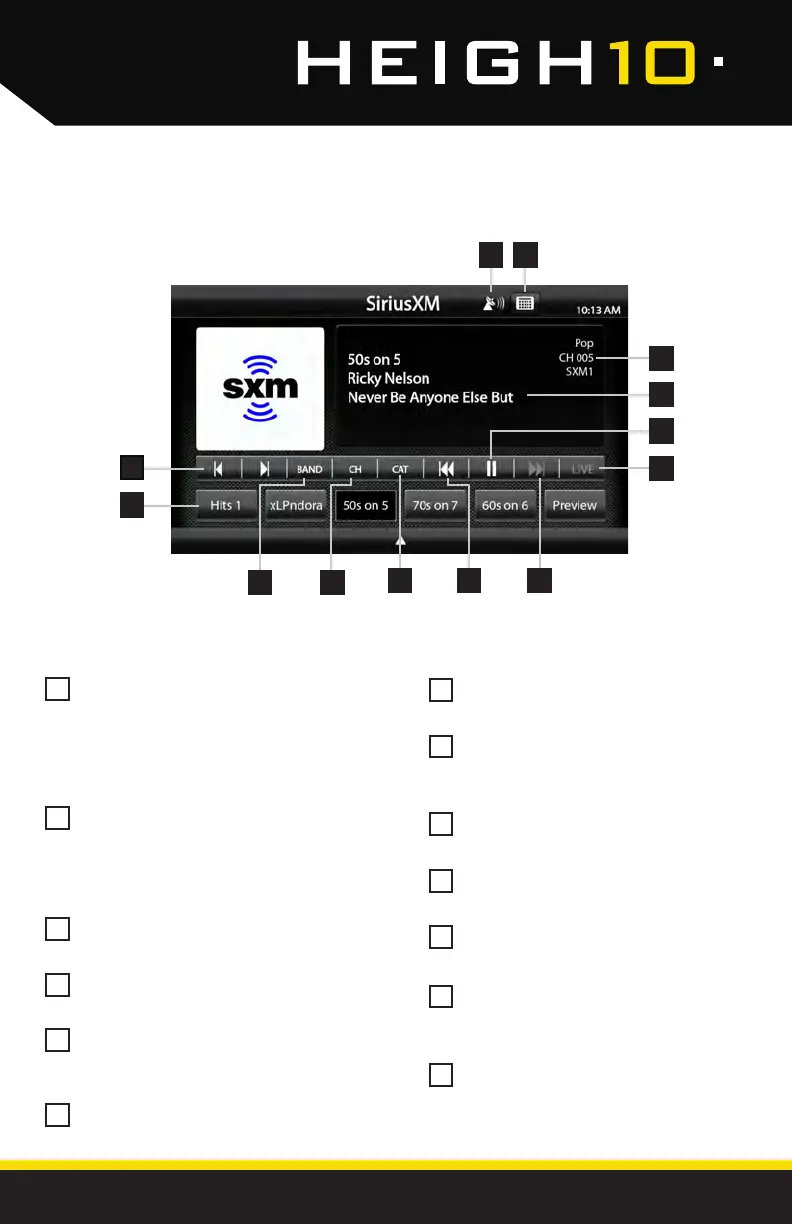
Channel Presets - To assign a preset,
go to desired channel, press and
hold a preset location until preset
button highlights and channel name
appears. A total of 18 channels can
be stored in memory.
Channel Down/Up- Touch to go to
previous channel / advance to next
channel. Touching and holding either
button will rapidly browse through the
channels.
Signal Strength - Displays tuner signal
strength, 0-3 bars.
Keypad - Touch to display keypad for
direct channel number entry.
SiriusXM Info - Displays current
channel category, channel number
and preset bank number.
Channel Info- Displays channel name,
song/content info.
Pause/Play - Pause live broadcast /
Play stored audio
LIVE- Select to return to live
broadcast when listening to stored
audio.
Fast Forward/Track Up- Move
forward through stored audio
Rewind/Track Down - Move
backwards through stored audio
CAT - Touch to display a list of
channel Categories.
CH - Touch to display a list of
available channels with channel
information.
BAND - Press to cycle through SXM
preset banks [SXM1-SXM2-SXM3]
1213
1
5
2
6
3
7
4
8
10
11
12
13
9
3 4
7
8
9
5
6
1
2
11 10
Press the HOME BUTTON > SiriusXM to select the SiriusXM source.



 To Next Page