EN
PROCEDURES
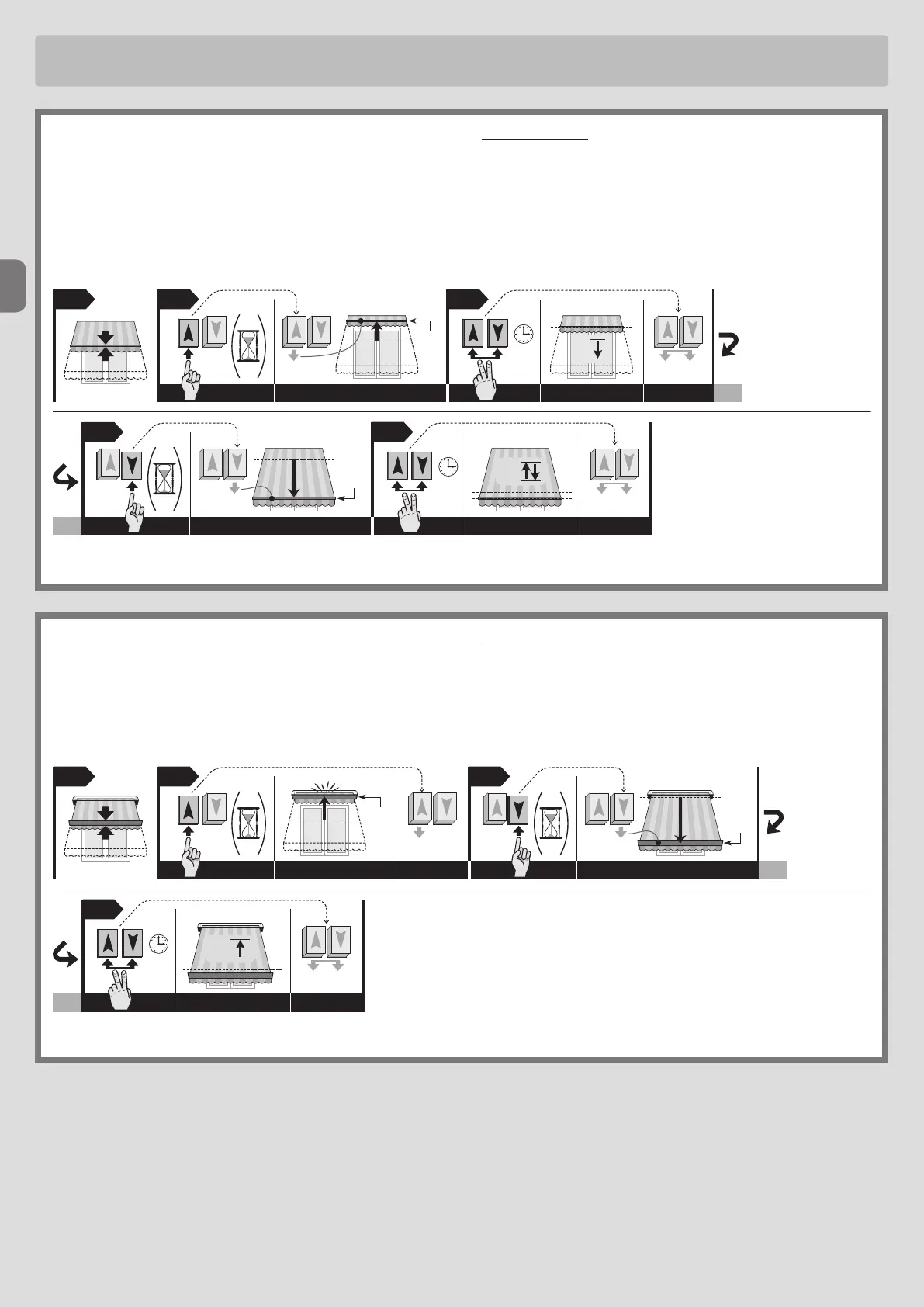
5.4-Programminglimitpositions“0”and“1”MANUALLY
Caution! • This programming is recommended for awnings without casings. • The high limit switch (0) or the low limit switch (1) can be memorised at the
beginning according to your needs.
01.UsetheUporDownbuttontomovetheawningtothepointofmid-travel.
02.PressandholdtheUppushbuttonuntiltheawningmovestotherequiredlimitposition,thenreleasethebutton.
03.PressandholdthetwoUpandDownpushbuttonssimultaneouslyuntilthemotorhascompletedashortdownmovement,thenrelease.
04.PressandholdtheDownpushbuttonuntiltheawningmovestotherequiredlimitposition,thenreleasethebutton.
05.PressandholdthetwoUpandDownpushbuttonssimultaneouslyuntiltheawninghascompletedoneshortupanddownmovement,thenrelease.
5.5-Programminglimitpositions“0”and“1”SEMI-AUTOMATICALLY
Caution! • This programming mode is recommended for awnings with boxes. • Program rst position “0” followed by position “1”.
01.UsetheUporDownbuttontomovetheawningtothepointofmid-travel.
02.PressandholdtheUppushbuttonuntiltheawningstopsonimpactwithlimitswitch“0”;thenreleasethebutton.
03.PressandholdtheDownpushbuttonuntiltheawningmovestotherequiredlimitposition(“1”);thenreleasethebutton.
04.PressandholdthetwoUpandDownpushbuttonssimultaneouslyuntiltheawninghascompletedoneshortupmovement,thenrelease.
16–English
02 03
01
“1”
5
sec.
04
THE
END
1
“0”
“0”
5
sec.
0201 03
05
5
sec.
1
“1”
04
THE
END
2
www.stobag.com



 To Next Page