EasyManua.ls Logo

Strand Lighting MX - MIDI Applications and Control; Introduction to MIDI Applications

Strand Lighting MX
20 pages
Print Icon
To Next Page IconTo Next Page
To Previous Page IconTo Previous Page
Loading...
Issue
2
MX
SUPPLEMENT
MIDI
APPLICATIONS
Introduction
The
main
purpose
of
incorporating
MIDI
into
Strands
lighting
desks
is
to
create
an
interface
between
light
and
sound
.
MIDI
is
now
an
industry
standard,
in
much
the
same
way
that
SMPTE
is
for
the
film
industry,
and
all
faders
and
switches
on
MX
are
allocated
unique
MIDI
codes
for
use
with
this
interface
.
MIDI
transmits
and
receives
over
16
channels
.
These
are
dedicated
MDI
channels
and
have
nothing
in
common
with
any
light
channels
.
All
MIDI
devices
generally
default
to
Channel
1
including
MX
.
Each
MIDI-equipped
instrument
usually
contains
a
receiver,
a
transmitter,
and
an
optional
socket
providing
a
through
(THRU)
facility
for
relaying
information
to
other
Midi
devices
.
MX
contains
these three
ports
.
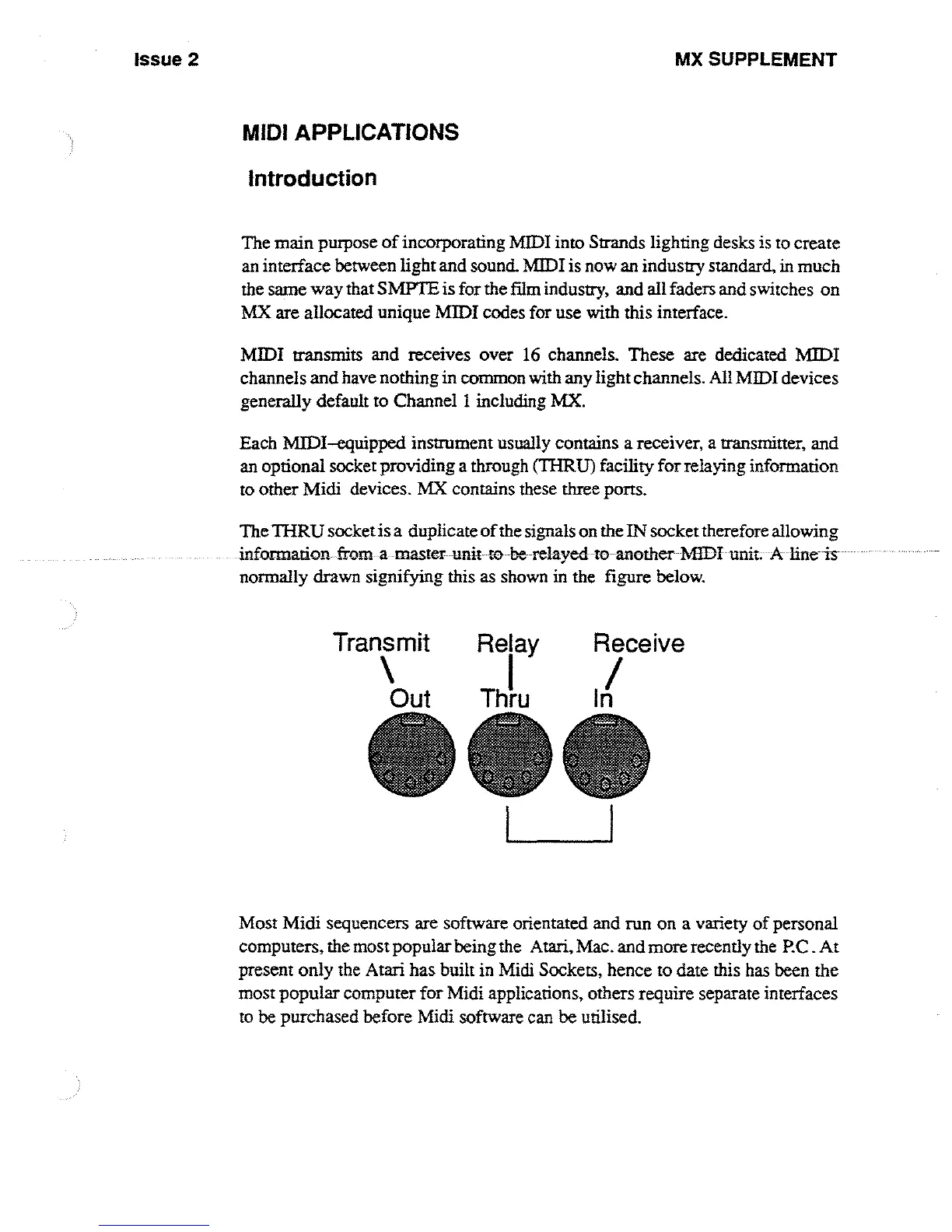
The
THRU
socket
is
a duplicate
of
the
signals
on
the
IN
socket
therefore
allowing
information
from
a
-master
unit to
be
relayed-to-another
MIDI
unit
.
-
A
-
fine is
normally
drawn
signifying
this
as
shown
in
the figure
below
.
Transmit
Relay
Receive
1
Out
Thru
I
n
Most Midi
sequencers
are
software
orientated
and
run
on
a
variety
of
personal
computers,
the
most
popular being
the
Atari,
Mac
.
and
more
recently
the
P
C
.
At
present
only
the
Atari
has
built
in
Midi
Sockets,
hence
to
date
this
has
been
the
most
popular
computer
for
Midi
applications,
others
require
separate
interfaces
to
be
purchased
before
Midi
software
can
be
utilised
.

Other manuals for Strand Lighting MX

Related product manuals