EasyManua.ls Logo

Strand Lighting MX - Recording MX with Music Sequencers

Strand Lighting MX
20 pages
Print Icon
To Next Page IconTo Next Page
To Previous Page IconTo Previous Page
Loading...
MX
SUPPLEMENT
Issue
2
1
IN
.'
TRK
.2
BASS
'"
TRK
.3
PIANO
cccccmc~ca
1
Recording
MX
with
Music
Sequencers
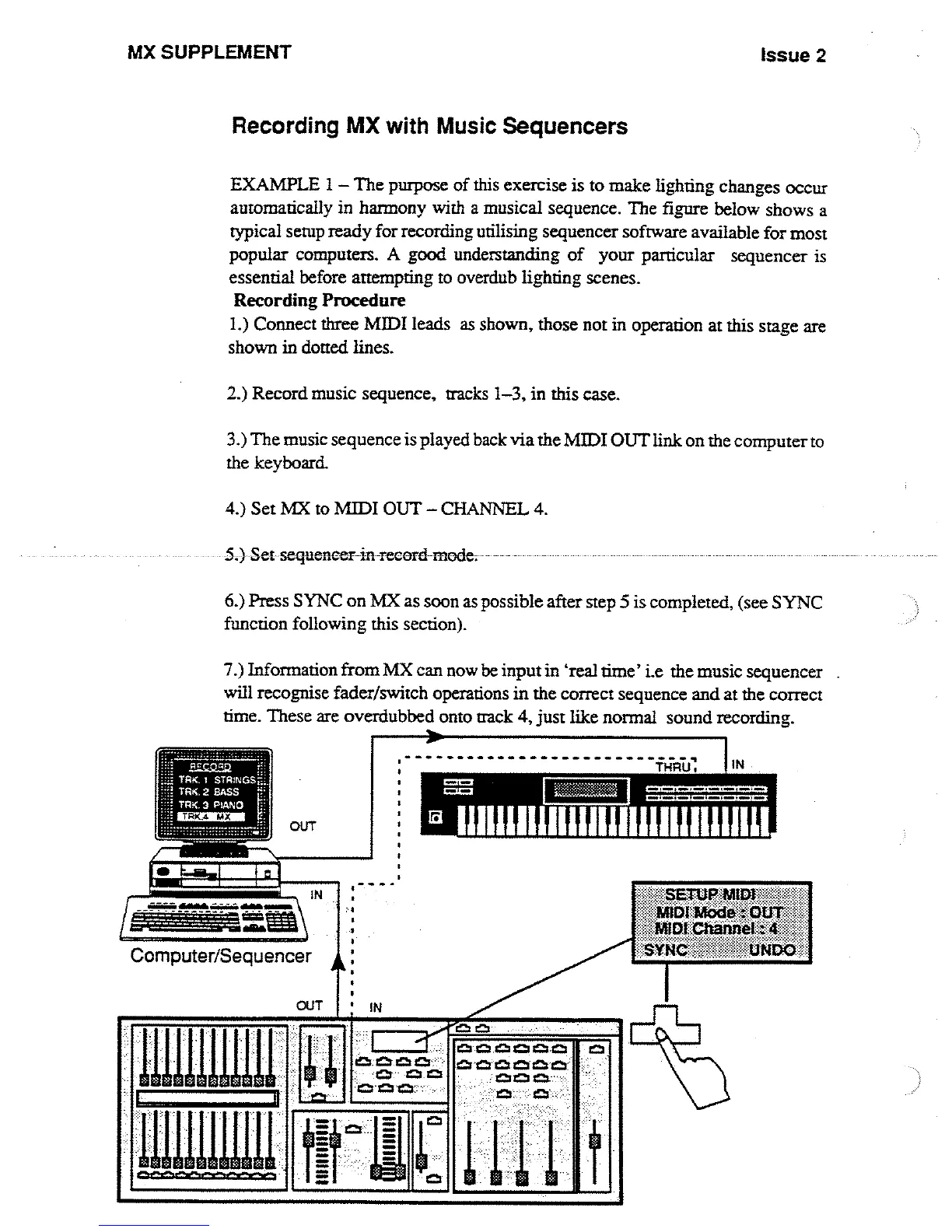
EXAMPLE
1-
The
purpose
of
this
exercise
is
to
make
lighting
changes
occur
automatically
in
harmony
with
a
musical
sequence
.
The
figure
below
shows
a
typical
setup
ready
for
recording
utilising
sequencer
software
available
for
most
popular
computers
.
A
good
understanding
of
your
particular
sequencer
is
essential
before
attempting
to
overdub
lighting
scenes
.
Recording Procedure
1 .)
Connect
three
MIDI
leads
as
shown,
those not
in
operation
at
this
stage
are
shown
in
dotted
lines
.
2
.)
Record
music
sequence,
tracks
1-3,
in
this
case
.
3
.)
The
music sequence
is
played
back
via the
MIDI
OUT
link
on
the
computer
to
the
keyboard
.
4
.)
Set
MX
to
MIDI
OUT
-
CHANNEL
4
.
5
.)
Set-sequencer-in
record
mode
.
6
.)
Press
SYNC
on
MX
as
soon
as
possible
after
step
5
is
completed,
(see
SYNC
function
following
this
section)
.
7
.)
Information
from
MX
can
now
be
input
in
`real
time'
i
.e
the
music
sequencer
will
recognise
fader/switch
operations
in the
correct
sequence
and
at
the
correct
time
.
These
are
overdubbed
onto
track
4,
just
like
normal
sound
recording
.
30
cm
0,123
I= ]z
I=
=cc,cca
o=a
.

Other manuals for Strand Lighting MX

Related product manuals