EasyManua.ls Logo

Strand Lighting MX - MIDI Playback and SYNC Function

Strand Lighting MX
20 pages
Print Icon
To Next Page IconTo Next Page
To Previous Page IconTo Previous Page
Loading...
Issue 2

MX
SUPPLEMENT
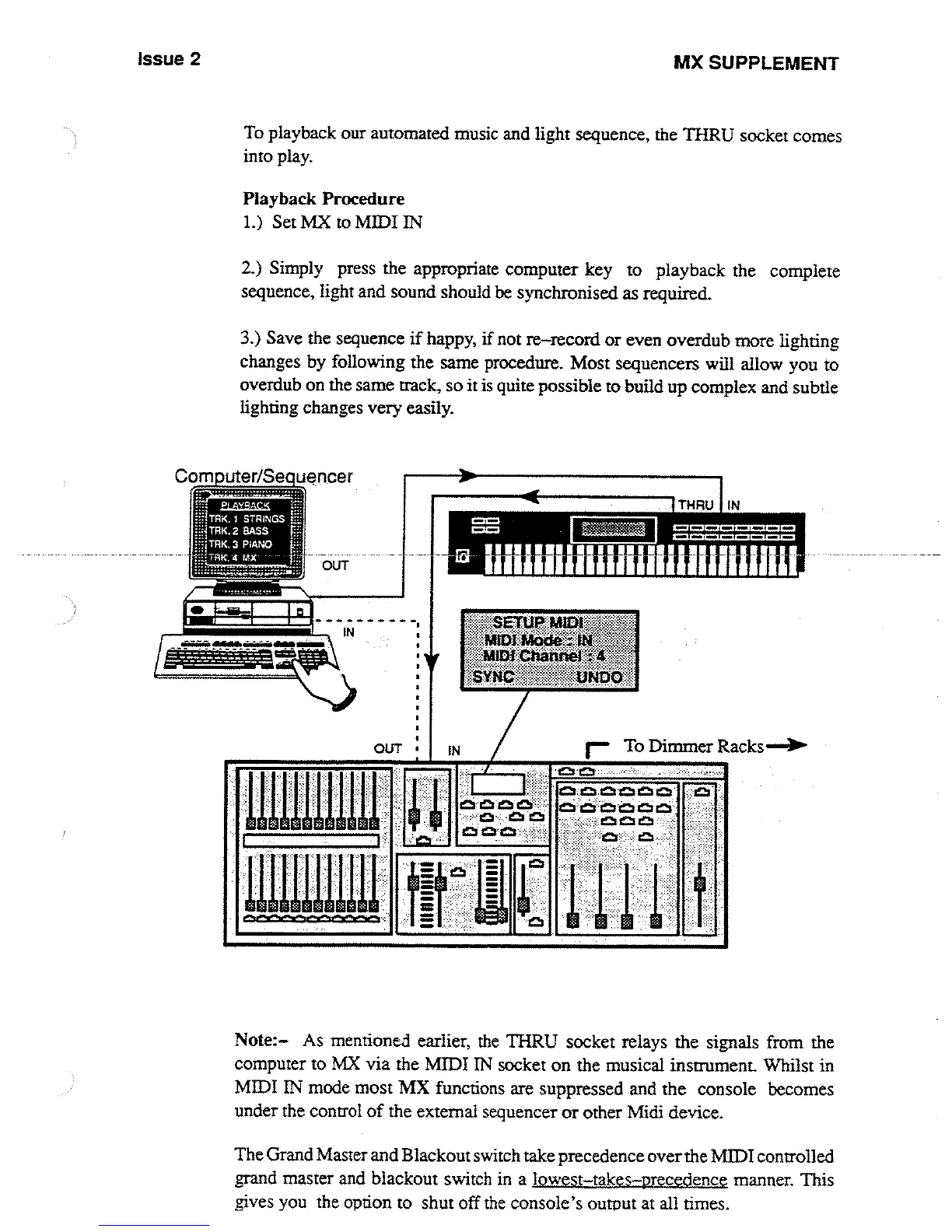
To
playback
our
automated
music
and
light
sequence,
the
THRU
socket
comes
into
play
.
Playback
Procedure
1
.)
Set
MX
to
MIDI
IN
2
.)
Simply
press
the appropriate
computer
key
to
playback
the
complete
sequence,
light
and
sound
should
be
synchronised
as
required
.
3
.)
Save
the
sequence
if
happy,
if
not
re-record
or
even
overdub
more
lighting
changes
by
following
the
same
procedure
.
Most
sequencers
will
allow
you
to
overdub
on
the
same
track,
so
it
is
quite
possible
to
build
up
complex
and
subtle
lighting
changes
very
easily
.
Computer/Sequencer
nuu~u
Note
:
As
mentioned
earlier,
the
THRU
socket
relays the
signals
from
the
computer
to
MX
via the
MIDI
IN
socket
on
the
musical
instrument
.
Whilst
in
MIDI
IN
mode
most
MX
functions
are
suppressed
and
the
console
becomes
under
the
control
of
the
external
sequencer
or
other
Midi
device
.
The
Grand
Master
and
Blackout
switch take
precedence
over
the
MIDI
controlled
grand
master
and
blackout
switch
in
a
lowest-takes-precedence
manner
.
This
gives
you
the
option
to
shut
off the
console's
output
at
all
times
.

Other manuals for Strand Lighting MX

Related product manuals