EasyManua.ls Logo

Strand Lighting MX - Remote GO Cue Features; Midi GO Functionality

Strand Lighting MX
20 pages
Print Icon
To Next Page IconTo Next Page
To Previous Page IconTo Previous Page
Loading...
Issue
2

MX
SUPPLEMENT
SETI
tE3l
:
MOde
=
LChann
REMOTE
GO
CUE
It is
now
possible to
remotely
triggerlighting
scenes
that
have
been
pre-recorded
into
the
CD
sequencer
by
means
of
an
external
control
such
as
an
audio
signal,
MIDI
timing
signal
or a
MIDI
PROGRAMME
CHANGE
command
.
This
feature
will
be
extremely
useful
to
any
production
that
has
music
or
sound
effects,
whether
it
be on
tape
orplayed
`live'
by
one
of today's
modern
keyboards
.
Midi
GO
Most
of
today's
keyboard
synthesisers
are
Midi
based
and
are
classed
as
MULTI
TIMBRAL
which means
that
different
instrument
voices
can
play
on
different
MIDI
channels
at
the
same
time
.
Pressing
a button
on
the synth to
change
the
,
voice'
normally
sends
out a
PROGRAMME
CHANGE
command
over
a
MIDI
channel
and
it
is
this
command
that
can
be
utilised
by
MX
.
The
effectiveness
of
the
GO
cue
will
depend
on
the
MIDI
capabilities
of
the
device
used,
some
have
2 or
3
banks
of
buttons
to
change
voices
and
some
have
only
I
or
2
and
need
to
be
programmed
to
change
voices,
but
as
long
as
a
PROGRAMME
CHANGE
is
sent
possible
the
GO
cue
will
work
.
EXAMPLE
-
We
wish
to
change
a
lighting
scene
every
time
we
change
voices
.
This
makes
sense,
as
switching
from
a percussive
piano
sound
to
some
lush
sounding
strings
will
obviously
create
a
different
mood
.
1 .)
Programme
the
sequence
of
lights
in
the
CD
sequencer
inclusive
of
both
fade
in
and
fade
out
times
.
2
.)
Check
that
AUDIO/MIDI
on
CONFIG
SYSTEM
menu
is
on
AUDIO
(
i .e
.
MIDI
timing
signals
are
ignored)
.
3
.)
Set
MX
to
MIDI
IN
.
4
.)
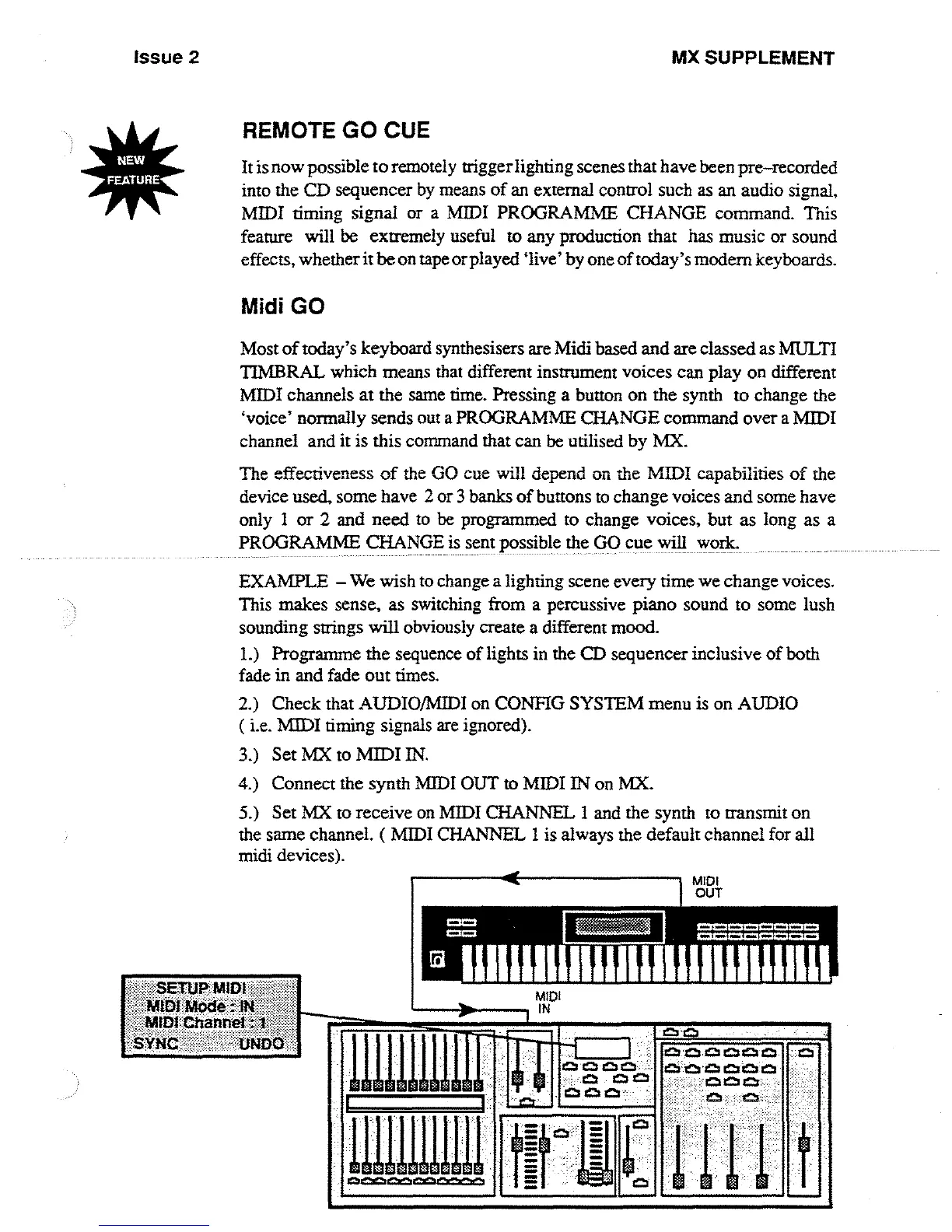
Connect
the
synth
MIDI
OUT
to
MIDI
IN
on
MX
.
5
.)
Set
MX
to
receive
on
MIDI
CHANNEL
1
and
the
synth
to transmit
on
the
same
channel
. (
MIDI
CHANNEL
1 is
always
the
default
channel
for
all
midi
devices)
.
MIDI
IN
C3
n
C3 CZ

~
o s
aQ

Other manuals for Strand Lighting MX

Related product manuals