EasyManua.ls Logo

Strand Lighting MX - Menu Displays

Strand Lighting MX
20 pages
Print Icon
To Next Page IconTo Next Page
To Previous Page IconTo Previous Page
Loading...
MX
SUPPLEMENT
Issue
2
Menu
Displays
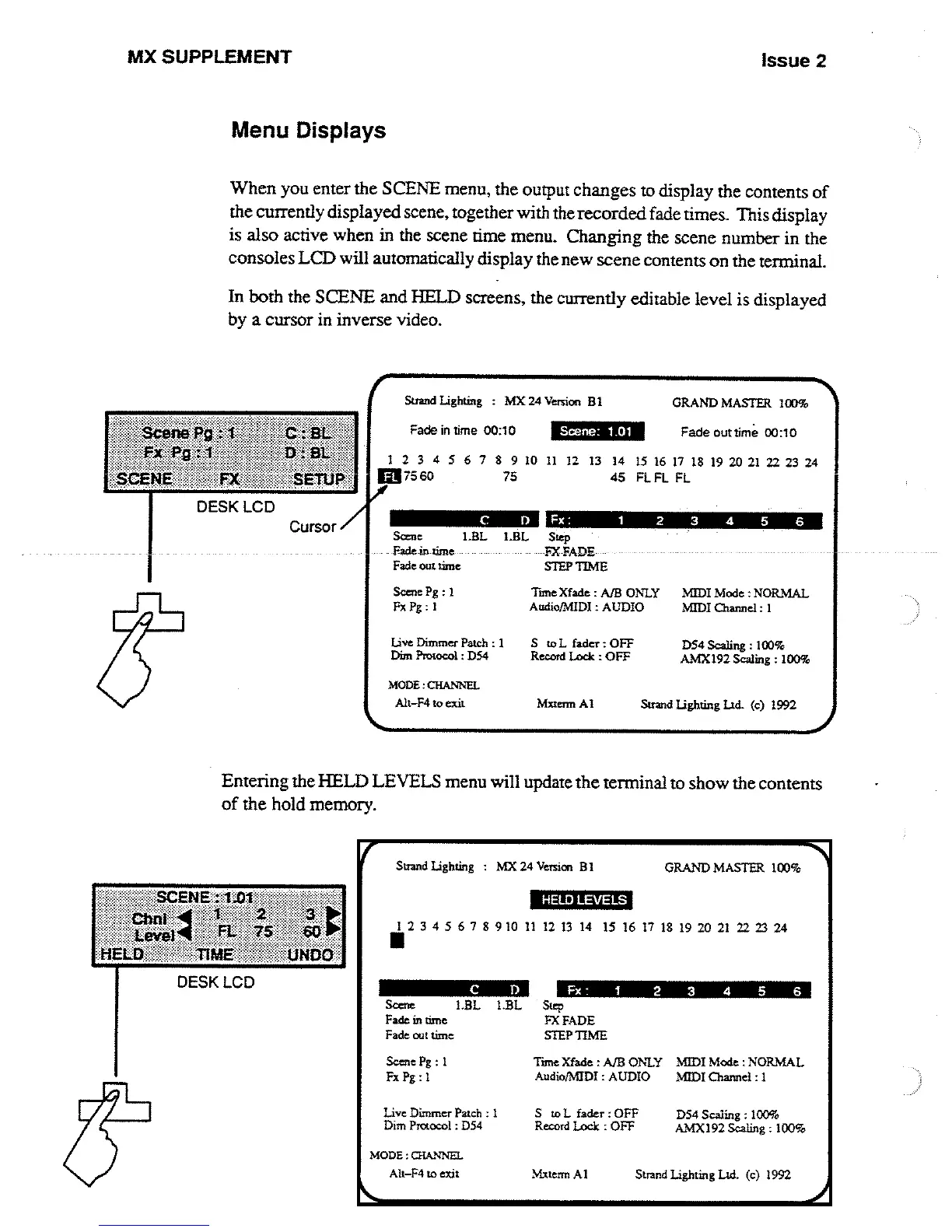
When
you
enter
the
SCENE
menu,
the output
changes
to
display
the
contents
of
the
currently
displayed
scene,
together
with
the
recorded
fade
times
.
This
display
is
also
active
when
in
the
scene
time
menu
.
Changing
the
scene
number
in
the
consoles
LCD
will
automatically
display
the
new
scene
contents
on
the terminal
.
In
both
the
SCENE
and
HELD
screens,
the
currently
editable
level
is
displayed
by
a
cursor
in
inverse
video
.
Strand
Lighting
:
MX
24
Version
BI
GRAND
MASTER
IOD%
Fade
in
time
00
:10
C
D
MODE
:CHANNEL
Scene
:
1 .01
Fade
out
time
00
:10
1
2 3
4
5 6 7 8 9
10
11
12
13
14 15 16
17
I8
19 20
21
22 23 24
[37560
75
45
FL
FL
FL
Some
1
.BL
I
.BL
Step
-Fade-in
time
FX-FADE
Fade
on
time
STEP
TIME
Scene
Pg
:
1
Time Xfade
:
A/B
ONLY
MIDI
Mode
:NORMAL
Fx Pg
: L
Audto/MIDI
:
AUDIO
MIDI
channel
:
I
Live
Dimmer
Patch
: 1
S
to
L
fader
:
OFF
D54
Scaling
:
100%
Dim
Protocol
:
D54
Record
Lock
:
OFF
AMX192
Scaling
:
100%
Alt-F4
to
exit
Mxtemt
AI
Strand
lighting
IAd
.
(c)
1992
Entering
the
HELD
LEVELS
menu
will
update
the
terminal
to
show
the
contents
of
the
hold
memory
.
Strand
Lighting
:
MX
24
Version
BI
GRAND
MASTER
100%
HELD
LEVELS
1234567891011121314
15161718192021
222324
MODE
:CHANNEL
Alt-F4
to
exit
Mxtetm
Al
Strand
Lighting
Ltd
.
(c)
1992
Scene
19L
I
.BL
Fade
in
time
Fade
out
time
Fx-
.
1
2
Step
FX
FADE
STEP
TIME
3 4
5
6
Scene
Pg
:
I
Tine Xfade
:
A/B
ONLY
MIDI
Mode
:NORMAL
Fx Pg
:
L
Audio/NUDI
:
AUDIO
MIDI
Channel
:
1
Live
Dimmer
Patch
:
I
S
to
L
fader
:
OFF
D54
Scaling
:
1009
.
Dim
Protocol
:
D54
Record
Lock
:
OFF
AMX
192
Scaling
:
100%

Other manuals for Strand Lighting MX

Related product manuals