EasyManua.ls Logo

Strand Lighting MX - Connecting MX for Terminal Output

Strand Lighting MX
20 pages
Print Icon
To Next Page IconTo Next Page
To Previous Page IconTo Previous Page
Loading...
Issue
2
MX
SUPPLEMENT
Connecting
MX
To
The
Strand
Terminal
Monitor
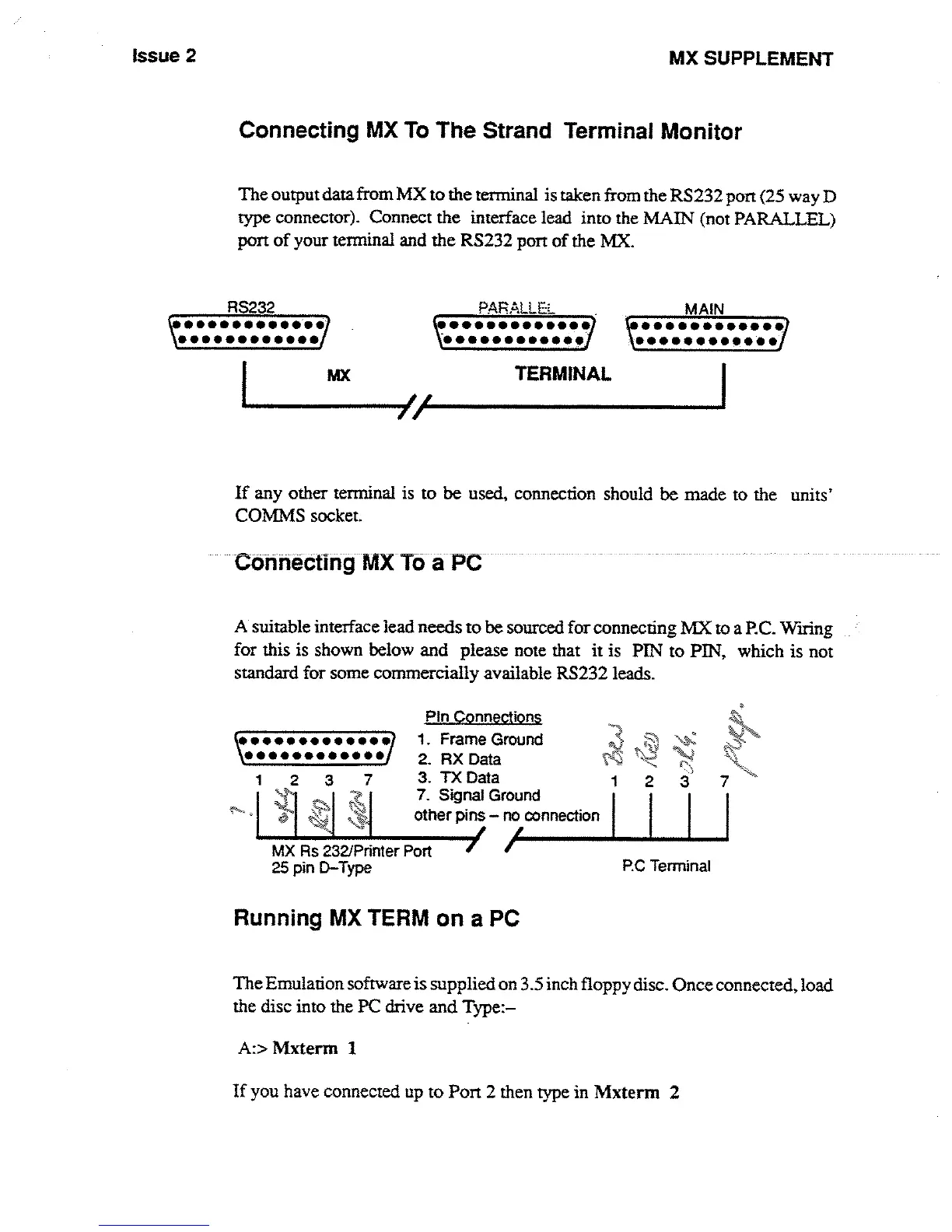
The
output
data
from
MX
to the
terminal
is
taken
from
the
RS232
port
(25
way
D
type
connector)
.
Connect
the
interface lead into
the
MAIN
(not
PARALLEL)
port
of
your
terminal
and
the
RS232
port
of
the
MX
.
_
RS232
PARALLE
:
MAIN
690i00099
90
A*66
0s000
*0*0
**0999*600*0
s0*0060600a*
.
TERMINAL
If
any
other terminal
is
to
be
used,
connection
should
be
made
to
the
units'
COMMS
socket
.
Connecting
MX
To
a
PC
-
A
suitable interface
lead
needs
to
be
sourced
for
connecting
MX
to
a
PC
.
Wiring
for
this
is
shown
below
and
please note
that
it is
PIN
to
PIN,
which
is
not
standard
for
some
commercially
available
RS232
leads
.
MX
Rs
232/Printer
Port
25
pin
D-Type
PIn
Connections
1
.
Frame
Ground
2
.
RX
Data
3
.
TX
Data
7
.
Signal
Ground
other
pins
-
no
connection
Running
MX
TERM
on
a
PC
RC
Terminal
A
:>
Mxterm
1
If
you
have
connected
up
to
Port
2 then
type
in
Mxterm
2
The
Emulation
software
is
supplied
on
3
.5
inch
floppy
disc
.
Once
connected,
load
the
disc into
the
PC
drive
and Type
:-

Other manuals for Strand Lighting MX

Related product manuals