EasyManua.ls Logo

Strand Lighting MX - Setting Up Terminal Display

Strand Lighting MX
20 pages
Print Icon
To Next Page IconTo Next Page
To Previous Page IconTo Previous Page
Loading...
MX
SUPPLEMENT
Issue
2
Setting
Up
Mx
for
Terminal
Monitor
&
PC
MXTERM
is
setup
up
to
run
at
:
9600
baud,
EVEN
parity,
1
stop
&
7
data
In the
RS232
menu
this
can
be
matched
by simply
pressing
the
MXTERM
function
key
.
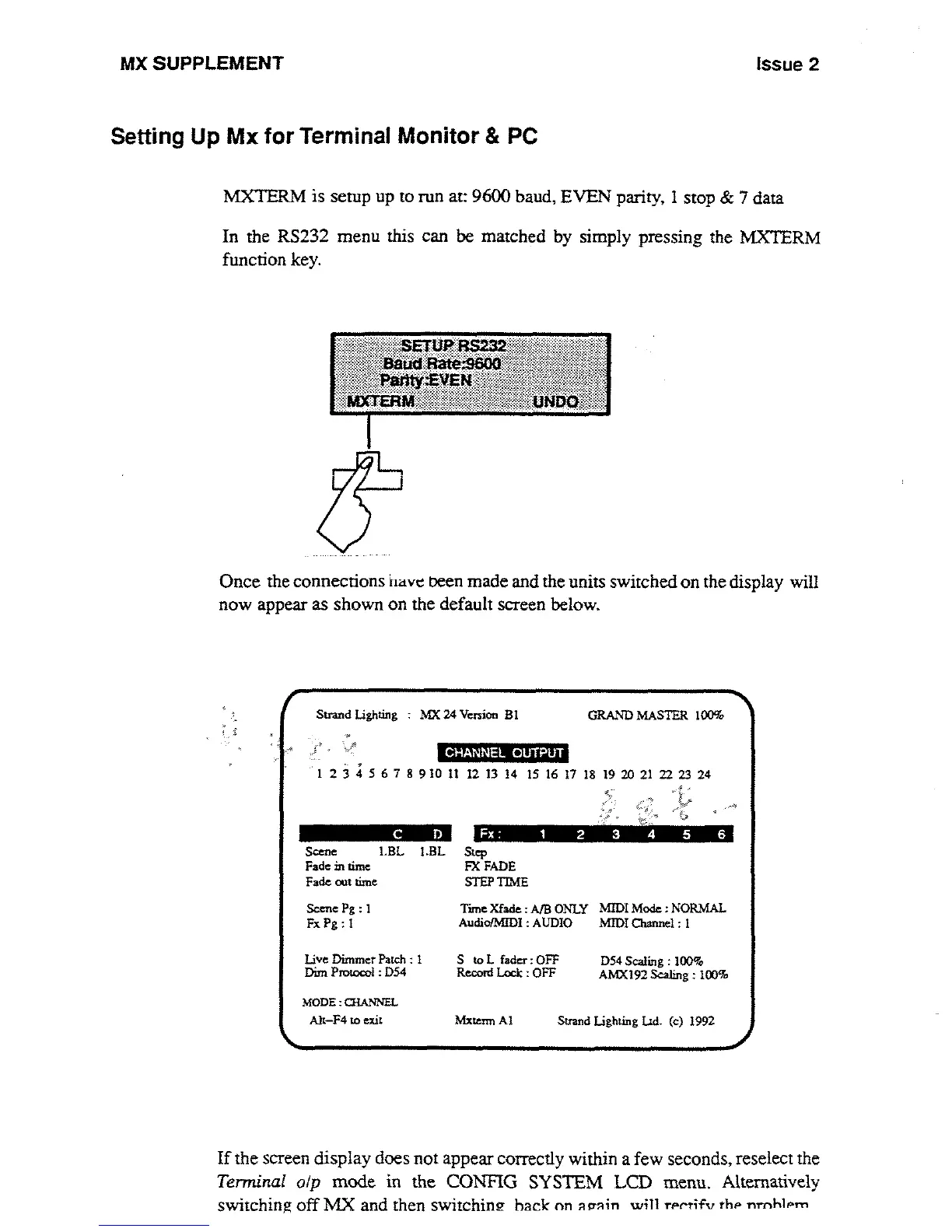
Once
the
connections
have
peen
made
and
the
units
switched
on
the display
will
now
appear
as
shown
on
the
default
screen
below
.
Stand
Lighting
:
MX
24
Version
In
GRAND
MASTER
100%
1
234567891011
121314
15161718192021222324
a .
C
D
CHANNEL
OUTPUT
Scene
1
.BL
I
.BL
Step
Fade
in
time
FX
FADE
Fade
out
nine
STEP
TIME
Scene
Pg
:
1
Tune
Xfade
:
AIB
ONLY
MIDI Mode
:NORMAL
Fx
Pg
: 1
Audio/M[DI
:
AUDIO
Mn)I
Channel
:
I
Live
Dimmer
Patch
:
I
S
to
L
fader
:
OFF
D54
Scaling
:
100go
AMX192
Scaling
:
100%
Dint
Protocol
:
D54
Record
Lock
:
OFF
MODE
:
QIANNEL
Fx
:
1
2
3
4 5 6
Alt-F4
to exit
Mxtenn
A1
Strand Lighting
Ltd
.
(c)
1992
If
the
screen
display
does
not
appear
correctly
within
a
few
seconds,
reselect
the
Terminal
olp
mode
in
the
CONFIG
SYSTEM LCD
menu
.
Alternatively
switching
off
MX
and
then
switching
hack
on
arrain
will
rr
rtifv
thr
nrnhlrm

Other manuals for Strand Lighting MX

Related product manuals