EasyManua.ls Logo

Strand Lighting MX - SYNC Function Explained

Strand Lighting MX
20 pages
Print Icon
To Next Page IconTo Next Page
To Previous Page IconTo Previous Page
Loading...
MX
SUPPLEMENT

Issue
2
During
MIDI
IN
mode,
the
LCD
will
be
fixed
to
a
MIDI
IN mode
display
.
However,
the
MIDI
mode
may
be
changed
to
MIDI
OFF,
MIDI
OUT
or
MIDI
SLAVE
mode
.
Normal
console
operation
can
only
occur
in
MIDI
OFF
and
MIDI
OUT
modes
.
Note
:-
When
the
mode
is
changed
back
to
either
MIDI
OFF
or
MIDI
OUT
mode,
the
output
will
be
controlled
immediately
by
the fader
levels
set
on
the
console
.
The
state
of
the console, as
set
by
MIDI
(such
as
effect
control
and
selection
of
operating
modes)
will
be
maintained
when
MIDI
modes
are
switched
.
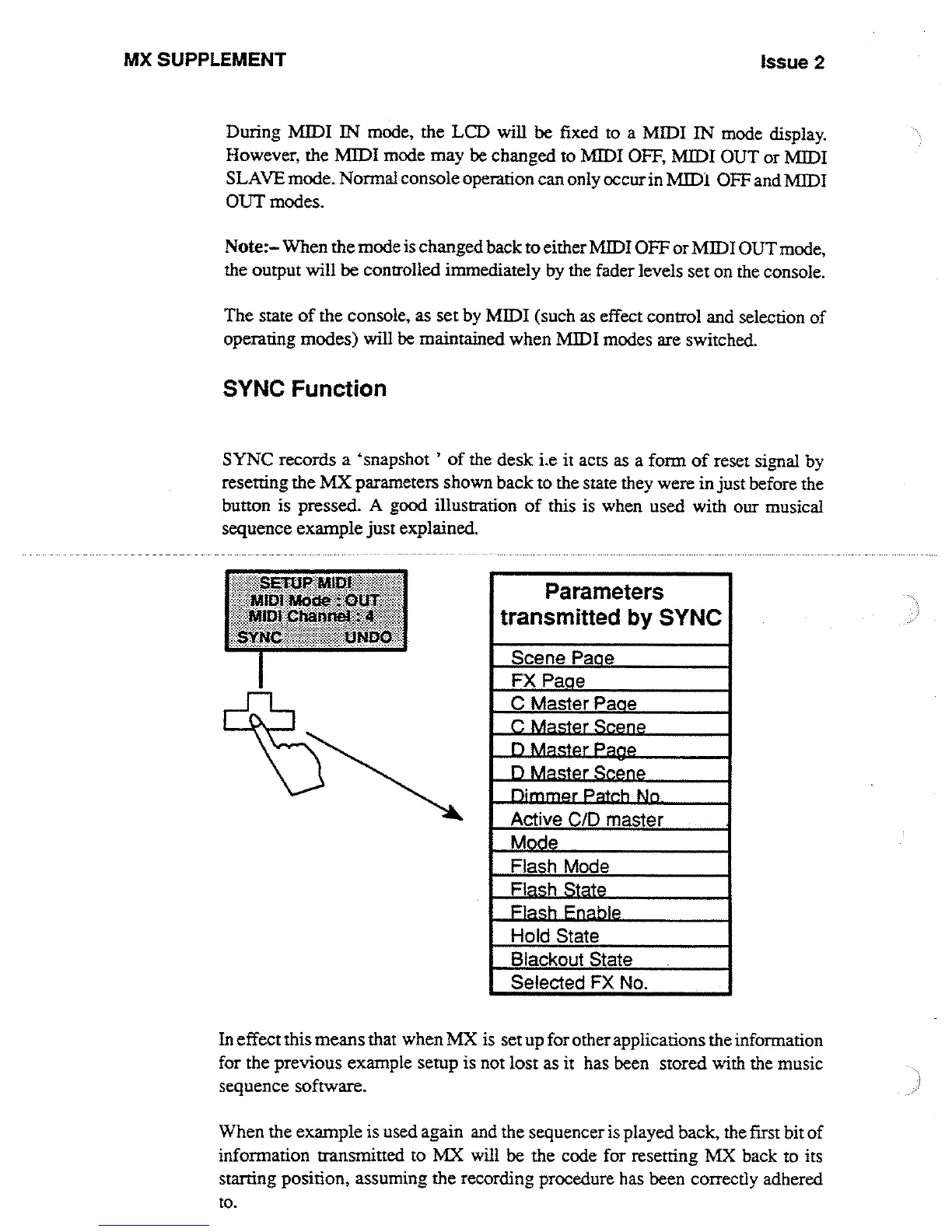
SYNC
Function
SYNC
records
a
`snapshot
'
of
the
desk
i
.e
it
acts
as
a form
of
reset
signal
by
resetting
the
MX
parameters
shown
back
to
the
state
they
were
in just
before
the
button
is
pressed
.
A
good
illustration
of
this
is
when
used with
our musical
sequence
example
just
explained
.
tni
a~to
e
Parameters
transmitted
by
SYNC
S
cene Page
FX
Page
C
Master
Paae
Dimmer
Patch
No
Active
CID
master
Mode
Flash
Mode
Flash
State
Flash
Enable
Hold
State
Blackout
State
Selected
FX No
.
In
effect
this
means
that
when
MX
is
setup
for
other
applications
the
information
for the
previous
example
setup
is
not
lost
as
it
has
been
stored
with
the
music
sequence
software
.
When
the
example
is
used
again
and
the
sequencer
is
played
back,
the
first
bit
of
information
transmitted
to
MX
will
be
the
code
for resetting
MX
back
to
its
starting
position,
assuming
the
recording
procedure has
been
correctly
adhered
to
.

Other manuals for Strand Lighting MX

Related product manuals